Showing posts with label Java Key Areas. Show all posts

Spring Hibernate Java interview questions and answers on asynchronous processing

The scenario based questions are very popular with the job interviewers, and some scenario based questions are related to decoupling and asynchronous (aka non-blocking) processing. The interviewer will give you a scenario like producing an aggregate report,  designing a trading system, or building an application that requires heavy auditing, logging or custom metrics gathering. Feel free to ask the right questions as the interviewer will be more interested in how you think and approach a problem rather than you solve it instantly or not. 

Q. Can you describe instances where you used asynchronous processing in your application?
A. The asynchronous processing is very handy for decoupling systems and for boosting  performance and scalability. Here are a few examples.


Example 1:

An online application with a requirement to produce time consuming reports or a business process (e.g. rebalancing accounts, aggregating hierachical information, etc) could benefit from making these long running operations asynchronous. Once the reports or the long running business process is completed, the outcome can be communicated to the user via emails or asynchronously refreshing the web page via techniques known as "server push" or "client pull". A typical example would be

a)  A user makes a request for an aggregate report or a business process like rebalancing his/her portfolios. 
b)  The user input can be saved to a database table for a separate process to periodically pick it up and process it asynchronously.
c)  The user could now continue to perform other functionalities of the website without being blocked.
d)  A separate process running on the same machine or different machine can periodically scan the table for any entries and produce the necessary reports or execute the relevant business process. This could be a scheduled job that runs once during off-peak or every 10 minutes. This depends on the business requirement.
e)  Once the report or the process is completed, notify the user via emails or making the report available online to be downloaded.


Example 2:

If you are working in an online trading application, you may want the functionality to queue trades and process them when the stock market opens. You also asynchronously receive the order statuses like partially-filled, rejected, fully filled, etc from the stock market. The message oriented middlewares provide features like guaranteed delivery with store-and-forward mechanism, no duplicates, and transaction management for enterprise level program-to-program communications by sending and receiving messages asynchronously (or synchronously). The diagram below gives a big picture.


Example 3:

You may have a requirement for stringent logging, auditing or performance metrics gathering. Processing these non-functional requirements asynchronously and non-intrusively can make your system perform and scale better. For example, you could send the log messages to a queue to be processed later asynchronously by a separate process running on the same machine or a separate machine. The performance metrics can be processed asynchronously as well. here is a working example with relevant code snippets.


For example, a trading application may have a number of synchronous and asynchronous moving parts and metrics needs to be recorded for various operations like placing a trade on to a queue, receiving asynchronous responses from the stock market, correlating order ids, linking similar order ids, etc. A custom metrics gathering solution can be accomplished by logging the relevant metrics to a database and then running relevant aggregate queries or writing to a file system and then running PERL based text searches to aggregate the results to a “csv” based file to be opened and analyzed in a spreadsheet with graphs. In my view, writing to a database provides a greater flexibility. For example, in Java, the following approach can be used.


Step 1: Use log4j JMS appender or a custom JMS appender to send log messages to a queue. This ensures that your application's performance is not adversely impacted by logging activities by decoupling it.

Step 2: Use this appender in your application via Aspect Oriented Programming (AOP – e.g Spring AOP, AspectJ, etc) or dynamic proxy classes to non-intrusively log relevant metrics to a queue. It is worth looking at Perf4j and context based logging with MDC (Mapped Diagnostic Contexts) or NDC (Nested Diagnostic Contexts) to log on a per thread basis to correlate or link relevant operations. Perf4J is a great framework for performance logging. It's non-intrusive and really fills the need for accurate performance logging. The Perf4j provides features like a command line tool to generate aggregated results and graphs from raw log files, ability to expose performance statistics as JMX attributes and to send notifications when statistics exceed specified thresholds, custom log4j appenders, and AOP aspects that allow non obtrusive statements when used with Spring AOP.

The Perf4J is for

System.currentTimeMillis( );

as Log4J is for

System.out.println(.....);

Step 3: A stand-alone listener application needs to be developed to dequeue the performance metrics messages from the queue and write to a database or a file system for further analysis and reporting purpose. This listener could be written in Java as a JMX service using JMS or via broker service like webMethods, TIBCO, etc.

Step 4: Finally, relevant SQL or regular expression based queries can be written to aggregate and report relevant metrics in a customized way.

The data captured could be an Event object containing

private final String environment;           // source environment
private final Long timestamp; // source timestamp
private final Long duration; // sample duration
private final String thread; // Log4j ThreadName
private final String component; // component name
private final Stage stage; // enum BEGIN | END | NONE
private final String source; // Log4j LoggerName
private final String context; // Log4j NDC
private final String process; // work process
private final String item; // work item identity (eg. orderId)
private final String level; // Log4j Level
private final String message; // Log4j RenderedMessage
private final String exceptionMessage; // Log4j Throwable Message
private final String exceptionStacktrace; // Log4j Throwable Stacktrace


An XML based library like Xtream can be used to serialize and deserialize the messages. Here is some pseudo code in Java.

Let's look at some sample code:

STEP-1: Define the custom appender in Log4j. In Log4J, appenders are responsible for handling the output and transport of logging data ('output destinations'). There are appenders for writing log data to files, for logging over the network or to write the logging output to the terminal, just to name a few.


package com;

public class EventJmsXmlAppender extends AppenderSkeleton {
...
public boolean requiresLayout( )
{
return true;
}

protected void append(LoggingEvent event)
{
try
{
//construct and the send the log metrics event to JMS queue
JMSServiceFactory jmsService = JMSServiceFactory.getJmsServiceFactory();
QueueConnectionFactory qFactory = (QueueConnectionFactory)jmsService.getTargetJMSConnectionFactory("jms/LogConnectionFactory", serviceLocator);
QueueConnection qConnection = qFactory.createQueueConnection();
qSession qSession = qConnection.createqSession(false, Session.AUTO_ACKNOWLEDGE);
Queue q = (Queue)jmsService.getTargetJMSQueue("jms/EventsQueue", serviceLocator);
QueueSender qSender = qSession.createSender(q);
TextMessage msg = qSession.createTextMessage();
msg.setText(getLayout().format(event));
qSender.send(msg);

}
catch(ServiceNotFoundException snfe)
{
//handle Exception
}
catch(JMSException jmse)
{
//handle Exception
}
}
...
}


In the log4j.xml file define the custom appender.

... 
<appender name="events" class="com.EventJmsXmlAppender">
<errorHandler class="org.jboss.logging.util.OnlyOnceErrorHandler"/>
<param name="Target" value="System.out"/>
<param name="Threshold" value="INFO"/>

<layout class="org.apache.log4j.PatternLayout">
<!-- The default pattern: Date Priority [Category] Message\n -->
<param name="ConversionPattern" value="%d{ABSOLUTE} %-5p [%c{1}] %m %n"/>
</layout>
</appender>


<logger name="com.LoggingInterceptor" additivity="false">
<level value="info" />
<appender-ref ref="events" />
</logger>

...


Step 2: Define the interceptor that logs metrics using the custom JMS appender. The interceptor will be invoked on actual method invocation to log the time. The interceptor will forward the request to actual method call via invocation.proceed( ) method call. After invoking the actual method, the time duration for the method execution is calculated. The LOG.info method call will be using the previously defined JMS appender.

package com;

public class LoggingInterceptor implements MethodInterceptor {

private static final Logger LOG = Logger.getLogger(LoggingInterceptor.class);

@Override
public Object invoke(MethodInvocation invocation) throws Throwable {
long begin = System.currentTimeMillis( );
...
try {
...
Object result = invocation.proceed( ); // run actual method
...
LOG.info("Duration = " + System.currentTimeMillis( ) - begin);
return result;
} catch (ResponseUnavailableException e) {
....
throw e;
} catch (Throwable e) {
throw e;
} finally {
...
}
}

..

}


In Spring config file wire up the required service(s) and interceptor(s). The TradingService will be making use of the interceptor(s) to log performance metrics.

<bean id="loggingInterceptor" class="com.LoggingInterceptor" />

<bean id="abstractService" abstract="true" class="org.springframework.aop.framework.ProxyFactoryBean">
<property name="interceptorNames">
<list>
<value>loggingInterceptor</value>
</list>
</property>
</bean>


<bean id="tradingService" parent="abstractService">
<property name="proxyInterfaces">
<value>com.TradingService</value>
</property>
<property name="target">
<bean class="com..TradingServiceImpl">
<constructor-arg><ref bean="..." /></constructor-arg>
<constructor-arg><ref bean=".." /></constructor-arg>
</bean>
</property>
</bean>


STEP 3: Write a stand-alone JMS listener to retrieve the XML event massages from the queue “jms/EventsQueue” and write to a database table or a file for further analysis and reporting. This can be done via a MDB (a Message Driven Bean in the EJB sepcification), a Spring based JMS listener, or a listener configured via a Message Oriented Broker like web Methods or TIBCO broker.
Spring Hibernate Caching Data in Java and LRU strategy


Q. What is the purpose of using a cache?
A. A cache is an area of local memory that holds a copy of frequently accessed data that is otherwise expensive to get or compute. Examples of such data include a result of a query to a database, a disk file or a report. Caching is used primarily for performance and scalability. It is a mechanism by which subsequent requests for the data are served faster.

Avoid the anti-pattern or pitfall of "Cache Them All", and cache only the data that is hard to get.

Q. What are some of the requirements you need to consider when writing your own cache or using a cacheing framework like EHCache, OSCache, etc?
A.
  1. The cache needs to have some boundary conditions defined to limit the memory usage. Each item in the cache can consume unbounded amounts of memory, hence the cache should hold its values using WeakReferences, which makes it possible for the cache to evict entries when memory is short, even when the cache is not full or the boundary conditions are not met.
  2. You need to have a replacement algorithm to purge entries from a cache when the boundary conditions are reached.  For example, reaching the maximum number of entries allowed. One such algorithm  is LRU (Least Recently Used). In this algorithm cache entries which have not been accessed recently will be replaced. If you are writing your own cache, one approach is to maintain  a timestamp at which the entry was inserted and select the entry with the oldest timestamp to be removed. But this search would be linear taking O(N) time. A more efficient approach would be to maintain the entries in a sorted collection based on the order in which the entries were accessed. Alternatively, you can use a doubly linked list where the items that are accessed via the cache are moved towards the end of the list, and purging of the entries in the cache are done from the front of the list.  
  3. Some caches need to be regularly refreshed to prevent them from becoming stale. This can be accomplished by adding an expiry timestamp. 
  4. If you are writing your own caching mechanism, then the cache item insertion and lookup operations need to be fast preferably O(1) time. This means a HashMap will be a potential candidate. The cached data can be accessed concurrently, hence a ConcurrentHashMap or a SynchronizedMap will be a good candidate. The cache should not be locked when an entry is searched, and only the searched entry should be locked. In the scenario where multiple threads search for the same key, the computation of the key value should be performed only once.


So, this is why you need to apply the "don't reinvent the wheel" principle and favor utilizing a proven and tested caching frameworks like EHCache that takes care of better memory management with LRU and FIFO eviction strategies, disk overflow, data expiration and many other optional advanced features, as opposed to writing your own. Having said this, there are cases where you might want to write your own simple caching solution or you might be asked in job interviews with questions like -- How will you implement an LRU cache in Java?

This is is very similar to the question, if Java did not have a HashMap class, how will you go about implementing your own? This was discussed with the answer and key considerations in the book "Core Java Career Esentials"


Q. What are the differences between HashMap, TreeMap (i.e. SortedMap), and a LinkedHashMap?
A. All three classes implement the Map interface and offer mostly the same functionality. The differences are in how the entries are iterated through

  • HashMap does not offer any guarantees about the iteration order. Its iteration order can change completely when new elements are added.
  • TreeMap will iterate according to the "natural ordering" of the keys according to their compareTo( ) method or based on an externally supplied Comparator. Additionally, it implements the SortedMap interface, which contains methods that depend on this sort order.
  • LinkedHashMap will iterate in the order in which the entries were put into the map.  The LinkedHashMap also provides a great starting point for creating a LRU Cache by overriding the removeEldestEntry( ) method. This lets you create a Cache that can expire data using some criteria that you define.

Q. What are the different types of algorithms that can be used to remove objects from the cache?
A. A variety of cache expiration mechanisms can remove objects from a cache. These algorithms are based on criteria such as least frequently used (LFU), least recently used (LRU), most recently used (MRU), first in first out (FIFO), last access time, and object size. Each algorithm has advantages and disadvantages. So, analyse your requirements and choose the most appropriate one.

In enterprise applications, object caching in a cluster is important because multiple JVMs run in a cluster, and it is crucial to keep all the cluster members' cached data in sync.


Q. How will you implement an LRU cache in Java?
A. Here is the sample code in Java

Firstly, define an interface so that the implementation can be changed  if for example,  in future you have a ConcurrentLinkedHashMap class.  A typical interface for a Java cache will look like

public interface LRUCache<K,V> {
public abstract V put(K key, V item);
public abstract V get(K key);
public abstract V atomicGetAndSet(K key, V item);
}


Now, the implementation class.

import java.lang.ref.SoftReference;
import java.util.LinkedHashMap;
import java.util.Map;

public class LRUCacheImpl<K, V> implements LRUCache<K, V> {

//SoftReference is used for a memory friendly cache.
//the value will be removed under memory shortage situations and
//the keys of the values will be removed from the cache map.
private final Map<K, SoftReference<V>> cache;


public LRUCacheImpl(final int cacheSize) {

// 'true' uses the access order instead of the insertion order.
this.cache = new LinkedHashMap<K, SoftReference<V>> (cacheSize, 0.75f, true) {

private static final long serialVersionUID = 1L;

@Override
protected boolean removeEldestEntry(Map.Entry<K, SoftReference<V>> eldest) {
// When to remove the eldest entry i.e Least Recently Used (i.e LRU) entry
return size() > cacheSize; // Size exceeded the max allowed.
}
};
}

@Override
public V put(K key, V value) {
SoftReference<V> previousValueReference = cache.put(key, new SoftReference<V>(value));
return previousValueReference != null ? previousValueReference.get() : null;
}

@Override
public V get(K key) {
SoftReference<V> valueReference = cache.get(key);
return valueReference != null ? valueReference.get() : null;
}

@Override
public V atomicGetAndSet(K key, V value) {
V result = get(key);
put(key, value);
return result;
}

}


Here some key points on the above code that are worthy of mentioning not only in the job interviews to stand out from your competition, but also to write quality code and get thumbs up in the code reviews.

  1. The above code would have been written as  LRUCacheImpl<K, V>extends LinkedHashMap<K, V>, but the GoF design pattern favors composition over inheritance as inheritance is more fragile to changes.
  2. SoftReference is  used as opposed to the hard reference, to force the items to be garbage collected when the Java heap runs low in memory.
  3. The methods are synchronized to be thread-safe. In future, if a ConcurrentLinkedHashMap were to be added, then it can be used instead the LinkedHashMap.
  4. If performance is of utmost importance is of utmost importance, then the public V get(K key)  method can be executed asynchrously via a thread pool as this method will get frequently executed.

Q. What are the different types of caches?
A. There are different types of caches
  • An application cache is a cache that an application accesses directly. An application benefits from using a cache by keeping most frequently accessed data in memory. This is also known as the first level cache. For example, Hibernate can use EHCache, OSCache, SwarmCache, or JBoss TreeCache as its first level cache.
  • Level 2 (aka L2) cache  provides caching services to an object-relational mapping (ORM) framework or a data mapping (DM) framework such as Hibernate or iBatis respectively by reducing the number of trips to the database. An L2 cache hides the complexity of the caching logic from an application.
  • In memory Data Grids/Clouds for distributed caching with powerful analysis and management tools to give you a complete solution for managing fast-changing data in multiple servers, compute grid, or in the cloud. For example, Apache HadoopGridGain, Oracle Cherence, etc. A data grid is a reliable distrbuted cache that uses an external data source to retrieve data that is not present in the cache and an external data store to write the updates. In simple terms, grid or cloud computing is all about setting up an HTTP server to farm out requests RESTfully, and accept responses the same way. You can also use messaging with JMS, RMI or even the old-school Corba. But why reinvent the wheel when there are open-source frameworks like Hadoop, GridGain, Hazelcast, etc. 

Q. Will WeakHashMap make a good cache? Explain your answer?
A. No. There are 2 reasons for it.

  1.  It uses weak references as the underlying memory management mechanism. If the garbage collector determines that an object is weakly reachable, it will clear atomically all weak references to the object., whereas if the garbage collector determines that an object is softly reachable (i.e. uses a soft reference as opposed to a weak refrence), it may clear atomically all soft references to the object, in the case that it finds that memory is running low, or at its own discretion.
  2. In a WeakHashMap, the weak references are used for the keys and not for the values. You want the map values to use a weaker reference.


Q. Where would you use a WeakHashMap ?
A. It is good to implement canonical maps where you can associate some extra information to an object that you have a strong reference to. You put an entry in a WeakHashMap with the object as the key, and the extra information as the map value. This means, as long as you keep a strong reference to the object, you will be able to check the map to retrieve the extra information, and once you release the object, the map entry will be cleared and the memory used by the extra information will be released.

Spring Hibernate Java Interview Questions and Answers - performance testing your Java application

I have never been in a project or organization that is yet to have any performance or scalability issues. It is a safe bet to talk up your achievements in fixing performance or resource leak issues in job interviews.  It is a pet subject of many job interviewers and if you are in an interview with an organization that is facing performance issue, you will be quizzed on it. Refer to interview questions and answers on performance overview and cpu profiling.


Q. How would you go about performance testing your Java application?
A.

1. Using a profiler on your running code. It should help you identify the bottlenecks. For example, jprofiler or Netbeans profiler. A profiler is a program that examines your application as it runs. It provides you with useful run time information such as time spent in particular code blocks, memory / heap, etc. In Java 6, you could use the JConsole.


2. You also need to set up performance test scripts with JMeter to simulate the load. Most issues relating to performance bottlenecks, memory leaks, thread-safety, deadlocks, etc only surface under certian load. The performance testing scripts can be recorded while the application is being used and then manually refined. The tools like JMeter HTTP Proxy or Badboy software can be used to trace the script.

3. You could provide a custom solution with the help of AOP (aspect oriented programming) or dynamic proxies to intercept your method calls. Dynamic proxies allow you to intercept method calls so you can interpose additional behavior between a class caller and its "callee".

For example, without AOP or dynamix proxy


public interface Customer {

public abstract void getDetails(String customerId) ;

}

public class CustomerImpl implements Customer{

public void getDetails(String customerId) {
long startTime = System.currentTimeMillis();
try {
// Actual method body...
Thread.sleep(2000);
} catch (InterruptedException e) {
e.printStackTrace();
} finally {
long endTime = System.currentTimeMillis();
System.out.println("method took: " + (endTime - startTime) + "ms");
}
}

}


The above approach is very intrusive. Imagine if you have to add this to 30 to 40 other methods. How do you turn this metrics monitoring on and off without commenting and uncommenting your actual method. With dynamic proxy or Spring based AOP, you can alleviate this problem. Here is an example of the dynamic proxy class.


import java.lang.reflect.InvocationHandler;
import java.lang.reflect.Method;

//uses Java reflection
public class PerformanceLogger implements InvocationHandler {

protected Object delegate; //actual object that performs a function

public PerformanceLogger(Object delegate) {
this.delegate = delegate;
}

@Override
public Object invoke(Object proxy, Method method, Object[] args)
throws Throwable {

long startTime = System.currentTimeMillis();

try {
Object result = method.invoke(delegate, args); // invoke the delegate
return result;
}

finally {
long endTime = System.currentTimeMillis();
System.out.println("method took: " + (endTime - startTime) + "ms");
}
}

}


Note: If you are using Java 5 or higher use the System.nanoTime( ) instead of System.currentTimeMillis(). For example,


long start = System.nanoTime(); // requires java 1.5
//some process
double elapsedTimeInSec = (System.nanoTime() - start) * 1.0e-9;

The test class that tests the above code

import java.lang.reflect.Proxy;


public class PerformanceTest {


public static void main(String[] args) {
Customer cust = new CustomerImpl();
PerformanceLogger pl = new PerformanceLogger(cust);
cust = (Customer)Proxy.newProxyInstance(CustomerImpl.class.getClassLoader(), new Class[] {Customer.class}, pl);
cust.getDetails("8");

}

}


With this approach, you don't need to put the System.currentTimeMillis( ) in your delegate classes. It only needs to be in PerformanceLogger, and it will intercept actual calls to the delegates to print performance metrics. If you want to make changes as to how the metrics are collected or want to turn off System.currentTimeMillis( ), you will only have to do it in one class, that is the dynamic proxy class PerformanceLogger.

If you are using Spring, you could use the AOP based interceptors. The AOP based deadlock retry using Spring is using a very similar approach for dead lock retry.

Note:I have been in interviews where the interviewer was more interested in the custom solution by asking

Q. If you did not have a profiling tool, how would you go about gathering performance metrics?
A. AOP or dynamic proxy based solution as discussed above. You could also mention the built-in command-line and graphical tools that come with Java  like JConsole, jstack, jmap, hprof, vmstat, etc. But the main focus must be via interceptors.

Design pattern: If you are asked to describe or talk about a design pattern, you could mention this dynamic proxy class as a proxy design pattern. Many pick either singleton or factory design pattern. It would be nicer to pick something other than these two common patterns. Some interviewers specifically ask you to pick anything except factory and singleton design pattern.


Q. What tips do you give someone regarding Java performance?
A.


1. Don't compromise on design: You should not compromise on architectural principles for just performance. You should make effort to write architecturally sound programs as opposed to writing only fast programs. If your architecture is sound enough then it would allow your program not only to scale better but also allows it to be optimized for performance if it is not fast enough. If you write applications with poor architecture but performs well for the current requirements, what will happen if the requirements grow and your architecture is not flexible enough to extend and creates a maintenance nightmare where fixing a code in one area would break your code in another area. This will cause your application to be re-written. So you should think about extendibility (i.e. ability to evolve with additional requirements), maintainability, ease of use, performance and scalability (i.e. ability to run in multiple servers or machines) during the design phase. List all possible design alternatives and pick the one which is conducive to sound design architecturally (i.e. scalable, easy to use, maintain and extend) and will allow it to be optimized later if not fast enough. Once you get the correct design, then measure with a profiler and optimize it.

2. Be aware of the death by thousand-cuts: Having said not to compromise on the design,  one needs to be mindful of  performance inefficiencies that can creep in throughout the software development. For example, an inefficient method being called 50-100 times can adversely impact performance. A real-life example would be a JSF application that invokes its life-cycle methods many times. So, having a long-running subroutine within the life-cycle method might end up calling it more than once. So, know your best practices and potential pitfalls. Here are a few things to keep in mind.

  • Use immutable objects where applicable. Immutable objects are inherently thread-safe and can also be reused. A good candidate for implementing the flyweight design pattern. The following Java method is an example of flyweight.

Integer.valueOf(String s)

        It keeps some amount of the created Integers internally, so, when you pass the String that you have
        passed before - it returns you an existing instance.


  • Check your regexes and SQL queries for backtracking and Cartesian joins respectively.


  • Define your objects and variables with the right scopes. The variables need to be defined at the lowest scope possible (e.g local --> instance --> static)
  • Use proven libraries, frameworks, built-in algorithms, and data structures as opposed to creating your own. For example, when handing concurrency use java.util.concurrent package.

3. Always have a performance focus by developing proper load testing scripts and benchmarks. The non-functional requirements should cover the relevant SLAs (i.e. Service Level Agreements). Tune your application server, database server, application, etc where required with proper bench marking and load testing scripts. The mission critical applications must have run time metrics gathering in place commercial tools. There are tools that can be used in production environment like YourKit for Java, JProfiler for Java, etc and for larger distributed and clustered systems with large number of nodes there are profilers like CA Wiley Introscope for Java, ClearStone for Java, and HP Performance managers. These tools are handy for proactive detection and isolation of server/application bottlenecks, historical performance trend tracking for capacity planning, and real-time monitoring of system performance.

Q. When designing your new code, what level of importance would you give to the following attributes? Rank the above attributes in order of importance?  

-- Performance
-- Maintainability
-- Extendibility
-- Ease of use
-- Scalability


Rank the above attributes in order of importance?  

A. This is an open-ended question. There is no one correct order for this question. The order can vary from application to application, but typically if you write 1 - extendable, 2 - maintainable and 3 – ease of use code with some high level performance considerations, then it should allow you to  optimize/tune for 4 - performance and 5 - scalability. But if you write some code, which only perform fast but not flexible enough to grow with the additional requirements, then you may end up re-writing or carrying out a major revamp to your code.

Note: These types of questions have no right or wrong answers, but can reveal a lot about your experience, passion, and attitude towards building a quality software. Good software developers and architects are opinionated based on their past experiences.

For writing  load/performance/stress testing scripts, the JMeter is a very useful free tool. Learn more about Java performance testing with JMeter

Spring Framework Identifying Java concurrency issues -- thread starvation, dead lock, and contention


Concurrency is very important in any modern system, and this is one topic many software engineers struggle to have a good grasp. The complexity in concurrency programming stems from the fact that the threads often need to operate on the common data. Each thread has its own sequence of execution, but accesses common data.


Debugging concurrency issues and fixing any thread starvation, dead lock, and contention require skills and experience to identify and reproduce these hard to resolve issues. Here are some techniques to detect concurrency issues.

How would you detect thread safety issues?
  • Manually reviewing the code for any obvious thread-safety issues. There are static analysis tools like Sonar, ThreadCheck, etc for catching concurrency bugs at compile-time by analyzing their byte code.
  • List all possible causes and add extensive log statements and write test cases to prove or disprove your theories.
  • Thread dumps are very useful for diagnosing synchronization problems such as deadlocks. The trick is to take 5 or 6 sets of thread dumps at an interval of 5 seconds between each to have a log file that has 25 to 30 seconds worth of runtime action. For thread dumps, use kill -3 in Unix and CTRL+BREAK in Windows. There are tools like Thread Dump Analyzer (TDA), Samurai, etc. to derive useful information from the thread dumps to find where the problem is. For example, Samurai colors idle threads in grey, blocked threads in red, and running threads in green. You must pay more attention to those red threads.
  • There are tools like JDB (i.e. Java DeBugger) where a “watch” can be set up on the suspected variable. When ever the application is modifying that variable, a thread dump will be printed.
  • There are dynamic analysis tools like jstack and JConsole, which is a JMX compliant GUI tool to get a thread dump on the fly. The JConsole GUI tool does have handy features like “detect deadlock” button to perform deadlock detection operations and ability to inspect the threads and objects in error states. Similar tools are available for other languages as well.

Here are some best practices to keep in mind relating to writing concurrent programs.

  • Favor immutable objects as they are inherently thread-safe.
  • If you need to use mutable objects, and share them among threads, then a key element of thread-safety is locking access to shared data while it is being operated on by a thread. For example, in Java you can use the synchronized keyword.
  • Generally try to keep your locking for as shorter duration as possible to minimize any thread contention issues if you have many threads running. Putting a big, fat lock right at the start of the function and unlocking it at the end of the function is useful on functions that are rarely called, but can adversely impact performance on frequently called functions. Putting one or many larger locks in the function around the data that actually need protection is a finer grained approach that works better than the coarse grained approach, especially when there are only a few places in the function that actually need protection and there are larger areas that are thread-safe and can be carried out concurrently.
  • Use proven concurrency libraries (e.g. java.util.concurrency) as opposed to writing your own. Well written concurrency libraries provide concurrent access to reads, while restricting concurrent writes.

Fixing production issues

There could be general runtime production issues that either slow down or make a system to hang. In these situations, the general approach for troubleshooting would be to analyze the thread dumps to isolate the threads which are causing the slow-down or hang. For example, a Java thread dump gives you a snapshot of all threads running inside a Java Virtual Machine. There are graphical tools like Samurai to help you analyze the thread dumps more effectively.

  • Application seems to consume 100% CPU and throughput has drastically reduced – Get a series of thread dumps, say 7 to 10 at a particular interval, say 5 -8 seconds and analyze these thread dumps by inspecting closely the “runnable” threads to ensure that if a particular thread is progressing well. If a particular thread is executing the same method through all the thread dumps, then that particular method could be the root cause. You can now continue your investigation by inspecting the code.
  • Application consumes very less CPU and response times are very poor due to heavy I/O operations like file or database read/write operations– Get a series of thread dumps and inspect for threads that are in “blocked” status. This analysis can also be used for situations where the application server hangs due to running out of all runnable threads due to a deadlock or a thread is holding a lock on an object and never returns it while other threads are waiting for the same lock.
The solution to the above problems could vastly vary from fixing the thread safety issue(s) to reducing the size of synchronization granularity, and from implementing appropriate caching strategies to setting the appropriate connection timeouts, and other reasons discussed in the last section.


Spring Hibernate Memory leak in Java


Q. How will you go about creating a memory leak in Java?
A. In Java, memory leaks are possible under a number of scenarios. Here is a typical example where hashCode( ) and equals( ) methods are not implemented for the Key class that is used to store key/value pairs in a HashMap. This will end up creating a large number of duplicate objects. All memory leaks in Java end up with java.lang.OutOfMemoryError, and it is a matter of time. The following code agressively creates the OutOfMemoryError via an endless loop for demonstration purpose.

If you are not familiar with the significance of equals( ) and hashCode ( ) methods in Java learn how to define proper key class in Java.


import java.util.HashMap;
import java.util.Map;

public class MemoryLeak {

public static void main(String[] args) {
Map<Key, String> map = new HashMap<Key, String>(1000);

int counter = 0;
while (true) {
// creates duplicate objects due to bad Key class
map.put(new Key("dummyKey"), "value");
counter++;
if (counter % 1000 == 0) {
System.out.println("map size: " + map.size());
System.out.println("Free memory after count " + counter
+ " is " + getFreeMemory() + "MB");

sleep(1000);
}


}
}

// inner class key without hashcode() or equals() -- bad implementation
static class Key {
private String key;

public Key(String key) {
this.key = key;
}

}

//delay for a given period in milli seconds
public static void sleep(long sleepFor) {
try {
Thread.sleep(sleepFor);
} catch (InterruptedException e) {
e.printStackTrace();
}
}

//get available memory in MB
public static long getFreeMemory() {
return Runtime.getRuntime().freeMemory() / (1024 * 1024);
}

}

If you run the above code, you will get the ouput as shown below

map size: 1000
Free memory after count 1000 is 4MB
map size: 2000
Free memory after count 2000 is 4MB
map size: 1396000
Free memory after count 1396000 is 2MB
map size: 1397000
Free memory after count 1397000 is 2MB
map size: 1398000
Free memory after count 1398000 is 2MB
map size: 1399000
Free memory after count 1399000 is 1MB
map size: 1400000
Free memory after count 1400000 is 1MB
map size: 1401000
Free memory after count 1401000 is 1MB
.....
.....
map size: 1452000
Free memory after count 1452000 is 0MB
map size: 1453000
Free memory after count 1453000 is 0MB
Exception in thread "main" java.lang.OutOfMemoryError: Java heap space
at java.util.HashMap.addEntry(HashMap.java:753)
at java.util.HashMap.put(HashMap.java:385)
at MemoryLeak.main(MemoryLeak.java:10)


As you could see, the size of the map keeps growing with the same objects and the available memory keeps coming down from 4MB to 0MB. At the end, the program dies with an OutOfMemoryError.


Q. How will you fix the above memory leak?
A. By providing proper implentation for the key class as shown below with the equals() and hashCode() methods.

    .....
static class Key {
private String key;

public Key(String key) {
this.key = key;
}


@Override
public boolean equals(Object obj) {

if (obj instanceof Key)
return key.equals(((Key) obj).key);
else
return false;

}

@Override
public int hashCode() {
return key.hashCode();
}
}
.....

If you rerun it after making the fix shown above to the MemoryLeak class, you will get an output as shown below. The program runs endlessly, and creates only one object in the HashMap.

map size: 1
Free memory after count 1000 is 4MB
map size: 1
Free memory after count 2000 is 4MB
map size: 1
Free memory after count 3000 is 4MB
map size: 1
Free memory after count 4000 is 4MB
...
Free memory after count 73000 is 4MB
map size: 1
Free memory after count 74000 is 4MB
map size: 1
Free memory after count 75000 is 4MB

Q. In real applications, how do you know that you have a memory leak?
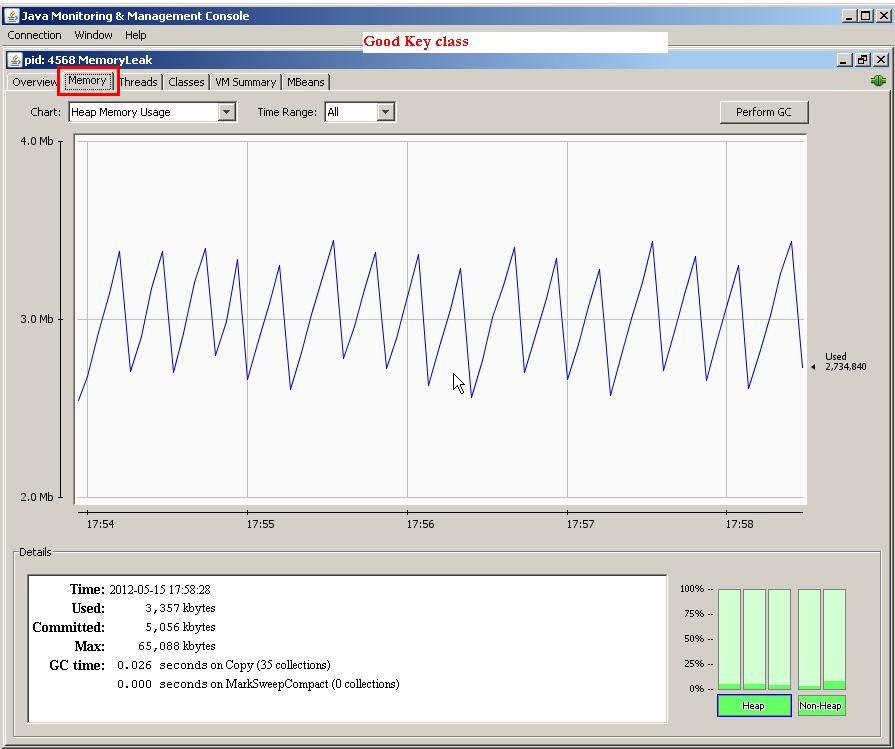
A. If you profile your application, you can notice a graph like a saw tooth. Here is how you can determine this with the help of jconsole for the above bad key class example. All you have to to do is while your MemoryLeak is running, get the Java process id by typing

C:\>jps
5808 Jps
4568 MemoryLeak
3860 Main

Now, open up the jconsole as shown below on a command line
 
C:\>jconsole 4568

If try this for both good key class and the bad key class you will get the memory graphs as shown below.

No memory Leak: 


With Memory Leak (saw tooth graph):


You can learn more about profiling


Spring Hibernate Java memory profiling questions and asnwers

The questions and answers on Java performance and CPU profiling was discussed in a separate blog. This blog covers memory profiling. Try this blog entry if you want to know how to create memory leak in Java.

Q. How will you go about profiling your Java application for memory usage?
A. There are number of tools both commercial and open-source. There are command line tools that get shipped with Java like hprof, jconsole, jhat, and jmap. Here is an example with hprof.


java -agentlib:hprof=heap=all,thread=y,format=b test.ProfilingTest

When you run the above command in binary format (i.e. format=b), it produces a heap dump file called “java.hprof” when the program exits or a control character (Ctrl-\ or Ctrl-Break on WIN32 and QUIT signal is received kill -QUIT  on Unix machines) is pressed, which can be opened in eclipse memory analysis tool (MAT) for further analysis and leak detection.


A Java heap dump is an image of the complete Java object graph at a certain point in time. It includes all objects, fields, primitive types and object references. It is possible to instruct the JVM to create a heap dump automatically in case of a OutOfMemoryError with the JVM option -XX:+HeapDumpOnOutOfMemoryError. You could also dump the heap on ctrl+brk key stroke by setting the JVM argument -XX:+HeapDumpOnCtrlBreak.


The above heap dump can also be analyzed instantly with the jhat tool that is shipped with your java.

jhat java.hprof


The above command starts a web server as shown below
Reading from java.hprof...
Dump file created Mon Nov 21 12:52:22 EST 2011
Snapshot read, resolving...
Resolving 5426 objects...
Chasing references, expect 1 dots.
Eliminating duplicate references.
Snapshot resolved.
Started HTTP server on port 7000
Server is ready.


The report can be viewed via an internet browser using http://localhost:7000


The “jmap” and jconsole are handy tools for analyzing heaps and garbage collection respectively. If you start your application with the following command line options, you will have a number of options to gather profiling data in Java.

  java -Dcom.sun.management.jmxremote -Dcom.sun.management.jmxremote.port=9000 \
-Dcom.sun.management.jmxremote.authenticate=false \
-Dcom.sun.management.jmxremote.ssl=false \
-agentlib:hprof=heap=dump, format=b,depth=10 test.ProfilingTest


If you type jconsole on a command line, you will get the following console.


The “4564” is the process id of the Java process. You can also find out the process id by typing “jps” on a command line.


Click on the connect button to view the different profiles as shown below. The jconsole has a button to invoke the garbage collection at your will along with other useful profiling information.


The “jmap” is a handy utility that will cause the heap dump of a running Java application. Find out the process id <pid> with the following command

jps 

and then run the jmap command as shown below with the relevant Java process id (e.g. 4564).


jmap -dump:format=b,file=hprof.bin 4564

 The heap dump file hprof.bin can be opened with jhat and eclipse memory analysis tool for further analysis.

There are commercial tools that can be used in production environment like YourKit for Java & .Net, JProfiler for Java, etc to tools for larger distributed and clustered systems with large number of nodes like CA Wiley Introscope for Java and .Net, SiteScope from HP and ClearStone for Java.

Java J2EE Spring Java interview questions and answers on code quality

Open-ended interview questions can tell a lot about a candidate.Code quality starts when you interview someone. You need the right people with the right skills and most importantly the right attitude. If you don't know how to achieve good code quality or don't care about it then your chances of job interview success will be very slim if not zero. The open-ended job interview questions give you a great opportunity to sell not only your technical skills, but also your soft-skills and personal traits. Impressive answers in open-ended questions can motivate your prospective interviewers to overlook any short-comings in your resume like not knowing a particular framework or tool or not having any experience with a particular application server. The following questions are very frequently asked, and your answers will be drilled down. So, don't just rely only on memorizing the answers given below, but apply it.

Q. How do you ensure code quality in your application?
A. code quality means writing readable and robust code, that conforms as much as possible to the style-guideline that is used, and that has as little as possible defects. It also means writing maintainable code with proper automated and manual tests.

1. Write a number of automated tests

  • Unit tests  using JUnit or TestNG. For unit tests use mock objects to ensure that your tests don't fail due to volatility of the data changes. There are mocking frameworks like EasyMock, Mockito, and PowerMock.
  • Integration testing of your services with JUnit or TestNG. Your integration tests are only as good as the quality of the data. You could either use dedicated test databases or use frameworks like DBUnit to manage extraction and insertion of data.
  • Web testing  using Selenium + WebDriver. Selenium + WebDriver ( Selenium interview questions and answers) allows you to reenact web user experience and run it as an automated unit test using JUnit or TestNG.Your tests are only as good as the quality of the data. You could either use dedicated system test databases or use frameworks like DBUnit. DBUnit allows you to extract the data from databases into flat XML files, and then refresh (i.e. insert or update) the data into the database during setup phase of running the unit tests. There are handy proxy JDBC driver tool called P6SPY, which logs the SQL queries that are executed against the database by the DBUnit. This P6SPY also very handy in debugging Hibernate’s generated SQL  by acting as a proxy driver between JDBC and the real driver so that all generated SQL will be logged. There are other Web testing tools like Badboy.
  • Load testing your application with tools like JMeter, OpenSTA, etc.  The Badboy compliments JMeter by allowing you to record scripts and then exporting the scripts as a JMeter file to be used in JMeter.JMeter Interview Questions and Answers

2. Have regular code reviews. There are tools like Crucible from Atlassian that gives your team an efficient way to benefit from the power of constant code review with features like inline commenting, simple workflow, asynchronous reviews, email and RSS notifications, JIRA integration and much more.

3. Using a number of code quality tools.

  • Checkstyle ensures the style of your Java code is standardized and "nice". It checks white spaces, new lines, formatting, etc. (i.e. it looks on the code line by line).  This only ensure style of your code.
  • On the other hand there is PMD which not necessarily checks the style of your code but it checks the structure of the whole code. PMD scans Java source code and looks for potential problems like possible bugs, dead code, suboptimal code, overcomplicated expressions, duplicate code, etc.
  • FindBugs is a static analysis tool to look for bugs in Java code. It discovers possible NullPointerExceptions and a lot more bugs.
  • Sonar is a very powerful tool covering 7 axes of code quality as shown below.
(The diagram is from the Sonar website)

4. Using continuous integration servers (on a clean separate machine) like Bamboo, Hudson, CruiseControl, etc to continuously integrate and test your code.

5. Not stopping to code once the code works. Too many developers feel their job stops at making something happen. It is a best practice to constantly refactor code with proper unit tests in place.


Q. Do you use test driven development? Why / Why not?
A. [Hint] Yes.

  • Gives you a better understanding of what you're going to write.  Gets you to clearly think what the inputs are and what the output is.  Helps you separate the concerns by getting you to think about the single responsibility principle (SRP).
  • Enforces a better test coverage. This gives you the confidence to refactor your code in the future, since you have a good coverage.
  • You won't waste time writing features you don't need.

Q. How do you keep your knowledge up to date about writing quality code?
A. Mainly through good books and online resources.

Through good books
  • Code Complete: A Practical Handbook of Software Construction by Steve McConnel
  • Clean Code:  A Handbook of Agile Software Craftsmanship by Robert. C. Martin

Through good articles and  quick tips at online resources like
  •   JavaLobby (java.dzone.com)
  •   TheServerside.com
  •   InfoQ.com
  •   handy blogs on Mockito, PowerMock, Easy mock, DBUnit, Selenium, JUnit, TestNG, etc. 

Q. What do you look for when you are reviewing others' code?
A. Firstly, and most importantly look to see if the following key areas are properly adhered to avoid any potential issues relating to thread-safety, performance, memory leak, scalability, transaction management, exception handling, etc. Also, look for the key areas like best practices, design concepts, and design patterns. Key Areas.

Secondly, ensure that proper test cases are written. Also, ensure that it has a good code coverage.

Here are a few finer points:
  • Naming conventions.
  • Existence of unused code and commenting code out. Delete unused code. Source control is there for maintaining the history of your code.
  • Unnecessary comments.  The method and variable names must be self explanatory without cluttering the code with excessive comments. The methods should do only one thing with fewer lines of code. More than 15-20 lines of code is questionable. The number of parameters passed in must also be small. The public methods must fail fast with proper validations.
  • Repeated code due to copy-paste. For example, same logic or hard coded values repeated in a number of places.
  • Favoring trivial performance optimization over readability and maintainability. 
  • Tightly copuled code. For example, not coding to interfaces, favoring inheritance over composition, etc.
  • Badly defined variable scopes or variable types. For example, using a data type double to represent monetary values instead of BigDecimal. The variable scopes must be as narrow as possible.
  • Using mutable objects and read only varaibles where immutable objects make more sense.
  • Proper implementation of language contracts. For example, not properly implemented equals and hashCode methods.
  • Deeply nested loops or conditionals. Nested loops can be replaced with changing the logic or through recursion. Nested if-else conditionals are a good candidate for applying polymorphism.
  • Not properly handling exceptions. For example, burying exceptions, exposing internal exception details to the users without proper friendly messages at the Web  layer, etc.
  • Badly written unit tests.
  • Not designing the classes and interfaces with proper design concepts and principles. For example, strongly coupled classes, classes trying to do more things than it should, modelling it as a class when it should be an attribute, etc.
  • Not handling and testing non-functional scenarios. For example, not properly handling service timeouts or using incorrect timeout values.
  • Reinventing the wheel by writing your own implementation, when there is already a proven and tested  implementation provided by the API.
Note: The Core Java Career Essentials cover all the above in detail with examples.


Q. There are lots of advantages in writing tests, but in your experience, are there any disadvantages?
A. [Hint: Everything has pros and cons. Discussing the cons demonstrates your experience, but make it a point to mention how you overcome the cons to exemplify your problem solving, researching, and analytical skills.

Tests need to be maintained. If a particular method signature or logic is changed, then all the relevant tests need to be fixed. Many developers don't put lots of thoughts into writing quality test cases through proper what if analysis. For example, what if new records are added to the database? What if the data is missing?, etc. So, this continuous tweaking of test cases will require time. Writing quality tests require experience and lots of  analysis.you need to have an enthusiastic team and at least one experienced developer who knows how to write good tests, and also knows a few thing about good architecture

Requires some initial upfront investment in time and cost. But, this initial up front investment will pay-off  significantly in a long run through quality code and robust application.

Q. What is the difference between fake objects, mock objects, and stubs?
A.

  • Fake objects build a very lightweight implementation of the same functionality as provided by a component that you are faking. Since they take some shortcut, they are not suitable for production.
  • Mocks are objects pre-programmed with expectations which form a specification of the calls they are expected to receive. You can use mocking frameworks like EasyMock, Mockito, PowerMock, etc to achieve this.When an actual service is invoked, a mock object is executed with a known outcome instead of the actual service. With mock objects, you can verify if expected method calls were made and how many times. The verify(mockOrderDao) shown below tells EasyMock to validate that all of the expected method calls were executed and in the correct order.

public void testOrderService() {

//....

expect(mockOrderDao.getOrders(...)) .andReturn(mockResults);
replay(mockDao);
assertTrue(service.login(userName, password));
verify(mockDao); //expected method calls were executed
}


  • Stubs are like a mock class, except that they don't provide the ability to verify that methods have been called or not called. Generally services that are not ready or currently not stable are stubbed to make the test code more stable.

You use a Mock when it's an object that returns values that you set to the tested class. You use a Stub to mimic an Interface or Abstract class to be tested. In fact, the difference is very subtle and it doesn't really matter what you call it, fake, mock, or stub, they are all objects that aren't used in production, and used for managing complexity to write quality tests.


Q. Can you list some of the key principles to remember while designing your classes?
A. Use design principles and patterns, but use them judiciously. Design for current requirements without anticipating future requirements, and over complicating things. A well designed (i.e. loosely coupled and  more cohesive) system can easily lend itself to future changes, whilst keeping the system less complex.

  • Favor composition over inheritance.
  • Don't Repeat Yourself (DRY principle). Code once and only once.
  • Find what varies and encapsulate it.
  • Code to an interface, and not to an implementation.
  • Strive for loose coupling and high cohesion.

Q. In your experience, what are some of the common dilemmas you face when writing unit tests?
A. [Hint: provide the dilemma and the tips to overcome the dilemma]

  • Whether to fix the code or the test. When you write unit tests, sometimes you feel compelled to change your code just to facilitate the test. For example, when you need to test a private method or attribute. Doing so is a bad idea. If you ever feel tempted to make a private method public purely for testing purposes, don't do it. Testing is meant to improve the quality of your code, not decrease it. Having said this, in most cases, thinking about the test first in a TDD (.i.e. Test Driven Development) will help you refactor and write better code. Also, mock frameworks like PowerMock, let you mock private methods, static methods, constructors, final classes and methods, etc. Care must be taken in testing private methods. Inside a class you can end up with a lot of private methods manipulating instance or class variables without having them passed as parameters. This leads to high method coupling, and something not recommended. Instead use private methods that take explicit parameters and provide explicit return values.
  • Whether to use mocks or not. The quality unit tests need to be repeatable. Some non-deterministic or environmental conditions can make your code fragile. Mocking these scenarios can make your code more robust. For example, a CircusService class can use a mock CircusDao to avoid test cases failing due to data related issues. Alternatively, the test cases can use frameworks like DBUnit to insert data  during test set up and  remove data during the test tear down to provide stable data for the test cases. Some test cases rely on Web service calls, and availability of these services are non-deterministic, and it makes more sense to mock those services.

  • How to test non-functional requirements? For example, a non-functional requirement like 95 percent of all Web-based transactions should complete within 2 seconds. Your approach here would be to simply run the test code many times in a loop and compare the transaction times with target time, and keeping track of the number of passes and fails. If at the end of the test less than 95 percent of the transactions fail, then fail the test too. There are scenarios where @Test(timeout=5)  becomes handy to fail a test case that takes longer than 5 seconds to execute.

  • Testing multi-thread code. This can be quite challenging  and sometimes an impossible task. If the tests are too complex, then review your code and design. There are ways to program for multi-threading that are more conducive for testing. For example, making  your objects immutable where possible, reducing the number of instances where multiple threads interact with the same instance, and using the ExecutorService (e.g. having a SerialExecutorService which is part of the jconch framework to execute the threads serially)  instead of the Thread class, etc. There are frameworks like GroboUtils and MultithreadedTC aiming to expand the testing possibilities of Java with support for multi-threading and hierarchical unit testing. The goal of  jconch project is to provide safe set of implementations for common tasks in multi-threaded Java applications. The SerialExecutorService class is one of them.

Related links:


J2EE Spring Hibernate Learn the Java/J2EE Core Concepts/Key Areas with an easy to understand questions and answers approach.

Java J2EE Job Interview Questions with Answers
The best way to make an impression in any organizations is to understand and proactively apply and resolve the issues relating to 14 Key Areas covered in "Java/J2EE Job Interview Companion"

  1. Language Fundamentals
  2. Specification Fundamentals
  3. Design Concepts
  4. Design Patterns
  5. Transactional Issues
  6. Concurrency Issues
  7. Performance Issues
  8. Scalability Issues
  9. Memory Issues
  10. Exception Handling
  11. Security
  12. Best Practices
  13. Software Development Process
  14. Coding

This book will assist Java/J2EE practitioners to become better at what they do. Usually it takes years to understand all the core concepts and design/coding issues when you rely only on your work experience. The best way to fast track this is to read appropriate technical information and proactively apply these in your work environment. It worked for me and hopefully it will work for you as well. I was also at one stage undecided whether to name this book Java/J2EE core concepts and solving design/coding issues or Java/J2EE Job Interview Companion. The reason I chose Java/J2EE Job Interview Companion is because these core concepts and design/coding issues helped me to be successful in my interviews and also gave me thumbs up in code reviews.

Spring Hibernate Java performance questions and answers: overview and profiling cpu

Q. When somebody says an application is running "very slow, what does he/she mean?
A. He/she is generally referring to one of two performance attributes –  latency or scalability. Latency describes how long it takes for a given task to complete, whereas scalability describes how a program's performance gets impacted under increasing load. Building high performance applications require 

  • Low latency –  for example,  low page loading times.
  • High scalability – for example, serving increasing number of users without adversely impacting performance. 
  • High availability – for example, staying up 24x7, without going down due to memory leak or running out of connections to the database or LDAP server.

As described in the above diagram, performance issues can occur due to a variety of reasons.  It can vary from a bad application, database, or infrastructure design that does not scale well to poorly tuned load balancer, virtual machine, application server, and from badly constructed SQL statements (e.g. a Cartesian join) and frequently back tracking regular expressions to thread contention issues caused by multiple threads simultaneously waiting for a long running locked method, block of code, or  database records. Memory and non-memory (e.g. sockets, connections, etc) leaks can also degrade performance by depriving your application of these scarce resources by either consuming more CPU cycles due to over working the garbage collection or by running out of memory or connections. 


Q. What tools do you need to profile a Java application?
A. For troubleshooting Java applications, there are basic tools like vmstat, hprof, JConsole, JAMon, PerfAnal, etc to more feature packed profiling tools like VisualVM, Netbeans profiler, eclipse TPTP (i.e. Test & Performance Tools Platform), etc to tools that can be used in production environment like YourKit for Java, JProfiler for Java, etc to tools for larger distributed and clustered systems with large number of nodes like CA Wiley Introscope for Java, HP Sitescope and ClearStone for Java.

Q. How would you go about profiling a Java application?
A. The following example uses an hprof tool that comes with Java to determine the cpu times. The profiles are dumped to “java.hprof.txt” file when the program exits or a control character Ctrl-\ or Ctrl-Break (WIN32) depending on platform is pressed. On Solaris OS and Linux a profile is also generated when a QUIT signal is received (kill -QUIT ). The process id can be determined with the “jps” command. The command shown below executes the "ProfilingTest" class with the hprof agent for measuring cpu times.

java -agentlib:hprof=cpu=times test.ProfilingTest 

The profiled results will be dumped to a file named “java.hprof.txt”.

CPU TIME (ms) BEGIN (total = 1953) Thu Sep 15 12:26:50 2011

rank self accum count trace method
1 51.20% 51.20% 1 301025 ProfilingTest.invokeMethod3
2 31.23% 82.44% 1 301015 ProfilingTest.invokeMethod2
3 15.21% 97.64% 1 301005 ProfilingTest.invokeMethod1
4 0.82% 98.46% 1 300396 java.net.URLClassLoader$1.run
5 0.77% 99.23% 2 300707 java.io.Win32FileSystem.normalize
6 0.77% 100.00% 268 300309 java.lang.StringBuilder.append
CPU TIME (ms) END
 
PerfAnal is a GUI based analysis tool to analyze the above results.

java -jar PerfAnal.jar  java.hprof.txt


Similar approach can be used for profiling for memory usage.


Learn more -- Java Interview Questions and Answers - performance testing your Java application

Labels

.equals = operator abstract class abstract method abstract window toolkit Access Modifiers accessing java beans accessing javabeans action events actionperformed active addition Advanced Advanced Overloading AdvJavaBooks Agile development ajax alive AMQP and Android anonymous class anonymous inner class Ant ant tutorials anti patterns antipatterns Apache Camel api for jsp api for servlet api for servlets api jsp application context application scope application session Apps Architecture are you eligible for the ocmjd certificaiton are you eligible for the scjd certification arithmetic operator arpanet array construction array declaration array initialization array list array to list conversion arraylist arraylist of strings arraylist of types arraylist questions arraylists Arrays arrays in java ask for help assert assert in java assertions assertions in java assignment assignment operator Atlassian attribute visibility authentication authorization autoboxing autounboxing awt AWT Event Handling awt interview questions AWT Layouts awt questions awt questions and answers backed collection backed collections Basic Basics of event handling bean attributes bean properties bean scope Beginner best practices BigData blocked books boxing buffer size bufferedreader bufferedwriter business delegate business delegate pattern calendar case statement casting in java casting interview questions chapter review choosing a java locking mechanism choosing a locking mechanism choosing a thread locking mechanism class inside a method class questions class with no name class without a name classes interview questions Clipboard closing jsp tags code snap coding cohesion collection generics collection interview questions collection methods collection of types collection questions collection searching collection types Collections Collections Framework collections interview questions collections sorting colors in java swings colors in swing command line arguments communication between threads comparable comparator comparison operators compiling java classes computers concurrency example and tutorial config Configuration ConnectionPooling constructor creation constructor interview questions constructor overloading constructors in java containers contents of deployment descriptor contents of web.xml context context scope converting array to list converting list to array core java core java interview core java interview question core java interview questions core java questions core java; core java; object oriented programming CoreJava CoreJavaBooks CORS coupling create threads creating 2 dimensional shapes creating 2D shapes creating a frame creating a jframe creating a thread creating an arraylist creating an inner class creating an interface creating java beans creating java threads creating javabeans creating threads creating threads in java CSS cURL currency current thread determination custom tag library custom taglib custom taglibs custom tags CVS dao dao design pattern dao factory pattern dao pattern data access object data access object pattern data structure and algorithm database date and time tutorial date format dateformat dates deadlock deadlocks debugging Declarations decorator pattern decrement default deleting sessions deploy web app deployment deployment descriptor deployment descriptor contents deployment of web application deserialization deserialize design pattern design pattern interview questions design patterns Designpatterns destory method destroy destroying sessions determining current thread determining the current thread Developer Differences different types of collections display stuff in a frame displaying images displaying images in java swings displaying images in swings displaying text in a component division do while loop doget dohead dopost doput DOS Downloads drawing a line drawing an ellipse drawing circles drawing ellipses drawing lines Drools tutorial eBooks Eclipse Eclipse Tutorial Encapsulation encapsulation in java enhanced for loop entity facade pattern enumerations enumerations in java enums equal to equals equals comparison error and exception error codes error handling in servlets error page event handling in swings event listeners exam prep tips example servlet Examples exception exception handling exception handling in servlets exception handling interview questions exception handling questions Exceptions exceptions in java exceptions in web applications explicit locking explicit locking of objects file file navigation filereader filewriter final class final method FireBug first servlet FIX protocol FIX Protocol interview questions FIX protocol tutorial font fonts for each loop for loop form parameters form values formatting forwarding requests frame frame creation frame positioning frame swings front controller front controller design pattern front controller pattern fundamental.Java FXML Games garbage collection garbage collection interview questions garbage collection questions garbage collector gc gc questions general generic Generics generics collections Geo get get set methods getattribute getting bean property getting form values getting form values in servlet getting scwcd certified getting servlet initialization parameters getting sun certified Google Graphics2D gregorian calendar handling strings in java hash hash map hash table hashcode hashmap hashset hashtable head head request HeadFirst heap heaps hibernate hibernate interview questions hibernate interview questions and answers hibernate questions hibernate questions and answers Hibernate Tutorial HibernateBooks homework How To HTML HTML and JavaScript html form http request http request handling http request header http request methods http request servlet http request type http session httprequest httprequest methods httpservlet httpservlet interview questions httpservlet interview questions with answers httpsession httpsession interview questions httpsession questions HttpSessionActivationListener HttpSessionAttributeListener HttpSessionBindingListener if if else if else block if else statement Image IO implementing an interface Implicit objects increment info inheritance inheritance in java init init method Initialization Blocks inner class inner class inside a method inner classes innerclass installation instanceof instanceof operator IntelliJ interaction between threads interface interface interview interface questions interfaces interfaces in java interfaces interview questions internet history interrupting a thread interrupting threads Interview interview questions interview questions on design patterns interview questions on exception handling interview questions on java collections interview questions on serialization introduction to java threads introduction to jsps introduction to threading introduction to threads invalidating session Investment Banking IO Package iscurrentthread iterator J2EE j2ee api j2ee design pattern j2ee design pattern interview questions j2ee design patterns j2ee hibernate interview questions j2ee history j2ee interview j2ee interview questions j2ee mvc j2ee mvc pattern j2ee programmer j2ee questions j2ee servlet api j2ee session j2ee struts interview questions java java 5 tutorial Java 8 java arrays java assertions java assignments java awt questions java bean java bean scope java beans java beginners tutorial Java career java certification Java Class java collection interview questions and answers java collection tutorial java collections java collections interview questions java constructors java currency Java CV java data base connectivity java database connectivity java database connectivity interview questions and answers java dates java design pattern java design patterns java developer certification Java EE java encapsulation java enums java event listeners java exceptions java formatting java garbage collection java garbage collector java gc java heap Java I/O java inheritance java input output Java Interface Java Interview Java Interview Answers Java Interview Questions Java Introduction java io java IO tutorial java iterator java jdbc Java JSON tutorial Java Key Areas java lists java literals java locks nested Java Media Framework java methods java multithreading Java multithreading Tutorials java nested locks java networking tutorial java numbers Java Objects java operators java overloading java parsing Java Programming Tutorials java race conditions java regex java regular expressions Java resume java scjp java searching java serialization java server pages java server pages api java server pages questions java spring interview questions. j2ee spring interview questions java stack java strings java swing java swing event listeners java swing frame java swing images java swings java swings images java thread explicit locking java thread lock scope java thread locking java thread locking mechanism java thread locking objects java threads java threads race condition java tips java tokenizing Java Tools Java Tutorial java ui questions Java Utilities java variables java wrappers Java xml tutorial java.lang java8 javabean javabean accessing javabean scope JavaBeans javac JavaEE JavaFX JavaFX 3D JavaFX 8 JavaOne JavaScript JavaTips JDBC jdbc driver jdbc example jdbc interview questions jdbc interview questions and answers jdbc interview questions with answers jdbc sample code JDBC Tutorial jdbc type 1 driver jdbc type 2 driver jdbc type 3 driver jdbc type 4 driver Jdeveloper JDK JDK8 JEE Tutorial jframe jframe creation jframe position jframe positioning JIRA JMeter JMS JMX join() joining threads JPA JQuery JS JSF JSF Tutorial JSONP JSP jsp and java beans jsp and servlets jsp and xml jsp api jsp code jsp compilation jsp conversion jsp directives jsp error page jsp error page directive jsp implicit objects jsp interview jsp interview questions jsp introduction jsp intvw questions jsp life jsp life cycle jsp life-cycle jsp lifecycle jsp page directive jsp questions jsp sample jsp scripting jsp scriptlets jsp servlets jsp summary jsp synopsis jsp tag libraries jsp tag library jsp taglib jsp tags jsp technology jsp to servlet jsp to servlet conversion jsp translation jsp usage jsp usebean jsp xml tags jsp xml tags usage jsp-servlet jsp:getProperty jsp:setProperty jsp:usebean jsps JSTL JUnit testing keyword synchronized keyword volatile Keywords Lambda Expressions Learning libraries life cycle life cycle of a jsp life cycle of a servlet life cycle of a thread life cycle of jsp life cycle of threads lifecycle of a thread linked list linkedhashmap linkedhashset linkedlist linux List listeners lists Literals locale lock manager pattern lock scope locking objects using threads log Logging logging errors logical and logical operators logical or loops loosely coupled making an arraylist making threads sleep making threads sleep for time MapReduce maps maps usage Maven Maven Tutorial max priority member access method arguments method local inner class method overloading method overriding method return types methods creating classes min priority Miscellaneous mobile mock exam model view controller model view controller design pattern model view controller pattern Multi Threading Multi-threading multiple threads multiplication multithreading multithreading in java multithreading interview questions multithreading questions mvc mvc design pattern mvc pattern MyEclipse mysql nested java lock nested java locks nested java thread locks nested locks nested thread locks NetBeans Networking new news nio NonAccess Modifiers norm priority normal inner class Normalization not equal to Notepad notify notifyall number format numberformat numbers object comparison object notify object orientation object oriented object oriented programming Object Oriented Programming in java objects interview questions ocmjd certification ocmjd certification eligibility OO OO Java oops OpenCSV OpenCV opening jsp tags OpenJDK OpenJFX Operators or Oracle Oracle ADF Mobile Oracle Certified Exams oracle certified master java developer oracle database ORM other topics out overloading overloading constructors overloading in java overriding page page directive page scope parsing passing variables passing variables to methods performance Platform Playing with Numbers points to remember polymorphism positioning a frame post practice exam Primitive Casting primitive variables printwriter priority queue priority queues priorityqueue priorityqueues private processing form values Products programming Projects protected public put questions questions on garbage collection questions on java strings queue quick recap quick review race conditions read objects from stream reading http request header RealTime_Tips redirecting to another servlet redirection reference reference variable casting reference variables Refreshing Java regex Regular Expressions regular inner class relational operators reminder request request dispatcher request forwarding request header request object. httpservletrequest request scope requestdispatcher response RESTClient RESTful retrieving values from session return error codes return types returning values runnable runnable interface running running java programs RUP sample jsp sample questions sample questions scwcd sample servlet scanner Scene Builder scjd certification scjd certification eligibility requirements scjp SCJP Certification scjp exam scjp exam questions scjp exam sample questions scjp questions scjp test scjp test questions scope scope of java locks scope of java thread locks scope of locks scripting in jsp scriptlet tags scriptlets scriptlets in jsp pages scwcd scwcd certification scwcd certification practice exam scwcd exam scwcd exam questions scwcd jsp summary scwcd mock exam scwcd mock exam answers scwcd practice exam scwcd practice test scwcd questions scwcd test SDLC searching searching arrays searching collections searching in java searching treemap searching treesets security self assement self assement scwcd self assessment scjp self test self test scjp self test scwcd send error method senderror method sending error code to browser serialization serialization in java serialization interview questions Serialization on Swing serialization questions service service method servlet servlet and forms servlet and jsp servlet api servlet attributes servlet code servlet container servlet context servlet error handling servlet exception handling servlet handling http request servlet initialization servlet initialization parameters servlet interview servlet interview questions servlet interview questions with answers servlet intvw questions servlet life cycle servlet lifecycle servlet questions servlet questions with answers servlet request servlet request dispatcher servlet request type servlet skeleton servletcontext servletcontextevent servletrequest Servlets servlets and jsps servlets api servlets details servlets request handling session session clean up session event listeners session facade pattern session interview questions session invalidation session listeners session management session questions session scope session timeout session tracking through url rewriting set collections set status method setattribute sets setstatus method setting bean property setting request type short circuit operators Singleton sleep sleeping threads soapUI Software Installation sorting sorting arraylist sorting arrays sorting collections special collections special inner classes split spring spring and hibernate interview questions spring batch Spring Core Spring Framework Spring Integration spring interview questions Spring JDBC Spring MVC Spring security Spring tutorial SQL SQL and database tutorial examples SQL Tutorial SSL stack stacks stacks and heaps static static class static declaration static imports static inner static inner class static method Static variable stopped stopping a thread stopping thread stopping threads Stored Procedure storing values in session Streams strictfp StrictMath string string buffer string builder string class string formatting String Handling string interview questions string manupulation string questions string tokenizer stringbuffer stringbuffer questions stringbuilder Strings strings in java struts Struts 1 Struts 1.2 Struts 2 struts framework interview questions struts interview questions struts interview questions with answers struts mvc interview questions struts questions Struts2 StrutsBooks submitting request subtraction Sun Certification sun certified java developer Sun Certified Java Programmer swing swing action performed swing and colors Swing Components swing event handling swing event listeners swing events Swing Hacks swing images Swing Look And Feels swings swings frame switch block switch case block switch case statement Sybase Sybase and SQL Server synchronization synchronized code synchronized keyword synchronized method System Properties tag lib tag library tag-lib taglibs tags TDD Technical Blogging ternary operator Test Driven Development test scjp Testing the context the session the volatile keyword thread thread class thread deadlocks thread interaction thread interruption thread life cycle thread lifecycle thread lock scope thread locks thread notify thread priorities thread race conditions race conditions in threads thread sleep thread states thread stoppage thread stopping thread synchronization thread syncing thread yield Threads threads in java threads interview questions threads life cycle threads questions tibco tightly coupled tips tips and tricks tips.FXML tokenizing Tomcat Tools toString transitions treemap treeset tricks Tricks Bag try catch try catch finally. finally block Tutorial type casting in java ui programming with java swings UML unboxing unit testing unix url rewriting use bean usebean using a arraylist using collections using colors using colours using command line arguments using different fonts using expressions using font using fonts using fonts in swings using hashmap using http session using httpsession using iterator using java beans in jsp using javabean in jsp using javabeans in jsp using javac using lists using maps using request dispatcher using scriptlets using session persistense using sets using special fonts using system properties using the jsp use bean using treeset using use bean Using Variables using volatile Using Wrappers using xml in jsp Util pack value object value object design pattern value object pattern var-args varargs Variable Arguments Variables vector vector questions vectors visibility vo pattern volatile volatile keyword volatile variables wait method waiting web app exception handling web app interview web application deployment web application exceptions web application scope web application security web component developer web component developer certification web context web context interfaces web context listeners web interview questions web security web server web servers Web services web.xml web.xml deployment webapp log weblogic website hacking website security what are threads what is a java thread what is a thread what is thread while loop windows windows 8 wrapper classes wrappers write objects to stream WSAD xml xml and jsp xml tags xslt yield()