One of my reader was installing Eclipse in his Windows 7 x86 machine and emailed me about this error "A java Runtime Environment (JRE) or Java Development kit (JDK) must be available in order to run Eclipse. No Java virtual machine was found". Before getting into details and trying to find root cause and solution of Eclipse Java Virtual Machine not found error, let's see some background about Eclipse. Eclipse is a popular Java IDE, which assist on coding, debugging and running Java program, but key point is, Eclipse itself need Java to launch and run. By default Eclipse scan your PATH and look for any JRE, if it founds suitable JRE than it runs otherwise it throws "A java Runtime Environment (JRE) or Java Development kit (JDK) must be available in order to run Eclipse. No Java virtual machine was found". Now, In order to install JRE, you can either download JDK or a JRE from Oracle's Java download site. For Java programmers, I suggest to install JDK because it comes with bundled JRE. Once you install JDK, its good to set your JAVA_HOME environment variable, and subsequently include JAVA_HOME/bin into your PATH. JAVA_HOME contains "java" command line utility which is what required by Eclipse to run. Alternatively you can install JRE on your windows 7 machine, and include its bin directory into PATH that contains javaw command, which can also run Eclipse or any Java program. By the way there is subtle difference between java and javaw, which is worth knowing. You can get "No Java virtual machine was found" error during fresh install or reinstalling Eclipse, but root cause always lies in PATH which is quite obvious with error itself.
Showing posts with label Eclipse. Show all posts
Showing posts with label Eclipse. Show all posts
Spring Framework How to attach source in eclipse for Jars, debugging and code look-up – JDK Example
Attaching source of any Jar in Eclipse e.g. JDK or open source libraries like Spring framework is good idea because it help during debugging and code development. As a Java programmer at least you should attach source of JDK in Eclipse IDE to find out more about JDK classes. Though Eclipse IDE is pretty good on code assist, sometime You want to know what's going inside a library or a JDK method, rather than just reading documentation. Interview questions like How HashMap works in Java or How substring cause memory leak can only be answered if you are familiar with source code of these classes. Once you attach source code of Java or Spring in Eclipse IDE, You can check code with just a single click. Some one may argue for Java decompiler like JAD which can create source from .class file which is also a smart way to look code for open source library, but decompiled source file is not same as original source file, as you lost comment and readability. As per my experience attaching source code corresponding to JAR file is much better than decompiling a class file using JAD decompiler.
Spring Framework What is java.library.path , How to set in Eclipse IDE
java.library.path is a System property, which is used by Java programming language, mostly JVM, to search native libraries, required by project. Similar to PATH and Classpath environment variable, java.library.path also includes a list of directory. When Java code loads a native library (a library or executable written in language like C, C++ or native code) using System.loadLibrary("name of library") method, java.library.path is scanned for specified library. If JVM doesn't found requested native library, then it throw java.lang.UnsatisfiedLinkError: no native library in java.library.path. Now some one may argue that, why does Java program should depend on native library, doesn't this make a Java application platform dependent? Well, he would be right, but there are situations, where most of code is already written in native languages, and you are just writing some Java code on top of that. In those scenario, instead of rewriting whole stuff, you tend to use native libraries. Sometimes a third party JAR (written in Java) depends upon some native components as well. If you have been using Tibco RV messaging, then you might know that Java API for Tibco RV depends upon several dll files, and until those files are present in java.library.path, you can not run those Java program successfully. Since most of us, run Java program from Eclipse IDE, it's important to know How to set java.library.path in Eclipse. In this Java tutorial, I will show you couple of ways to set java.library.path in Eclipse IDE, you can follow similar steps in other IDE like Netbeans or IntelliJ to set java.library.path
Java J2EE Spring How to setup Java remote debugging in Eclipse
How to remote debug Java application in Eclipse IDE
Remote debugging is not a new concept and many of you are aware of this just for who don’t know what is remote debugging? It’s a way of debugging any process could be Java or C++ running on some other location from your development machine. Since debugging Java application is essential part of Java development and ability to debug your application not only saves time but also increase productivity. Local debugging is the best way to debug Java program in my opinion and should always be preferred over remote debugging as discussed in my post How to debug Java program in Eclipse, but if local debugging is not possible and there is no way to debug your process then remote debugging Java application is the solution. All Major IDE like NetBeans, Eclipse, IntelliJ allows you to remote debug Java program but I mostly use Eclipse for remote debugging Java application because it's free and standard IDE in Investment banks for Java projects. By the this is second article on Eclipse IDE in Javarevisited after sharing Top 30 Eclipse keyboard shortcuts to improve productivity in previous post.
Java J2EE Spring Finally Eclipse supports JDK7 in Eclipse Indigo 3.7.1
Much awaited release of Eclipse with JDK7 is now over, Eclipse has announce release of version Indigo 3.7.1 which will support JDK7.though I already have downloaded Netbeans with JDK7 support I was eagerly waiting for my favorite java development IDE to comes with java7 support. I am expecting this to support all new java7 features including automatic resource management, string in switch and multiple-cache block in exception handling. You can download the new Eclipse 3.7.1 version from here. You can also update your existing eclipse IDE with new feature from Menu-->Help-->Check for
Updates.
 There is not much in this release except JDK7 feature, no new feature has been introduced which will probably be released in either 3.8 or 4.2. Java community is still embracing JDK7 but sooner or later it will adopt it and my feeling is that it will happen very soon because it contains the similar features which JDK 1.5 was contained though not that significant but still pretty useful for day 2 day work.
Enjoy
Related Java tutorials
Spring Hibernate Eclipse shortcut to System.out.println in Java program - Tips
Eclipse IDE provides quick shortcut keys to print System.out.println statement in Java but unfortunately not every Java programmers are familiar of that. Even programmers with 3 to 4 year of experience sometime doesn't know this useful Eclipse shortcut to generate System.out.println messages. This Eclipse tips is to help those guys. Let me ask you one question, How many times you type System.out.println in your Java program? I guess multiple time, while doing programming, debuggingand testing small stuff. System.out.println is most preferred way to print something on console because it doesn’t required setup like configuring Log4J or java.util.Logger . Though I recommend using logging for better information display in production code, nobody can undermine importance of System.out.println statement in Java. On the quest of learning Eclipse shortcut, some of them which I have discussed in my list of Top 30 Eclipse shortcut for Java programmers, I found a very useful Eclipse shortcut for generating code for System.out.println statement in Java source file. By using this Eclipse shortcut you can create System.out.println() messages in 60% less time, as you only need to type the message. This Eclipse shortcut will place your cursor right in the place, where it should be i.e. inside System.out.println method.
Spring Framework How to escape text when pasting as String literal in Eclipse Java editor
Whenever you paste String in Eclipse which contains escape characters, to store in a String variable or just as String literal it will ask to manually escape special characters like single quotes, double quotes, forward slash etc. This problem is more prominent when you are pasting large chunk of data which contains escape characters like a whole HTML or XML file, which contains lots of single quotes e.g. ‘’ and double quotes “” along with forward slash on closing tags. It’s very hard to manually escape all those characters and its pretty annoying as well. While writing JUnit test for XML documents, parsing and processing I prefer to have whole XML file as String in Unit test, which pointed me to look for that feature in Eclipse. As I said earlier in my post Top 30 Eclipse keyboard shortcuts, I always look to find new shortcut and settings in Eclipse which help to automate repetitive task. Thankfully Eclipse has one setting which automatically escapes text as soon as you paste it. This is even more useful if you prefer to copy file path and just paste it, Since windows uses forward slash it automatically escape that instead of you going manually and escaping them. By default this setting is disabled in Eclipse IDE and you need to enable it.
Spring Framework How to fix Failed to load Main-Class manifest attribute from jar - Java Eclipse Netbeans Tutorial
If you have tried creating JAR file and running Java program form command line you may have encountered "Failed to load Main-Class manifest attribute from jar" , This error which haunts many Java programmer when they enter into command line arena and tries to create JAR file in command lineor IDE like Netbeans and Eclipse. Major problem with "Failed to load Main-Class manifest attribute from jar" error is that, it’s unnecessary creates panic which it doesn't deserve, may be because process involves of creating and running JAR is not that common like running Java program using "java" command. Anyway in this Java tutorial we will see Why "Failed to load Main-Class manifest attribute from jar" comes and How to fix Failed to load Main-Class manifest attribute from jar error.
Spring Hibernate Eclipse shortcut to remove all unused imports in Java file
How to remove all unused imports in Eclipse
Eclipse IDE gives warning "The import XXX is never used" whenever it detect unused import in Java source file and shows a yellow underline. Though unused import in Java file does not create any harm, its unnecessary increase length and size of Java source file and if you have too many unused imports in your Java source file, those yellow underline and Eclipse warning affect readability and working. In our last post on Eclipse, we have seen dome Java debugging tips on Eclipse and in this post we will see Eclipse shortcut to remove all unused imports in Eclipse. There are many option to tackle with this problem e.g. you can collapse import section of code in Eclipse or you can altogether remove all unused imports from Java file. Since Eclipse is favorite IDE of many Java programmer, who love to do things fast in shortcuts, I will also shared Eclipse shortcut to remove unused imports from Java program in this article. This is one of many Eclipse shortcuts which we have discussed in our post Top 30 Eclipse keyboard shortcut for Java programmer. Let's see How to remove all unused imports from Java file in Eclipse IDE.
Spring Framework How to decompile class file in Java and Eclipse - Javap command example
Ability to decompile a Java class file is quite helpful for any Java developer who wants to look into the source of any open source or propriety library used in project. Though I always prefer to attach source in Eclipse of most common libraries like JDK but it’s not always possible with increasing number of dependencies. Java decompiler (a program which can decompile Java class files to produce source files) is very helpful on such situation. By using Java decompiler you can easily check out source of any .class file. Thanks to Eclipse IDE and increasing number of free plug-in available for Java developers, You can have powerful Java decompile in your armory. Earlier I used to used JadEclipse an Eclipse plugin which works well with JAD decompiler but knowing about JAD decompiler is not supporting Java 1.5 source, I was in hunt of another suitable and useful Eclipse plugin which can decompile .class file. My search ends with JD-Eclipse , this is another free Eclipse plugin for non commercial and personal use which helps you to get source from class files. JD-Eclipse is easy to install and its site has detailed step by step guide on how to install JD-Eclipse plug-in. If you are already familiar with Eclipse plugin installation than it just a cake walk.
Spring Hibernate Throwing javaw.exe error path while starting Eclipse
A Java Runtime Environment(JRE) or Java Development Kit (JDK) must be available in order to run Eclipse. No Java virtual machine wes found after searching the following locations:
E:\SoftWares\Eclipse\ECLIPSE_GANYMEDE\eclipse-jee-ganymede-SR2-win32\eclipse\jre\bin\javaw.exe
javaw.exe in your current PATH
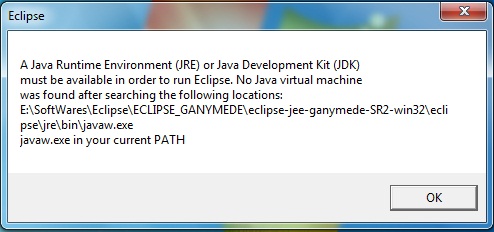
then we can understand that no jre folder in Eclipse Installed folder.

Go to java installed folder and copy the jre folder and paste in Eclipse folder below mentioned path.
E:\SoftWares\Eclipse\ECLIPSE_GANYMEDE\eclipse-jee-ganymede-SR2-win32\eclipse\

now click the eclipse icon and start working on it.
E:\SoftWares\Eclipse\ECLIPSE_GANYMEDE\eclipse-jee-ganymede-SR2-win32\eclipse\jre\bin\javaw.exe
javaw.exe in your current PATH
then we can understand that no jre folder in Eclipse Installed folder.

Go to java installed folder and copy the jre folder and paste in Eclipse folder below mentioned path.
E:\SoftWares\Eclipse\ECLIPSE_GANYMEDE\eclipse-jee-ganymede-SR2-win32\eclipse\

now click the eclipse icon and start working on it.
Spring Framework Eclipse shortcut to comment uncomment single line and block of code - Eclipse Tips Tricks
Knowing Eclipse shortcut to comment and uncomment single line or block of code can save you lot of time while working in Eclipse. In fact I highly recommend every Java programmer to go through these top 30 Eclipse shortcut and 10 java debugging tips in Eclipse for improved productivity. If you are Java programmer, coding in Eclipse and want to comment and uncomment single line or block of code quickly you can either use ctrl + / to comment a single line and subsequently uncomment a commented line. If you want to comment a block of code or a complete method, you have two option you can either line comment (//) all those selected lines or block comment (/* */) those lines. For line comment multiple line, select multiple line and press ctrl + /, it will put // in front of every line. For block commenting in Eclipse, first select all the lines or code block you want to comment and then enter ctrl+shift+/ it will put /* on first line and */ on last line. Here is better illustrated example of commenting and uncommenting Java code in Eclipse IDE :
J2EE Spring Hibernate Top 30 Eclipse Keyboard Shortcuts for Java Programmer
This tutorial is about 30 Eclipse keyboard shortcuts, this list is by no means complete and I will suggest you guys to share eclipse shortcuts listed other than here to make this more useful.Eclipse is most used Java development IDE and knowing Eclipse shortcuts not only improve your productivity but also makes you more efficient, you will have more time for things you like to do. Using keyboard shortcuts also helps to impress colleagues and shows that you have good hold on tools you used for Java Development.
Spring Framework How to Increase Console Buffer Size in Eclipse IDE - Output and Debug Console
By default Eclipse IDE has limit on console output, also known as console buffer size. Which means, your Eclipse console will overfill quickly, if you are running a Java server program, which usually do lot of logging. Once this happen, you start losing logs. whenever new logs appear, equal number of oldest logs are truncated. Thankfully there is a way to increase output capacity in Eclipse IDE. I discovered this tip, on my search of Eclipse productivity tips e.g. Eclipse shortcuts and settings to organize import. You can increase console buffer size, which is specified in characters by using Eclipse preferences. Eclipse Indigo has default console buffer size as 250000 characters. Eclipse also provides a check box Limit Console Output to put enforce limit on console output, In order to increase console output either you can unchecked this box or you can increase console buffer size. I usually unchecked, Limit Console Output to avoid guessing a good number for console buffer size.
Java J2EE Spring Java debugging tutorial - 10 tips on debugging in java with example
How to debug java program in Eclipse
Debugging is a must have skill for any java developer. Having ability to debug java program enables to find you any subtle bug which is not visible during code review or comes when a particular condition offer, This becomes even more important if you are working in high frequency trading or electronic trading system project where time to fix a bug is very less and bug usually comes on production environment and doesn't appear in your Windows XP machine. in my experience debugging java application also helps you understand flow of java program. In this java tutorial we will see how to debug a java program, setting up remote debugging in java and some java debugging tips on Eclipse and Netbeans IDE. It’s also good to know various java debug tool available and how java debugger or jdb works but it’s not mandatory for doing debugging in Java. To start java debugging you just needs your project to be configured in a modern IDE like eclipse and Netbeans and you are ready to debug java program.Java debugging tools
 I mostly used Eclipse IDE and Netbeans IDE for java development and these IDE have great support for java debugging. They allow you to set various breakpoints like line breakpoint, conditional breakpoint or exception breakpoint. I prefer Eclipse over netbeans because of its seamless integration with remote debugging because most of the time your application will run on Linux machine and you might not have local version running on your machine, in such scenario remote debugging is extremely useful. You can check how to setup java remote debugging in eclipse for step by step guide on setting remote debugging in eclipses. Apart from Eclipse and Netbeans IDE you can also use Java debugger jdb which is a simple command line based java debugger and based on java platform debugging architecture and can be used to debug java program locally or remotely.
Java debug options
If you are not using any IDE for java debugging locally you need to provide java debug option while starting your program. You need to provide java debug option also if you are setting up remote debugging session or using jdb for java debugging. Following are the two java debugging option which needs to be provided to java program:| Debug Options | Purpose |
| Xdebug | Used to run java program in debug mode |
| Xrunjdwp:transport=dt_socket,server=y,suspend=n | Loads in Process debugging libraries and specifies the kind of connection to be made. |
Using jdb to debug java application
1) Start your java program with two options provided above for example, below command will start StockTrading java program in debug mode.% java -Xdebug -Xrunjdwp:transport=dt_socket,address=8000,server=y,suspend=n StockTrading
After starting your java application in debug mode you can attach java debugger "jdb" to the VM with the following command:
% jdb -attach 8000
You can check the jdb manual page for complete detail on how to do java debugging with jdb.
Java remote debugging with eclipse
This is another cool feature of eclipse which allows you to connect your java application running on remote host and do remote debugging. You just need to start your java application with the java debug option discussed above and then connect your application from eclipse into specified port. You can check below link for step by step guide on java remote debugging with eclipse.Debugging java application in Eclipse and Netbeans
Debugging java application locally on any IDE like Eclipse or Netbeans it’s very simple, just select the project and click debug or use debug shortcut provided by IDE. You can also debug a single java class with main method. In Eclipse just right click and select "Debug as Java Application".10 practical Java debugging tips
Now let's see some java debugging tips which I used while doing debugging in Java in eclipse.1) Use conditional breakpoint
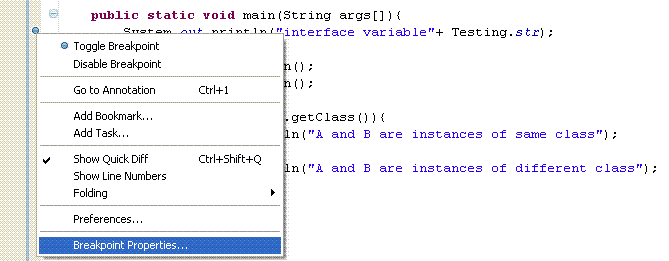
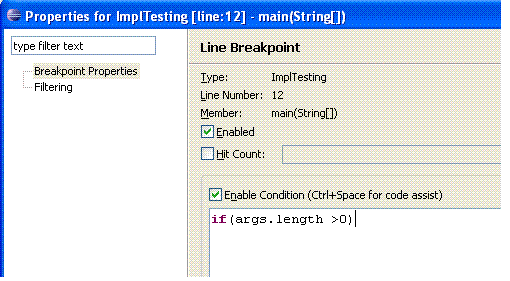
Eclipse allows you to setup conditional break point for debugging java program, which is a breakpoint with condition and your thread will only stop at specified line if condition matches instead of just stopping on that line like in case of line breakpoint. To setup a conditional breakpoint just double click on any line where you want to setup a breakpoint and then right click --> properties and then insert the condition. Now program will only stop when that particular condition is true and program is running on debug mode.
2) Use Exception breakpoint
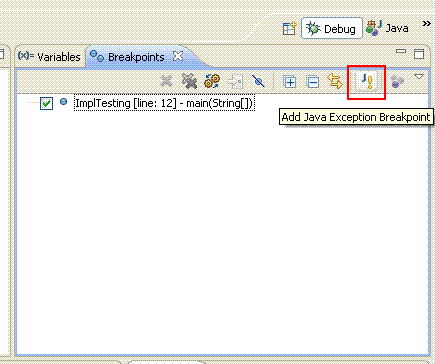
How many times you have frustrated with a NullPointerException and you don't know the source from where the exception is coming. Exception breakpoints are just made for such situation. Both Eclipse and Netbeans allows you to setup Exception breakpoint. You can setup Exception breakpoint based on java exception like NullPointerException or ArrayIndexOutOfBoundException. You can setup Exception breakpoint from breakpoint window and your program will stop when you start it on debug mode and exception occurs.
These are simply great debugging options available in any Java IDE, extremely useful if you are debugging multi-threaded application and want to navigate step by step.
4) Stopping for a particular Thread
This is my own custom made java debugging tips which I made using conditional breakpoints. since most of my projects are multi-threaded java programs and I want only a particular thread to stop on a particular line, for doing that I setup a conditional breakpoint on that line and put Thread.currentThread().getName().equals("TestingThread") and it works fantastically.
5) Inspect and Watch
These are two menu options which I use to see the value of expression during debugging java program. I just select the statement, right click and inspect and it will show you the value of that statement at debugging time. You can also put watch on that and that condition and its value will appear on watch window.
6) Suspending and resuming thread
You can suspend and resume any thread while debugging java program from debug window. Just right click on any thread and select either suspends or resume. This is also very useful while debugging multi-threading program and simulating race conditions.
7) Using logical structure
Logical structure option is very useful for examining contents inside java collection classes like java hasmap or Java Arraylist during java debugging. Logical view will show the contents like key and value of hashmap instead of showing full details of hashmap which we may not be interested, you can enable and disable logical view from variables window.
8) Step filtering
When we do Step Into on process debugging java program control goes form one class to other and it eventually go to JDK classes like System or String. Some time we just to remain in our application and don't want to navigate into JDK System classes in that case Step filtering is great you can just filter out JDK class from Step into. You can setup step filtering from preferences àJavaàDebugàStep Filtering and enable and disable it from Debug window.
9) Copy Stack
While debugging java program if you want to copy the stack of a thread which hit the breakpoint and suspended you do so by "Copy Stack" option. Just right click on Thread on Debug Window and select "Copy Stack".
10) Last tip is use java debugging as last option and not the first option because it’s very time consuming, especially remote java debugging which takes a lot of time if network latency is very high between local and remote host. Try to identify problem by looking at code it would be very handy and quick.
lastly java debugging is real fun so definitely try it few times to get hold of it and please share some other java debugging tips you use on your daily life.
Spring Framework How to Fix Must Override a Superclass Method Error Eclipse IDE Java
One of annoying error while overriding Java method in Eclipse IDE is must override a superclass method error , This error is quite frequent when importing Java projects and still I haven't seen any permanent solution of it. Must override a super class method error comes in Eclipse, if you have Java Class that implements interface and overrides method from interface and uses @Override annotation . Unfortunately Eclipse defaults to Java 1.5, which only recognize @Override annotation for overriding method from super class and not from interface. This creates lots of confusion between Java programmers as not every one is aware of this subtle difference of using @Override annotation with class and interface methods and they start looking classpath and path suspiciously. @Override annotation for interface methods are only available from Java 1.6 and if you use @Override while overriding interface methodthan you will get must override a superclass method error. In this Java and Eclipse tutorial we will see how to fix must override a superclass method error in eclipse but before that we will reproduce this error in a manner which will clear that Eclipse will complain only for methods which is overridden from interface.
Subscribe to:
Posts (Atom)