Showing posts with label Tools. Show all posts

Java J2EE Spring Build tools (Maven and Ant) interview questions and answers

In my view, open ended interview questions on tools help interviewer  assess a candidate's experience. A typical question would be to ask, what tools would you require to get your job down?

Q. What Java build tools are you experienced with? Which tool will you choose?
A. Ant + Ivy and Maven are the ones have been around for a while now.  Gradle is a less matured build tool that takes a hybrid approach of both Ant and Maven, but looks very promising. Buildr is a build system for Java-based applications, including support for Scala, Groovy and a growing number of JVM languages and tools.

  • Ant is more like a build language offering great flexibility as to how you build. You can write elegant and modular builds with it, but the main problem with this flexibility is that many don't write good build programs. For any non-trivial projects, over time it can lead to duplication of configuration between builds if proper care is not taken. If you need great flexibility in builds or you are working with some legacy code base where you have no control over the convention that Maven expects, then go for Ant. Ant is used for defining and executing the build steps. If you need dependency management to be integrated with Ant, then use Ivy as the dependency manager. 


  • Maven is a build framework. Maven takes the opposite approach to Ant and expects you to completely integrate with the Maven lifecycle. Maven's philosophy is  "Ant With Convention Over Configuration". For example conventions like the "Standard Directory Layout"  (e.g. src/main/java, src/main/resources, src/test/java, src/test/resources, etc) , build cycles, and phases. The Maven plugin mechanism allows for very powerful build configurations, and the inheritance model allows you to define a small set of parent POMs encapsulating your build configurations for the whole enterprise, and individual projects can inherit those configurations, leaving them lightweight. If you want to do anything that is "not the Maven way" you have to write a plugin or use the Ant integration.  Maven also has great tool support with IDEs like eclipse, NetBeans, and IntelliJ. Maven is very handy working with multiple-module projects  and in scenarios where your project consists of several teams working on dependent modules. These modules can be automatically versioned and composed in to the application regularly.
  • Gradle is more of a build language like Ant that incorporates some of the pluses of Maven. Gradle tries to provide a hybrid solution to meet in the middle between Ant and Maven. It uses Ivy's approach for dependency resolution. It allows for convention over configuration but also includes Ant tasks as first class citizens for greater flexibility. It also allows you to use existing Maven/Ivy repositories.
Gradle looks very promising by providing the best of both worlds, but only time will tell its adoption. There are also other factors to consider when choosing a tool like how comfortable your team is with a particular tool, standards and guidelines already in place from a consistency and governance perspective (especially in larger organizations), etc.

    Q. What features do you expect in a build tool?
    A.
    • Compile java code and build jar, war, and ear files for deployment and release.
    • Versioning and dependency management of relevant artifacts and modules.
    • Execute tests and report test results.
    • Run code quality check tools like Sonar, Checkstyle, Findbugs, etc.
    • Environment property substitution
    • Generation of files (e.g. Java source code from WSDL, AspectJ, XSL transformation, etc)
    • Support for cross-platform (UNIX, Windows, etc) and IDEs (e.g eclipse, NetBeans, IntelliJ, etc)
    • Proper documentation and support. 

    Q. What do you understand by Maven's build life cycle?
    A. The build life cycle has a number phases like validate, compile, test, package, integration-test, verify, install, and deploy. Each phase can have 0 or more goals (i.e. tasks). These build phases are executed sequentially to complete the default life cycle. Maven will first validate the project, then will try to compile the sources, run those against the tests, package the binaries (e.g. jar), run integration tests against that package, verify the package, install the verified package to the local repository, then deploy the installed package in a specified environment.

    If you want to do all the phases, you only need to call the last build phase to be executed, which is deploy:

    mvn deploy

    This is because if you call a build phase, it will execute not only that build phase, but also every build phase prior to the called build phase.

    mvn integration-test

    will do every build phase before it (validate, compile, package, etc.), before executing integration-test.

    A project specific customization of a build cycle involves binding specific goals to specific phases beyond the default settings in the configuration file (i.e. pom.xml). The code snippet below demonstrates how the maven-check-style plugin can be configured in the pom.xml file to execute the "checkstyle" task during the verify phase to evaluate code quality.


    <plugin>
    <groupid>org.apache.maven.plugins</groupid>
    <artifactid>maven-checkstyle-plugin</artifactid>
    <version>2.2</version>
    <configuration>
    <failonviolation>true</failonviolation>
    <failsonerror>true</failsonerror>
    <consoleoutput>true</consoleoutput>
    <cachefile>true</cachefile>
    <configlocation>${project.parent.basedir}/checkstyle.xml</configlocation>
    <suppressionslocation>${project.parent.basedir}/checkstyle-suppressions.xml</suppressionslocation>
    </configuration>
    <executions>
    <execution>
    <phase>verify</phase>
    <goals>
    <goal>checkstyle</goal>
    </goals>
    </execution>
    </executions>
    </plugin>


    Q. In your experience, what are some of the challenges you faced with maven, and how do you over come them?
    A.When it works which is 95% of the time it's quite nice, and when it doen't, it can be a challenge. Some of the challenges can be resolved by keeping some tips in mind.

    For example, it might not automatically download a particular artefact from a repository. In this case, you can manually install it to your local repositary using the following command.

    mvn install:install-file -DgroupId=javax.transaction -DartifactId=jta -Dpackaging=jar -Dversion=1.0.1B -Dfile=c:\Temp\maya-commonservices-1.5.5-SNAPSHOT-tests.jar -DgeneratePom=true 

    You have no control over, and limited visibility into, the dependencies specified by your dependencies (i.e. transitive dependencies). Builds will break because different copies of Maven will download different artifacts at different times. Your local build can break again in the future when the dependencies of your dependencies accidentally release new, non-backwards compatible changes without remembering to bump their version number. You can use the following commands and tools to check the dependency tree.

    mvn dependency:tree
    mvn dependency:analyze

    The IDEs do provide very useful graphical tools to display. For example, the diagram below shows the plugin that opens a pom.xml file in eclipse.


    This is also very handy to resolve class loading issues due to jar conflicts. Also keep in mind that the dependencies are loaded in the order in which they are declared in the pom.xml. So look at the effective pom with mvn help:effective-pom.

    The following flags are handy for debugging any other maven issues:

    The -X flag shows debug logging, and tee it to a file which you then search for clues of what happened.

    mvn -X install | tee maven_out.txt 

    To show the logical pom.xml or settings.xml being used

    mvn help:effective-pom
    mvn help:effective-settings

    Note: options like help:active-profiles and help:all-profiles also come in handy.

    To skip tests to resolve any other issues

    mvn install -DskipTests             //this will skip running tests, but still compile it. 
    mvn install -Dmaven.test.skip=true //this will skip compilation and execution of tests
    mvn install -Dtest=FooTest //runs only FooTest
    mvn -Dmaven.surefire.debug test //to debug your tests 
     
    There are other handy options to resume your build from where maven failed in a multi module project. For example, if your build failed at proj-commons, you can run the build from this module by typing:


    mvn -rf proj-commons clean install   //Resume from proj-commons
    mvn -pl proj-commons, proj-service clean install //build only 2 modules
    mvn -nsu clean install //Don't update the snapshots

    To debug maven plugins via your IDE like eclipse,set the MAVEN_OPTS environmental variable as shown below

    MAVEN_OPTS="-Xdebug -Xnoagent -Xrunjdwp:transport=dt_socket,server=y,suspend=y,address=8000";
    export MAVEN_OPTS

    rf --> resume from,  pl --> project list, nsu --> no snapshot update, am --> also make (If project list is specified, also build projects required by the list), amd --> also make dependents (If project list is specified, also build projects that depend on projects on the list)

    Now, use your IDEs remote debugging option by connecting to port 8000. In eclipse, you do this via Run --> open debug dialog and then select "Remote Java application".

    You may also find Maven interview questions and answers - inheritance versus aggregation useful.

    Spring Hibernate Building my First JavaFX Application using NetBeans 7.1


    Introduction: Building my First JavaFX Application using NetBeans 7.1
    This is an Introduction for a series of videos about how to create a simple JavaFX application using NetBeans 7.1. This video will show you the final result, before you can go through the steps.

    Java J2EE Spring Pre-Built Developer VMs, for Oracle VM VirtualBox.


    Oracle have packaged pre-built Oracle VM VirtualBox appliances that you can download, install, and experience as a single unit. Just assemble the downloaded files (if needed), import into VirtualBox (available for free), import, and go!

    Developer VMs are currently available in these flavors, with more to come.
    • Java Development VM
    • Database App Development VM
    • SOA & BPM Development VM
    • Enterprise Java Development VM
    • Oracle WebCenter Portal Framework 11g Hands-on VM
    • Oracle Solaris 11 Express Developer VM
    • Oracle Solaris 11 Express Network Virtualization VM
    • Oracle Tuxedo Web Application Server Demo VM
    • Enterprise PHP Development VM
    • Oracle Business Intelligence Enterprise Edition Plus VM


    Know more>>

    Spring Framework NetBeans IDE 7.3 Release Candidate Now Available


    The NetBeans Team announce the Release Candidate build of NetBeans IDE 7.3.

    NetBeans IDE 7.3 provides new support for the latest HTML5, JavaScript, and CSS standards, as well as enhancements to support for Groovy, PHP and many other features.

    Source: NetBeans.org Community News

    Spring Hibernate JavaFX 2.1 now available


    The JavaFX 2.1 release includes the JavaFX Software Development Kit (SDK) for the Windows and Mac OS X platforms. The JavaFX SDK provides the tools and technologies for developing JavaFX applications. This release also includes the JavaFX Runtime for the Windows platform.
    In addition to a number of bug fixes, this release includes:
    • Media H.264 and AAC support
    • Mac OS X support
      Applications must be packaged for the desktop, Web and Web Start applications are not yet supported.
    • LCD text
    • UI enhancements, including controls for Combo Box, Stacked Chart, and application-wide menu bar
    • Webview to support JavaScript to Java method calls

    - Read the JavaFX 2.1 Release Notes.

    - JavaFX 2.1 General Availability Download


    Spring Hibernate Getting Started with JavaFX Scene Builder


    JavaFX Scene Builder is a design tool for the JavaFX platform. It allows for the simple drag and drop of graphical user interface (GUI) components onto a JavaFX scene. As you build the scene, the FXML code for the designed application interface is automatically generated. This video will show you how to get started with the Scene Builder.

    Related:
    - JavaFX Scene Builder Docs Updated


    Spring Hibernate NetBeans IDE 7.2 Beta Released


    NetBeans IDE 7.2 Beta provides a significantly improved performance and coding experience, with new static code analysis capabilities in the Java Editor and smarter project scanning. The release also includes notable features such as integration with Scene Builder for visually creating JavaFX forms; support for multiple PHP frameworks; updated Groovy support; and many other enhancements in Java EE, Maven, C/C++ and the NetBeans Platform.

    NetBeans IDE 7.2 Beta is available in English, Brazilian Portuguese, Japanese, Russian, and Simplified Chinese.

    NetBeans IDE 7.2 Beta Release Information

    Related:
    - Getting Started with JavaFX Scene Builder
    - JavaFX Scene Builder Docs Updated


    Spring Hibernate NetBeans IDE 7.2 released

    NetBeans IDE 7.2 released: http://netbeans.org/


    NetBeans IDE 7.2 provides a significantly improved performance and coding experience, with new static code analysis capabilities in the Java Editor and smarter project scanning. Other notable features include integration with JavaFX Scene Builder; support for multiple PHP frameworks; updated Groovy support; and enhancements for Java EE, Maven, C/C++ and the NetBeans Platform.


    Java J2EE Spring How to run NetBeans compiled program

    Last article show how to create a Hello World program using NetBeans IDE 7.1, and also run it - inside NetBeans IDE. If you try to run it in command line using java (ex. java HelloNetBeans), may be you will be complaiined with Error of java.lang.NoClassDefFoundError. It should be a normal case.

    Now, click Run -> Clean and Build Main Project in NetBeans IDE top menu. NetBeans' Output window will show you how to run it in command line. such as:
    java -jar "C:\Users\erix7\Documents\NetBeansProjects\helloNetBeans\dist\helloNetBeans.jar"

    NetBeans IDE Output show you How to run NetBeans compiled program
    Run the generated jar using java in command line

    Java J2EE Spring Hello World! using NetBeans IDE 7.1

    To verify our installation of NetBeans 7.1, we are going to create a helloworld using NetBeans.

    - Click File -> New Project... in NetBeans IDE top menu.

    - Select Java from Categories, and Java Application from Projects. Then click Next.
    New Java Application

    - Enter helloNetBeans in Project Name field, make sure both checkbox of Create Main Class and Set as Main Project is checked. the Main class name will updated automatically when we enter Project Name. Click Finish.
    Enter Name and Location

    - A default project will be generated for you.
    Auto generated code

    - Modify the code in main() to say something.
    public class HelloNetBeans {

    /**
    * @param args the command line arguments
    */
    public static void main(String[] args) {
    // TODO code application logic here
    System.out.println("Hello World! from NetBeans.");
    }
    }


    - Final Save(File -> Save), Build (Run -> Build Project) and Run (Run -> Run Main Project). If everything go correctly, you can see the word "Hello World! from NetBeans." in the Output windows, that means your installation is properly.
    Hello World shown in Output window

    Related Article:
    - How to run NetBeans compiled program

    Spring Framework Setting up your Java Dev Environment


    YouTube Developers Live: Setting up your Java Dev Environment

    Want to learn how to setup your IDE and Maven for YouTube API Java development? Join +Ikai Lan and +Ibrahim Ulukaya as they start from scratch and end up with a productive YouTube API Java development environment.

    They will cover IDE setup, Maven integration and go over Java code samples of the YouTube Data API v3. Whether you are an experienced developer working through initial YouTube API library setup or a new developer ready to get started, this show will be great DIY guide!


    Spring Hibernate Oracle Java SE Critical Patch Update Advisory - June 2012

    A Critical Patch Update is a collection of patches for multiple security vulnerabilities. The Critical Patch Update for Java SE also includes non-security fixes. Critical Patch Updates are cumulative and each advisory describes only the security fixes added since the previous Critical Patch Update.

    Details: http://www.oracle.com/technetwork/topics/security/javacpujun2012-1515912.html

    Spring Framework Android development arrive IntelliJ

    EARLY ACCESS PREVIEW of Android Studio is available now. Android Studio is a new Android development environment based on IntelliJ IDEA. Similar to Eclipse with the ADT Plugin, Android Studio provides integrated Android developer tools for development and debugging.

    Android Studio is currently available as an early access preview. Several features are either incomplete or not yet implemented and you may encounter bugs.

    Spring Hibernate Introduce JavaFX Scene Builder

    JavaFX Scene Builder is a design tool that enables you to drag and drop graphical user interface (GUI) components onto a JavaFX scene. It can help you to quickly prototype interactive applications that connect GUI components to the application logic. It automatically generates the FXML source code as you define the GUI layout for your application.

    Before you can use the JavaFX Scene Builder. You also need to install the NetBeans IDE 7.2 Beta, which is used in this tutorial. See the JavaFX Scene Builder Installation Guide for more details.

    The Getting Started with JavaFX Scene Builder document presents the step-by-step creation of a simple issue-tracking application. It shows how quickly you can build the GUI for a JavaFX application by using JavaFX Scene Builder and connect it to the source code that handles the interaction between the data and the user interface.

    Java J2EE Spring NetBeans IDE 7.0.1 with JDK 7


    The NetBeans IDE is an award-winning integrated development environment available for Windows, Mac, Linux, and Solaris. The NetBeans project consists of an open-source IDE and an application platform that enable developers to rapidly create web, enterprise, desktop, and mobile applications using the Java platform, as well as PHP, JavaScript and Ajax, Groovy and Grails, and C/C++.

    NetBeans IDE 7.0 introduces language support for development to the Java SE 7 specification with JDK 7 language features. The release also provides enhanced integration with the Oracle WebLogic server, as well as support for Oracle Database and GlassFish 3.1. Additional highlights include Maven 3 and HTML5 editing support; a new GridBagLayout designer for improved Swing GUI development; enhancements to the Java editor, and more.

    The latest available download is NetBeans IDE 7.0.1, which is an update to NetBeans IDE 7.0.


    link: http://netbeans.org/community/releases/70/

    how to:
    - Create Java Desktop Application using NetBeans IDE
    - Setting Events With the Connection Wizard

    Spring Framework Atlassian - Issue & Project Tracking Software

    Atlassian_logoIn Current market Atlassian is the major project tracking software using by all software companies.
    We must  know, what is this software and what is the main purpose of this in real time world. Actually a normal software developer can develop code using MyEclipse or NetBeans IDEs. Then he can commits the code using SVN or CVS. Once he committs the code each file can get a version number in repository.If you want to check which line of code we modified or added or removed we don't know.again we should compare from history. But in Atlassin fisheye we can find all the changes you committed and which line deleted and which line committed, we can find easily with colors. Atlassian reduces developer efforts and reduces time all the things automated by atlassian once the code committed to repository.

    Actually this software contains several products with in this to tack the issues and maintenance the software in the normal software companies.

    Atlassian is having Different types of products under different categories. JIRA,GreenHopper and Bonfire comes under Project and Issue Tracking.Confluence,Team Calendars, SharePoint Connector and HipChat chating application are comes under Collaboration and Content Sharing softwares.Stash and Bitbucket are the DVCS Solutions Behind The Firewall or In The Cloud softwares.The Code Quality softwares are the major products from Atlassian, those are: FishEye, Crucible, Bamboo and Clover.Atlassian is having almost 1,328 add-ons to enhance your atlassian applications. Popular Add-ons are : Marketplace, salesforce, Tempo, Zen, Crowd, SourceTree, IDE Connector and JIRA mobile connect.
    Bamboo_logo
    Crucible_logo
    FishEye_logo
    JIRA_logo
    A Quick overview about Atlassian achievements:

    Co-Founder and CEO s are: Mike Canon Brookes and Scott Farquhar
    Mike Canon-Brookesscott_Farquhar
    • Atlassian came from Atlas is a Greek word. Atlassian is born at 2002 and JIRA 1.0 is released as a major product from JIRA.
    • In 2003 Confluence 1.0 released.
    • In 2004 2k customers joined with Atlassian.
    • New branch opened in San Francisco at 2005.
    • In 2007 Atlassian acquires Cenqua company with the development tools Fisheye,Clover and Crucible.
    • Entered in bycycles city Amsterdam to spread market in 2008.
    • 2009 is the huge hit with 10k customers by providing licenses with $10.
    • Bitbucket came to dump your code as a hosting services in 2010.
    • In 2010 Donated to Room to Read up to $1,250,000.
    • Bonfire,Team Calender introduced and onDemand app are rocketed into the cloud in 2011.
    • A Chat app HipChat and Stash introduced in 2012.

    Major Customers are: Facebook, hulu, eBay, zynga, Cisco, twitter, linked-in, Apache, adobe, netflix, Audi, NASA, DELL and more 25,000 customers with Atlassian.

    In Future we will learn more about Atlassian products in detail ..

    Java J2EE Spring Java Interview Questions and Answers on tools

    In today's enterprise Java development, you will use plethora of tools to make your life easier and more productive. The open-ended questions described below are not to make the Hire/No Hire decision, but to judge your seniority and experience.


    Q. Can you describe some real life scenarios in which tools helped you solve issues?
    A. [Hint: The objective is to ascertain, if you are using the right tool for right job. This question can also be phrased differently with How would you go about ....? type of questions like How would you go about fixing a memory or resource leak in a JEE application?, etc ].

    1. Debugging: The application and server logs are the first place to turn for any issues in production or during development. It is really worth understanding some of the tools that will help to obtain, analyze and search through the logs.

    • FileZilla or WinSCP to transfer files using FTP, SFTP or SCP protocols. Log files or database extract files can be transferred from a Unix machine to your sandbox (i.e. local machine) using these utilities, and explored further using text editors like Notepad++, UltraEdit, or TextPad. These text editors provide handy features like  search text highlighting, REGEX based searches, column formatting,  compare files, and many more. Notepad++ has powerful editing features, uses less CPU, and opens larger files.  

    • Cygwin or MSYS to emulate Unix like environment for Windows. Many production systems are Unix/Linux based, and having a Unix/Linux environment on your local environment can make you more productive by harnessing the power of Unix commands.
              Search the log files to see if a particular user logged in.
    cat /var/log/server.log | grep "login.jsp" | grep "userid"
             List all the log files that have a particular search text.
    grep -l "Missing Characteristic Value" *.log* 

            You can use regular expression patterns to search.
    grep -e '^import.*util.regex' *.java

            Find all occurrences of util.* packages except the util.regex package.
    grep -e '^import.*util' *.java | grep -v 'regex' 

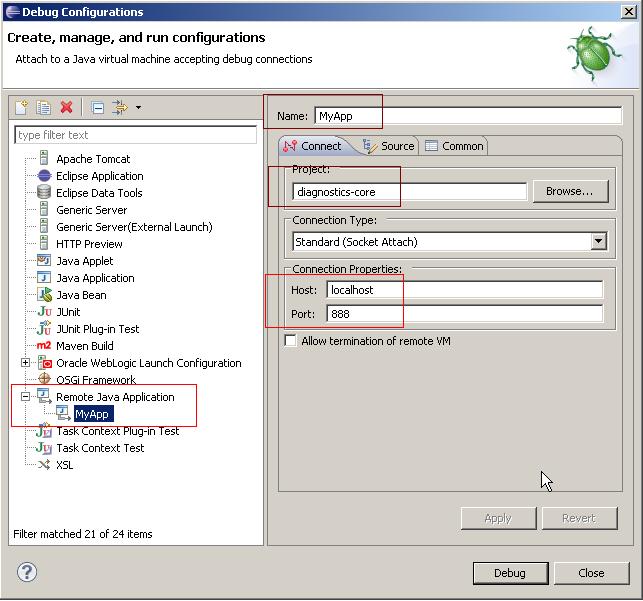
    • Remote debugging: It is increasingly essential with the globalization to be able to debug a Java application that is deployed remotely, in another country or city. You will come across scenarios where an application might be running fine in your sandbox (i.e. local desktop), but might be buggy when running in another environment or country.

      Say you want to remotely debug an application called MyApp.jar that is running remotely, you can set up your desktop to be able to debug it by enabling the remote debugging as shown below:

      java -Xdebug -Xrunjdwp:transport=dt_socket,address=888,server=y -jar MyApp.jar

      The above command tells the MyApp.jar to start a server socket on port 888, and publish the debugging messages using the jdwp, which stands for Java Debug Wire Protocol. The IDEs like eclipse can be configured to tap in to remote debugging as shown below. 

     In eclipse, select  Run --> Debug Configurations. Right click on "Remote Java Application", and select "New". Fill in the config details as shown below and apply the changes. Click on the "Debug" button to start debugging the remote application within eclipse. You will have to attach the source files from within eclipse.


    The "diagnostic-core" is the project with the source files within eclipse. The "MyApp" is the remote debug configuration that can be stopped and started within eclipse. The connection properties provide information as to where to look for debug messages exposed via jdwp. 

      • Web debugging tools like Fiddler2 for IE, Firebug NET tab for Firefox, JMeter HTTP proxy server, Charles web debugging, etc act as a proxy to capture request parameters, request/response content, headers, cookies, etc for debugging purpose.

      • SQL proxy drivers like P6SPY, log4jdbc, etc to log generated SQL statements, execution times, etc.

      • Network packet sniffing tools like Wireshark, Kismet, tcpdump, etc for analyzing the network protocols & issues. Developing applications that interact with web services presents a unique set of problems like not knowing exactly what message was sent to the server, or what response was received. Some of the most difficult bugs to track down are caused by a disconnect between what you think you are sending to the server, and what is actually going across the wire. These tools are commonly called "packet sniffers" and capture all network packets that move across your network interface. Examining the contents of these packets and the order in which they were sent and received can be a useful debugging technique.


        2. Integration testing: Most applications built nowadays need to integrate with internal and external systems through SOAP or RESTful web service and messaging (e.g. JMS). There are a number of handy tools/clients to assist in development, testing, and debugging applications that integrate with other systems.

        • HermesJMS is an extensible console that helps you interact with JMS providers making it simple to publish and edit messages, browse or search queues and topics, copy messages around and delete them.
        • soapUI is a functional testing tool for SOA and Web Service testing. soapUI provides complete test coverage - from SOAP and REST-based Web services, to JMS enterprise messaging layers, databases, Rich Internet Applications, and much more.
        • Firefox poster plugin is a developer tool for interacting with web services and other web resources that lets you make HTTP requests, set the entity body, and content type. For example, you can make RESTful service calls over HTTP by posting XML. 

        3. Version control: CVS and Subversion are the two most prominent open source version control tools. TortoiseCVS and TortoseSVN let you work with files under CVS and SVN version control systems directly from Windows Explorer. With these tools you can directly check out modules, update, commit and see differences by right clicking on files and folders within Explorer. You can see the state of a file with overlays on top of the normal icons within Explorer. It even works from within the file open dialog.

        4. Performance testing: JMeter is a popular performance testing tool for testing web applications, web services (both SOAP and RESTful), and SQL query performance.JMeter Interview Questions and Answers

        5. Hot deployment tools like  JRebel, improves developer productivity by skipping the build and redeploy phases in your sandbox. JRebel is a  JVM agent, which instantly reloads your code upon change without having to restart your application server or redeploy the application. It integrates into your JVM as a classloader extension and enables reloading of classes without requiring to create a new classloader, which is usually the case when redeploying or restarting application servers.

        6. Database administration and SQL execution tools such as db-visualizer, SQuirreL SQL,  SQL Developer, DBArtisan, and Toad.There are command-line tools like iSQL for Sybase and SQLPlus for Oracle. BCP (stands for Bulk CoPy) and SQL Loader are ETL (i.e. Extract Transform and Load) tools to import data from a flat file into a database and export data from a database into a flat file.

        7. Penetration testing or "PEN test" tools like Google's Skipfish, Firefox plugin "tamperdata", etc to identify security holes in your web application.


        Q. What are some of the frequently used short-cut keys on your favorite IDE?
        A. The less you touch the mouse, the more code you can write. For example, in eclipse, the following short-cut keys are very handy and makes you more productive.

        1. CTRL + SHIFT + R to open a resource and CTRL + SHIFT + T for Java type
        2. F4 on highlighting a class or interface to open the type hierarchy.
        3. CTRL + SHIFT + O to organize imports
        4. CTRL + SHIFT + F to format text.
        5. CTRL + D to delete a row
        6. CTRL + SHIFT + / to comment out code.
        7. CTRL + 1 is probably the most useful one. It activates the quick fix.
        8. CTRL + SHIFT + G to generate getters and setters.
        9. CTRL + O to get a snapshot of the class members. You can go directly to a member (method, variable) of a huge class file with this. If you just want to jump from one member to the next (or previous), you can use Ctrl + Shift + downarrow or Ctrl + Shift + uparrow, respectively.
        10. CTRL + L to go to a particular line. Handy when the stack trace says that the error is on line 256. 
        11. CTRL + SHIFT + L to get the list of all the currently defined short-cut keys.
        12. Pressing down the CTRL key while hovering over a class, interface or a method with the mouse to invoke the contextual menu to navigate to a particular interface, implementation, or method. Very useful.


        Q. Name a feature in your favorite IDE that you discovered recently  or  find it very useful?
        A. In eclipse, the "working sets" are very handy concept to categorize resources across projects into a contextually relevant representation. Working sets are simply, as their name suggests, a sub-set of files, classes, folders or projects with the following benefits.

        • Categorize multiple projects together that may represent a single application. For example, maven multi-module projects like   myproject-core, myproject-web, myproject-batch, myproject-parent, myproject-schedule, etc can be grouped into a single working set named "myproject".

        • You can search or access resources by working sets. You can even close the whole working set.

        • If you like, you can also create working sets by layers -- Model, View, Controller, Service, DAO, etc. It is also possible to select particular packages, classes, and folder structures to be included or excluded from a given working set. This allows developers to organize code anyway they want. 

        • Very handy and useful especially in larger projects.

        You can get the production support team to email you a stack trace, and then you can copy and paste the stack trace into Eclipse's Console window for further analysis. You can then click on class names in the stack trace as if your own code had generated it.

        There are other productivity improving features described above in terms of short-cut keys, especially the ctrl-1 for quick fix.

        The "templates" are very handy for frequently used code snippets. The window --> preferences --> Java --> Editor --> Templates can be used  to add handy code snippets to improve productivity. For example, the following template to declare loggers.

        ${:import(org.apache.commons.logging.Log, org.apache.commons.logging.LogFactory)}
        private static final Log LOG = LogFactory.getLog(${enclosing_type}.class);


        You can name the above template snippet as "logger" and when you are inside your class, if you type "logger" and then ctrl+space, eclipse will generates and inserts the required code based on the saved template.

        private static final Log LOG = LogFactory.getLog(TestSpring3.class);


        Many other useful templates can be created for productivity.


        Other similar links:

        Spring Hibernate j2objc - A Java to iOS Objective-C translation tool and runtime


        J2ObjC is an open-source command-line tool from Google that translates Java code to Objective-C for the iOS (iPhone/iPad) platform. This tool enables Java code to be part of an iOS application's build, as no editing of the generated files is necessary. The goal is to write an app's non-UI code (such as data access, or application logic) in Java, which is then shared by web apps (using GWT), Android apps, and iOS apps.

        J2ObjC supports most Java language and runtime features required by client-side application developers, including exceptions, inner and anonymous classes, generic types, threads and reflection. JUnit test translation and execution is also supported.

        J2ObjC is currently between alpha and beta quality. Several Google projects rely on it, but when new projects first start working with it, they usually find new bugs to be fixed. Apparently every Java developer has a slightly different way of using Java, and the tool hasn't translated all possible paths yet. It's initial version number is 0.5, which hopefully represents its release status correctly.

        Project Home: http://code.google.com/p/j2objc/

        Java J2EE Spring Install NetBeans IDE on Windows 8

        NetBeans IDE is open-source and free IDE, Runs on Windows, Linux, Mac OS X and Solaris, to develop desktop, mobile and web applications with Java, PHP, C/C++ and more. The current version is NetBeans IDE 7.1.

        - Browse to NetBeans download page, http://netbeans.org/downloads/index.html. Make sure the Platform selection is suit your platform, and click to select the bundles to download. In my case, I download with All bundles of 249MB. Actually, you can add or remove packs later using the IDE's Plugin Manager (Tools | Plugins).
        Download to install

        - Your download should start automatically. Click to run it after download completed.


        - Accept the suggested NetBeans IDE directory. The JDK directory should be the detected directory with JDK. (Refer to the post Install JDK 7 on Windows 8 if yo haven't install it)


        - Accept the suggested install GlassFish directory.
        install GlassFish directory

        - Review your setting and click Install.


        - Finish.
        Finish

        - You should have shortcut to NetBeans IDE 7.1 on both your Metro UI and Desktop.
        NetBeans IDE shortcut on Metro UI
        NetBeans IDE shortcut on Desktop

        Related:
        - Create Hello World! using NetBeans IDE 7.1 to verify your installation.

        Labels

        .equals = operator abstract class abstract method abstract window toolkit Access Modifiers accessing java beans accessing javabeans action events actionperformed active addition Advanced Advanced Overloading AdvJavaBooks Agile development ajax alive AMQP and Android anonymous class anonymous inner class Ant ant tutorials anti patterns antipatterns Apache Camel api for jsp api for servlet api for servlets api jsp application context application scope application session Apps Architecture are you eligible for the ocmjd certificaiton are you eligible for the scjd certification arithmetic operator arpanet array construction array declaration array initialization array list array to list conversion arraylist arraylist of strings arraylist of types arraylist questions arraylists Arrays arrays in java ask for help assert assert in java assertions assertions in java assignment assignment operator Atlassian attribute visibility authentication authorization autoboxing autounboxing awt AWT Event Handling awt interview questions AWT Layouts awt questions awt questions and answers backed collection backed collections Basic Basics of event handling bean attributes bean properties bean scope Beginner best practices BigData blocked books boxing buffer size bufferedreader bufferedwriter business delegate business delegate pattern calendar case statement casting in java casting interview questions chapter review choosing a java locking mechanism choosing a locking mechanism choosing a thread locking mechanism class inside a method class questions class with no name class without a name classes interview questions Clipboard closing jsp tags code snap coding cohesion collection generics collection interview questions collection methods collection of types collection questions collection searching collection types Collections Collections Framework collections interview questions collections sorting colors in java swings colors in swing command line arguments communication between threads comparable comparator comparison operators compiling java classes computers concurrency example and tutorial config Configuration ConnectionPooling constructor creation constructor interview questions constructor overloading constructors in java containers contents of deployment descriptor contents of web.xml context context scope converting array to list converting list to array core java core java interview core java interview question core java interview questions core java questions core java; core java; object oriented programming CoreJava CoreJavaBooks CORS coupling create threads creating 2 dimensional shapes creating 2D shapes creating a frame creating a jframe creating a thread creating an arraylist creating an inner class creating an interface creating java beans creating java threads creating javabeans creating threads creating threads in java CSS cURL currency current thread determination custom tag library custom taglib custom taglibs custom tags CVS dao dao design pattern dao factory pattern dao pattern data access object data access object pattern data structure and algorithm database date and time tutorial date format dateformat dates deadlock deadlocks debugging Declarations decorator pattern decrement default deleting sessions deploy web app deployment deployment descriptor deployment descriptor contents deployment of web application deserialization deserialize design pattern design pattern interview questions design patterns Designpatterns destory method destroy destroying sessions determining current thread determining the current thread Developer Differences different types of collections display stuff in a frame displaying images displaying images in java swings displaying images in swings displaying text in a component division do while loop doget dohead dopost doput DOS Downloads drawing a line drawing an ellipse drawing circles drawing ellipses drawing lines Drools tutorial eBooks Eclipse Eclipse Tutorial Encapsulation encapsulation in java enhanced for loop entity facade pattern enumerations enumerations in java enums equal to equals equals comparison error and exception error codes error handling in servlets error page event handling in swings event listeners exam prep tips example servlet Examples exception exception handling exception handling in servlets exception handling interview questions exception handling questions Exceptions exceptions in java exceptions in web applications explicit locking explicit locking of objects file file navigation filereader filewriter final class final method FireBug first servlet FIX protocol FIX Protocol interview questions FIX protocol tutorial font fonts for each loop for loop form parameters form values formatting forwarding requests frame frame creation frame positioning frame swings front controller front controller design pattern front controller pattern fundamental.Java FXML Games garbage collection garbage collection interview questions garbage collection questions garbage collector gc gc questions general generic Generics generics collections Geo get get set methods getattribute getting bean property getting form values getting form values in servlet getting scwcd certified getting servlet initialization parameters getting sun certified Google Graphics2D gregorian calendar handling strings in java hash hash map hash table hashcode hashmap hashset hashtable head head request HeadFirst heap heaps hibernate hibernate interview questions hibernate interview questions and answers hibernate questions hibernate questions and answers Hibernate Tutorial HibernateBooks homework How To HTML HTML and JavaScript html form http request http request handling http request header http request methods http request servlet http request type http session httprequest httprequest methods httpservlet httpservlet interview questions httpservlet interview questions with answers httpsession httpsession interview questions httpsession questions HttpSessionActivationListener HttpSessionAttributeListener HttpSessionBindingListener if if else if else block if else statement Image IO implementing an interface Implicit objects increment info inheritance inheritance in java init init method Initialization Blocks inner class inner class inside a method inner classes innerclass installation instanceof instanceof operator IntelliJ interaction between threads interface interface interview interface questions interfaces interfaces in java interfaces interview questions internet history interrupting a thread interrupting threads Interview interview questions interview questions on design patterns interview questions on exception handling interview questions on java collections interview questions on serialization introduction to java threads introduction to jsps introduction to threading introduction to threads invalidating session Investment Banking IO Package iscurrentthread iterator J2EE j2ee api j2ee design pattern j2ee design pattern interview questions j2ee design patterns j2ee hibernate interview questions j2ee history j2ee interview j2ee interview questions j2ee mvc j2ee mvc pattern j2ee programmer j2ee questions j2ee servlet api j2ee session j2ee struts interview questions java java 5 tutorial Java 8 java arrays java assertions java assignments java awt questions java bean java bean scope java beans java beginners tutorial Java career java certification Java Class java collection interview questions and answers java collection tutorial java collections java collections interview questions java constructors java currency Java CV java data base connectivity java database connectivity java database connectivity interview questions and answers java dates java design pattern java design patterns java developer certification Java EE java encapsulation java enums java event listeners java exceptions java formatting java garbage collection java garbage collector java gc java heap Java I/O java inheritance java input output Java Interface Java Interview Java Interview Answers Java Interview Questions Java Introduction java io java IO tutorial java iterator java jdbc Java JSON tutorial Java Key Areas java lists java literals java locks nested Java Media Framework java methods java multithreading Java multithreading Tutorials java nested locks java networking tutorial java numbers Java Objects java operators java overloading java parsing Java Programming Tutorials java race conditions java regex java regular expressions Java resume java scjp java searching java serialization java server pages java server pages api java server pages questions java spring interview questions. j2ee spring interview questions java stack java strings java swing java swing event listeners java swing frame java swing images java swings java swings images java thread explicit locking java thread lock scope java thread locking java thread locking mechanism java thread locking objects java threads java threads race condition java tips java tokenizing Java Tools Java Tutorial java ui questions Java Utilities java variables java wrappers Java xml tutorial java.lang java8 javabean javabean accessing javabean scope JavaBeans javac JavaEE JavaFX JavaFX 3D JavaFX 8 JavaOne JavaScript JavaTips JDBC jdbc driver jdbc example jdbc interview questions jdbc interview questions and answers jdbc interview questions with answers jdbc sample code JDBC Tutorial jdbc type 1 driver jdbc type 2 driver jdbc type 3 driver jdbc type 4 driver Jdeveloper JDK JDK8 JEE Tutorial jframe jframe creation jframe position jframe positioning JIRA JMeter JMS JMX join() joining threads JPA JQuery JS JSF JSF Tutorial JSONP JSP jsp and java beans jsp and servlets jsp and xml jsp api jsp code jsp compilation jsp conversion jsp directives jsp error page jsp error page directive jsp implicit objects jsp interview jsp interview questions jsp introduction jsp intvw questions jsp life jsp life cycle jsp life-cycle jsp lifecycle jsp page directive jsp questions jsp sample jsp scripting jsp scriptlets jsp servlets jsp summary jsp synopsis jsp tag libraries jsp tag library jsp taglib jsp tags jsp technology jsp to servlet jsp to servlet conversion jsp translation jsp usage jsp usebean jsp xml tags jsp xml tags usage jsp-servlet jsp:getProperty jsp:setProperty jsp:usebean jsps JSTL JUnit testing keyword synchronized keyword volatile Keywords Lambda Expressions Learning libraries life cycle life cycle of a jsp life cycle of a servlet life cycle of a thread life cycle of jsp life cycle of threads lifecycle of a thread linked list linkedhashmap linkedhashset linkedlist linux List listeners lists Literals locale lock manager pattern lock scope locking objects using threads log Logging logging errors logical and logical operators logical or loops loosely coupled making an arraylist making threads sleep making threads sleep for time MapReduce maps maps usage Maven Maven Tutorial max priority member access method arguments method local inner class method overloading method overriding method return types methods creating classes min priority Miscellaneous mobile mock exam model view controller model view controller design pattern model view controller pattern Multi Threading Multi-threading multiple threads multiplication multithreading multithreading in java multithreading interview questions multithreading questions mvc mvc design pattern mvc pattern MyEclipse mysql nested java lock nested java locks nested java thread locks nested locks nested thread locks NetBeans Networking new news nio NonAccess Modifiers norm priority normal inner class Normalization not equal to Notepad notify notifyall number format numberformat numbers object comparison object notify object orientation object oriented object oriented programming Object Oriented Programming in java objects interview questions ocmjd certification ocmjd certification eligibility OO OO Java oops OpenCSV OpenCV opening jsp tags OpenJDK OpenJFX Operators or Oracle Oracle ADF Mobile Oracle Certified Exams oracle certified master java developer oracle database ORM other topics out overloading overloading constructors overloading in java overriding page page directive page scope parsing passing variables passing variables to methods performance Platform Playing with Numbers points to remember polymorphism positioning a frame post practice exam Primitive Casting primitive variables printwriter priority queue priority queues priorityqueue priorityqueues private processing form values Products programming Projects protected public put questions questions on garbage collection questions on java strings queue quick recap quick review race conditions read objects from stream reading http request header RealTime_Tips redirecting to another servlet redirection reference reference variable casting reference variables Refreshing Java regex Regular Expressions regular inner class relational operators reminder request request dispatcher request forwarding request header request object. httpservletrequest request scope requestdispatcher response RESTClient RESTful retrieving values from session return error codes return types returning values runnable runnable interface running running java programs RUP sample jsp sample questions sample questions scwcd sample servlet scanner Scene Builder scjd certification scjd certification eligibility requirements scjp SCJP Certification scjp exam scjp exam questions scjp exam sample questions scjp questions scjp test scjp test questions scope scope of java locks scope of java thread locks scope of locks scripting in jsp scriptlet tags scriptlets scriptlets in jsp pages scwcd scwcd certification scwcd certification practice exam scwcd exam scwcd exam questions scwcd jsp summary scwcd mock exam scwcd mock exam answers scwcd practice exam scwcd practice test scwcd questions scwcd test SDLC searching searching arrays searching collections searching in java searching treemap searching treesets security self assement self assement scwcd self assessment scjp self test self test scjp self test scwcd send error method senderror method sending error code to browser serialization serialization in java serialization interview questions Serialization on Swing serialization questions service service method servlet servlet and forms servlet and jsp servlet api servlet attributes servlet code servlet container servlet context servlet error handling servlet exception handling servlet handling http request servlet initialization servlet initialization parameters servlet interview servlet interview questions servlet interview questions with answers servlet intvw questions servlet life cycle servlet lifecycle servlet questions servlet questions with answers servlet request servlet request dispatcher servlet request type servlet skeleton servletcontext servletcontextevent servletrequest Servlets servlets and jsps servlets api servlets details servlets request handling session session clean up session event listeners session facade pattern session interview questions session invalidation session listeners session management session questions session scope session timeout session tracking through url rewriting set collections set status method setattribute sets setstatus method setting bean property setting request type short circuit operators Singleton sleep sleeping threads soapUI Software Installation sorting sorting arraylist sorting arrays sorting collections special collections special inner classes split spring spring and hibernate interview questions spring batch Spring Core Spring Framework Spring Integration spring interview questions Spring JDBC Spring MVC Spring security Spring tutorial SQL SQL and database tutorial examples SQL Tutorial SSL stack stacks stacks and heaps static static class static declaration static imports static inner static inner class static method Static variable stopped stopping a thread stopping thread stopping threads Stored Procedure storing values in session Streams strictfp StrictMath string string buffer string builder string class string formatting String Handling string interview questions string manupulation string questions string tokenizer stringbuffer stringbuffer questions stringbuilder Strings strings in java struts Struts 1 Struts 1.2 Struts 2 struts framework interview questions struts interview questions struts interview questions with answers struts mvc interview questions struts questions Struts2 StrutsBooks submitting request subtraction Sun Certification sun certified java developer Sun Certified Java Programmer swing swing action performed swing and colors Swing Components swing event handling swing event listeners swing events Swing Hacks swing images Swing Look And Feels swings swings frame switch block switch case block switch case statement Sybase Sybase and SQL Server synchronization synchronized code synchronized keyword synchronized method System Properties tag lib tag library tag-lib taglibs tags TDD Technical Blogging ternary operator Test Driven Development test scjp Testing the context the session the volatile keyword thread thread class thread deadlocks thread interaction thread interruption thread life cycle thread lifecycle thread lock scope thread locks thread notify thread priorities thread race conditions race conditions in threads thread sleep thread states thread stoppage thread stopping thread synchronization thread syncing thread yield Threads threads in java threads interview questions threads life cycle threads questions tibco tightly coupled tips tips and tricks tips.FXML tokenizing Tomcat Tools toString transitions treemap treeset tricks Tricks Bag try catch try catch finally. finally block Tutorial type casting in java ui programming with java swings UML unboxing unit testing unix url rewriting use bean usebean using a arraylist using collections using colors using colours using command line arguments using different fonts using expressions using font using fonts using fonts in swings using hashmap using http session using httpsession using iterator using java beans in jsp using javabean in jsp using javabeans in jsp using javac using lists using maps using request dispatcher using scriptlets using session persistense using sets using special fonts using system properties using the jsp use bean using treeset using use bean Using Variables using volatile Using Wrappers using xml in jsp Util pack value object value object design pattern value object pattern var-args varargs Variable Arguments Variables vector vector questions vectors visibility vo pattern volatile volatile keyword volatile variables wait method waiting web app exception handling web app interview web application deployment web application exceptions web application scope web application security web component developer web component developer certification web context web context interfaces web context listeners web interview questions web security web server web servers Web services web.xml web.xml deployment webapp log weblogic website hacking website security what are threads what is a java thread what is a thread what is thread while loop windows windows 8 wrapper classes wrappers write objects to stream WSAD xml xml and jsp xml tags xslt yield()