Showing posts with label Web services. Show all posts

Spring Hibernate Java Web Services Interview Questions and Answers: SOAP clients

Q. How would you go about generating a SOAP Web service client in Java?
A. There are number of IDE based and other tools to achive this. The steps involved include

1. Get hold of the WSDL file for the service.
2. Generate the client Java code using the relevant IDE or maven plugin like jaxws-maven-plugin.
3. Use the generated code within your client Java file to invoke the service. Read the server details like host name and port-number from an environment based configuration file. The URL specified in the WSDL is hard-coded just for the contract sake.
The WSDL file can be drawn as shown below.


The sample WSDL file is OrderServices.WS_getOrdersForAccount.wsdl. This WSDL file could come from a Web service written in any language like C#, Java, etc or an enterprise Service bus like Tibco, Oracle Service Bus, web Methods, etc.


<?xml version="1.0" encoding="UTF-8"?>
<wsdl:definitions name="getOrdersForAccountWS" targetNamespace="http://server123/OrderExecutionServices.OrderServices.PublicServices:getOrdersForAccountWS" xmlns:soapenc="http://schemas.xmlsoap.org/soap/encoding/" xmlns:http="http://schemas.xmlsoap.org/wsdl/http/" xmlns:soapjms="http://www.w3.org/2010/soapjms/" xmlns:tns="http://server123/OrderExecutionServices.OrderServices.PublicServices:getOrdersForAccountWS" xmlns:wsdl="http://schemas.xmlsoap.org/wsdl/" xmlns:xsd="http://www.w3.org/2001/XMLSchema" xmlns:mime="http://schemas.xmlsoap.org/wsdl/mime/" xmlns:soap="http://schemas.xmlsoap.org/wsdl/soap/" xmlns:soap12="http://schemas.xmlsoap.org/wsdl/soap12/">
<wsdl:types>
<xsd:schema targetNamespace="http://server123/OrderExecutionServices.OrderServices.PublicServices:getOrdersForAccountWS" xmlns:tns="http://server123/OrderExecutionServices.OrderServices.PublicServices:getOrdersForAccountWS" xmlns:xsd="http://www.w3.org/2001/XMLSchema">
<xsd:element name="getOrdersForAccount" type="tns:getOrdersForAccount"/>
<xsd:element name="getOrdersForAccountResponse" type="tns:getOrdersForAccountResponse"/>
<xsd:complexType name="getOrdersForAccount">
<xsd:sequence>
<xsd:element name="accountNo" type="xsd:string"/>
<xsd:element name="fromDate" type="xsd:string"/>
<xsd:element name="toDate" type="xsd:string"/>
<xsd:element name="minRow" type="xsd:string"/>
<xsd:element name="maxRow" type="xsd:string"/>
</xsd:sequence>
</xsd:complexType>
<xsd:complexType name="getOrdersForAccountResponse">
<xsd:sequence>
<xsd:element maxOccurs="unbounded" name="OrderSummaries" nillable="true" type="tns:OrderSummary"/>
</xsd:sequence>

</xsd:complexType>
<xsd:complexType name="OrderSummary">
<xsd:sequence>
<xsd:element name="orderNo" nillable="true" type="xsd:string"/>
<xsd:element name="description" nillable="true" type="xsd:string"/>
<xsd:element name="orderDate" nillable="true" type="xsd:string"/>
<xsd:element name="orderStatus" nillable="true" type="xsd:string"/>
<xsd:element name="unitsValue" nillable="true" type="xsd:string"/>
<xsd:element name="nettValue" nillable="true" type="xsd:string"/>
</xsd:sequence>
</xsd:complexType>
</xsd:schema>
</wsdl:types>
<wsdl:message name="getOrdersForAccountWS_PortType_getOrdersForAccountResponse">

<wsdl:part name="parameters" element="tns:getOrdersForAccountResponse">
</wsdl:part>
</wsdl:message>
<wsdl:message name="getOrdersForAccountWS_PortType_getOrdersForAccount">
<wsdl:part name="parameters" element="tns:getOrdersForAccount">
</wsdl:part>
</wsdl:message>
<wsdl:portType name="getOrdersForAccountWS_PortType">
<wsdl:operation name="getOrdersForAccount">

<wsdl:input message="tns:getOrdersForAccountWS_PortType_getOrdersForAccount">
</wsdl:input>
<wsdl:output message="tns:getOrdersForAccountWS_PortType_getOrdersForAccountResponse">
</wsdl:output>
</wsdl:operation>
</wsdl:portType>
<wsdl:binding name="OrderExecutionServices_OrderServices_PublicServices_getOrdersForAccountWS_Binder" type="tns:getOrdersForAccountWS_PortType">
<soap:binding style="document" transport="http://schemas.xmlsoap.org/soap/http"/>
<wsdl:operation name="getOrdersForAccount">

<soap:operation soapAction="OrderExecutionServices_OrderServices_PublicServices_getOrdersForAccountWS_Binder_getOrdersForAccount" style="document"/>
<wsdl:input>
<soap:body parts="parameters" use="literal"/>
</wsdl:input>
<wsdl:output>
<soap:body parts="parameters" use="literal"/>
</wsdl:output>
</wsdl:operation>
</wsdl:binding>

<wsdl:service name="OrderExecutionServices.OrderServices.PublicServices.getOrdersForAccountWS">
<wsdl:port name="OrderExecutionServices_OrderServices_PublicServices_getOrdersForAccountWS_Port" binding="tns:OrderExecutionServices_OrderServices_PublicServices_getOrdersForAccountWS_Binder">
<soap:address location="http://server123:7555/ws/OrderExecutionServices.OrderServices.PublicServices.getOrdersForAccountWS/OrderExecutionServices_OrderServices_PublicServices_getOrdersForAccountWS_Port"/>
</wsdl:port>
</wsdl:service>
</wsdl:definitions>


Ensure that you have required jar files required for jaxws-rt and jaxws-tools. It depends on the version of Java and Maven you are using.


The jaxws-rt.jar is required if you are using Java version 5. In Maven pom.xml, you will require the following dependnecy if using Java 5. The Java 6 comes with the relevant libraries within rt.jar under javax.xml.ws package.

<dependencies>
<dependency>
<groupId>com.sun.xml.ws</groupId>
<artifactId>jaxws-rt</artifactId>
<version>2.2</version>
</dependency>
</dependencies>


If your Maven does not have the jaxws-tools included, then you will require the following dependency jar for the jaxws-maven-plugin.


<dependencies>
<groupId>com.sun.xml.ws</groupId>
<artifactId>jaxws-tools</artifactId>
<version>2.2.1</version>
</dependencies>


Configure the Maven pom.xml file to generate the relevant code to invoke the Web service with the "jaxws-maven-plugin".

<build>
<plugins>
<plugin>
<groupId>org.codehaus.mojo</groupId>
<artifactId>jaxws-maven-plugin</artifactId>
<version>1.10</version>
<executions>
<execution>
<id>compile-orderservice-wsdl</id>
<goals>
<goal>wsimport</goal>
</goals>
<configuration>
<sourceDestDir>${basedir}/src/main/java</sourceDestDir>
<wsdlUrls>
<wsdlUrl>${basedir}/src/main/resources/wsdl/OrderServices.WS_getOrdersForAccount.wsdl</wsdlUrl>
</wsdlUrls>
<packageName>com.myapp.service.ws</packageName>
</configuration>
</execution>
</executions>
</plugin>


....

</build>


Finally the client class that makes use of the generated classes and the JAXWS classes like QName and BindingProvider.


package com.myapp.ws.client;

import java.net.MalformedURLException;
import java.net.URL;
import java.util.ArrayList;
import java.util.Collections;
import java.util.List;
import java.util.Map;

import javax.xml.namespace.QName;
import javax.xml.ws.BindingProvider;

import org.apache.log4j.Logger;

//...other imports

public class OrderServiceImpl implements OrderService {

private static final Logger LOG = Logger.getLogger(OrderServiceImpl.class);

private static final String PACKAGE_NAME = "OrderExecutionServices.OrderServices.PublicServices";
private static final String SERVICE_NAME = PACKAGE_NAME + ".getOrdersForAccountWS";
private static final String NAMESPACE_URI = "http://server123/OrderExecutionServices.OrderServices.PublicServices:getOrdersForAccountWS"


@Override
public List<order> getOrder(OrderQuery query) throws OrderServiceException {
LOG.trace("getOrdersForAccount accountNumber=" + query.getAccountNumber());
//The WSDL service element has the sample endpoint location. Here provide the actual location
//by reading the <hostname>:<portno> from a config file
URL url = toUrl("http://myserver:5555/" + "ws/" + SERVICE_NAME + + "?WSDL");
// it takes namespaceURI and the localPart as the arguments
QName qName = new QName(NAMESPACE_URI, SERVICE_NAME);
//OrderExecutionServicesOrderServicesPublicServicesGetOrderForAccountWS is a generated class from the WSDL using wsimport
OrderExecutionServicesOrderServicesPublicServicesGetOrderForAccountWS service =
new OrderExecutionServicesOrderServicesPublicServicesGetOrderForAccountWS(url, qName);
//GetOrderForAccountWSPortType is a generated class from the WSDL using wsimport
GetOrdersForAccountWSPortType port = service.getOrderExecutionServicesOrderServicesPublicServicesGetOrderForAccountWSPort();
configurePort(port);

// The binding element in the WSDL defines the operation name as "getOrdersForAccount"
List<order> listOfOrders = port.getOrderForAccount(
query.getAccountNumber(),
query.getFromDate(),
queryl.getToDate(),
query.getStartRow(),
query.getStartRow() + query.getPageSize());

return listOfOrders;
}


private void configurePort(Object port) {
if (port instanceof BindingProvider) {
BindingProvider bindingProvider = BindingProvider.class.cast(port);
Map<string, Object> requestContext = bindingProvider.getRequestContext();
requestContext.put(BindingProvider.USERNAME_PROPERTY, "john"); //should be read from a properties file
requestContext.put(BindingProvider.PASSWORD_PROPERTY, ""); //should be read from a properties file
requestContext.put("com.sun.xml.ws.connect.timeout", 1000L); //should be read from a properties file
requestContext.put("com.sun.xml.ws.request.timeout", 20L); //should be read from a properties file in encrypted format and then decrypted
} else {
throw new RuntimeException("Expected " + port + " to be of " + BindingProvider.class);
}
}

private static URL toUrl(String url) {
try {
return new URL(url);
} catch (MalformedURLException e) {
throw new RuntimeException(e);
}
}

}


Q. How would you generate a sample SOAP payload from the WSDL
A.

1. Open the soapUI tool. If not already installed, download the free version and install it.
2. Create a new soapUI project by clicking File --> New soapUI Project.
3. In the pop-up enter a project name and where it says initial WSDL/WADL point your WSDL file. It could be a local file or a URL pointing to your WSDL.For example, OrderServices.WS_getOrdersForAccount.wsdl.

http://server123:7555/ws/OrderExecutionServices.OrderServices.PublicServices.getOrdersForAccountWS/OrderExecutionServices_OrderServices_PublicServices_getOrdersForAccountWS_Port?wsdl


4. Say okay and yiu will have a soapUI project created with a sample request contang the SOAP payload under the operation "getOrdersForAccount" subfolder. The payload will look like

<soapenv:Envelope xmlns:soapenv="http://schemas.xmlsoap.org/soap/envelope/" xmlns:ord="http://server123/OrderExecutionServices.OrderServices.PublicServices:getOrdersForAccountWS">
<soapenv:Header/>
<soapenv:Body>
<ord:getOrdersForAccount>
<accountNo>?</accountNo>
<fromDate>?</fromDate>
<toDate>?</toDate>
<minRow>?</minRow>
<maxRow>?</maxRow>
</ord:getOrdersForAccount>
</soapenv:Body>
</soapenv:Envelope>


Fill in the "?"s and configure the actual endpoint details, etc you will be able to test the actual service from the soapUI tool.

Spring Framework RESTFul Web Service URI conventions with Spring MVC examples

The high level pattern for the RESTful URI is
  • http(s)://myserver.com:8080/app-name/{version-no}/{domain}/{rest-reource-convetion}
For example:

  • http(s)://myserver.com:8080/accounting-services/1.0/forecasting/accounts
to list  all the accounts. This is a plural resource returning a collections of accounts. The URI contains nouns representing the resources in a hierarchical structure. For example, if you want a to get a particular transaction value under an account you can do

  • http(s)://myserver.com:8080/accounting-services/1.0/forecasting/account/123/transaction/567
Where  123 is the account number and 567 is the transaction number or id. This is a singular resource returning a single transaction.

What if you want to list a collection of transactions that are greater than a particular date?

  • http(s)://myserver.com:8080/accounting-services/1.0/forecasting/account/123/transactions/search?txn-date=20120201
The  verbs are defined via the HTTP methods GET, POST, PUT, and DELETE. The above examples are basically GET requests returning accounts or transactions. If you want to create a new transaction request, you do a POST with the following URL.

  • http(s)://myserver.com:8080/accounting-services/1.0/forecasting/account/123/transaction
 The actual transaction data will be sent in the body of the request as JSON data. The above URI will be used with a PUT http method to modify an existing transaction record.


Finally, you can also control which method gets executed with the help of HTTP headers or host names in the URL. Let's see some Spring MVC examples in a controller class as to how it maps a request URI, headers, etc to execute the relevant method on the server side.


Here is the sample code with GET requests


@Controller
@RequestMapping("/forecasting")
public class CashForecastController

{

@RequestMapping(
value = "/accounts,
method = RequestMethod.GET,
produces = "application/json")
@ResponseBody
public AccountResult getAllAccounts(HttpServletResponse response) throws Exception
{
//get the accounts via a service and a dao layers
}

@RequestMapping(
value = "/accounts.csv,
method = RequestMethod.GET,
produces = "text/csv")
@ResponseBody
public void getAllAccounts(HttpServletResponse response) throws Exception
{
//produces a CSV download file
}


@RequestMapping(
value = "/account/{accountCd}",
method = RequestMethod.GET,
produces = "application/json")
@ResponseBody
public Account getAccount(
@PathVariable(value = "accountCd") String accountCode, HttpServletResponse response) throws Exception
{
//get the accounts via a service and a dao layers
}


//accept only if there is a special header
@RequestMapping(
value = "/account/{accountCd}",
method = RequestMethod.GET,
headers =
{
"operation=special"
}
produces = "application/json")
@ResponseBody
public Account getAccountSpecial(
@PathVariable(value = "accountCd") String accountCode, HttpServletResponse response) throws Exception
{
//get the accounts via a service and a dao layers
//special handling based
}

@RequestMapping(
value = "/account/{accountCd}/transaction/{transactionId}",
method = RequestMethod.GET,
produces = "application/json")
@ResponseBody
public Transaction getTransaction(
@PathVariable(value = "accountCd") String accountCode,
@PathVariable(value = "transactionId") String txnId,
HttpServletResponse response) throws Exception
{
//get the accounts via a service and a dao layers
//accountCode and txnId can be used here
}

@RequestMapping(
value = "/account/{accountCd}/transactions/search",
method = RequestMethod.GET,
produces = "application/json")
@ResponseBody
public TransactionResult getTransactions(
@PathVariable(value = "accountCd") String accountCode,
@RequestParam(value = "txn-date", required = true) @DateTimeFormat(pattern = "yyyyMMdd") Date txnDate,
HttpServletResponse response) throws Exception
{
//get the accounts via a service and a dao layers
//accountCode and txnDate can be used here
}
}


Here is the sample code with POST and PUT requests
@Controller
@RequestMapping("/forecasting")
public class CashForecastController

{
@RequestMapping(
value = "/account/transaction",
method = RequestMethod.POST)
public @ResponseBody Transaction addTransaction(@RequestBody Transaction txn, HttpServletResponse response)
throws Exception
{

//logic to create a new Transaction records via service and dao layers

}


@RequestMapping(
value = "/account/transaction",
method = RequestMethod.PUT)
public @ResponseBody Transaction modifyTransaction(@RequestBody Transaction txn, HttpServletResponse response)
throws Exception
{

//logic to modify a Transaction record via service and dao layers

}
}


Do's and Don'ts

  • Don't use query parameters to alter state. Use query parameters for sub-selection of a resource like pagination, filtering, search queries, etc
  • Don't use implementation-specific extensions in your URIs (.do, .py, .jsf, etc.). You can use .csv, .json, etc.
  • Don't ever use GET to alter state. Use GET for as much as possible. Favor POST over PUT when in doubt. 
  • Don't perform an operation that is not idempotent with PUT. 
  • Do use DELETE in preference to POST to remove resources.
  • Don't clutter your URL with verbs or stuff that should be in a header or body. Move stuff out of the URI that should be in an HTTP header or a body. Whenever it looks like you need a new verb in the URL, think about turning that verb into a noun instead. For example, turn 'activate' into 'activation', and 'validate' into 'validation'.

Spring Hibernate SOAP (JAX-WS) Web Service Tutorial with Apache CXF, eclipse and maven

In the previous tutorial RESTful service with Apache CXF was demonstrated. This tutorial modifies the same one for SOAP based Web Service.


Step 1: You need to bring in the relevant CXF framework JAR files. The transitive dependencies will bring in the other dependent Spring jar files, JAXB jar files, and many other jar files listed in the screenshot below.

The pom.xml file is shown below:

<project xmlns="http://maven.apache.org/POM/4.0.0" xmlns:xsi="http://www.w3.org/2001/XMLSchema-instance"
xsi:schemaLocation="http://maven.apache.org/POM/4.0.0 http://maven.apache.org/maven-v4_0_0.xsd">
<modelVersion>4.0.0</modelVersion>
<groupId>com.mytutorial</groupId>
<artifactId>simpleWeb</artifactId>
<packaging>war</packaging>
<version>1.0-SNAPSHOT</version>
<name>simpleWeb Maven Webapp</name>
<url>http://maven.apache.org</url>


<properties>
<cxf.version>2.2.3</cxf.version>
</properties>

<dependencies>
<dependency>
<groupId>junit</groupId>
<artifactId>junit</artifactId>
<version>3.8.1</version>
<scope>test</scope>
</dependency>


<!-- CXF SOAP Web Service JARS -->
<dependency>
<groupId>org.apache.cxf</groupId>
<artifactId>cxf-rt-frontend-jaxws</artifactId>
<version>${cxf.version}</version>
</dependency>
<dependency>
<groupId>org.apache.cxf</groupId>
<artifactId>cxf-rt-transports-http</artifactId>
<version>${cxf.version}</version>
</dependency>


</dependencies>
<build>
<finalName>simpleWeb</finalName>
</build>
</project>


Now, if you right-mouse-click on simpleWeb,  and select "Maven --> Update Depencies", you can see all the transitively dependent jar files in the "Java Perspective" as shown below.


As you can see, it transitively brings in Spring and JAXB jars in addition to other relevant jars.

Step 2: Define the SOAP (i.e. JAX-WS) Web Service interface and implementation classes with relevant annotations.

Interface HelloUserWebService.java

package com.mytutorial.webservice;

import javax.jws.WebService;

import com.mytutorial.pojo.User;

@WebService
public interface HelloUserWebService {
//parameter that gets passed via the URL
User greetUser(String userName);
}

Implementation HelloUserWebServiceImpl.java

package com.mytutorial.webservice;

import javax.jws.WebParam;
import javax.jws.WebService;

import com.mytutorial.pojo.User;

@WebService(endpointInterface = "com.mytutorial.webservice.HelloUserWebService")
public class HelloUserWebServiceImpl implements HelloUserWebService {


public User greetUser(@WebParam(name="name") String userName) {
User user = new User();
user.setName(userName);
return user;
}

}


Step 3: Define the web service endpoint via cxf.xml, which internally uses the Spring framework. Define this under sr/main/resources folder under a package com.mytutorial.webservice.

<beans xmlns="http://www.springframework.org/schema/beans"
xmlns:xsi="http://www.w3.org/2001/XMLSchema-instance"
xmlns:jaxws="http://cxf.apache.org/jaxws"
xsi:schemaLocation="http://www.springframework.org/schema/beans
http://www.springframework.org/schema/beans/spring-beans.xsd
http://cxf.apache.org/jaxws
http://cxf.apache.org/schemas/jaxws.xsd">

<import resource="classpath:META-INF/cxf/cxf.xml" />
<import resource="classpath:META-INF/cxf/cxf-extension-soap.xml"/>
<import resource="classpath:META-INF/cxf/cxf-servlet.xml" />

<jaxws:endpoint id="auth"
implementor="com.mytutorial.webservice.HelloUserWebServiceImpl"
address="/userservices"/>
</beans>


Step 4: The web.xml file and the User.java files are same as the RESTful Web Service tutorial. You should now have the relevant artifacts as shown below.


Step 5: Deploy the simpleWeb.war to the Tomcat server from within eclipse or from outside eclipse as described in the simple web JEE tutorial.

Step 6:  Open a wen browser like google chrome, and type the following URL -> http://localhost:8080/simpleWeb/. This will list the JAX-WS and JAX-RS  Web services that are available.


Step 7:  You can now open a WSDL (Web Services Description Language) file on the browser with the following URL --> http://localhost:8080/simpleWeb/userservices?wsdl

<?xml version='1.0' encoding='UTF-8'?><wsdl:definitions name="HelloUserWebServiceImplService" targetNamespace="http://webservice.mytutorial.com/" xmlns:ns1="http://cxf.apache.org/bindings/xformat" xmlns:soap="http://schemas.xmlsoap.org/wsdl/soap/" xmlns:tns="http://webservice.mytutorial.com/" xmlns:wsdl="http://schemas.xmlsoap.org/wsdl/" xmlns:xsd="http://www.w3.org/2001/XMLSchema">
<wsdl:types>
<xs:schema elementFormDefault="unqualified" targetNamespace="http://webservice.mytutorial.com/" version="1.0" xmlns:tns="http://webservice.mytutorial.com/" xmlns:xs="http://www.w3.org/2001/XMLSchema">
<xs:element name="greetUser" type="tns:greetUser" />
<xs:element name="greetUserResponse" type="tns:greetUserResponse" />
<xs:element name="user" type="tns:user" />
<xs:complexType name="greetUser">
<xs:sequence>
<xs:element minOccurs="0" name="arg0" type="xs:string" />
</xs:sequence>
</xs:complexType>
<xs:complexType name="greetUserResponse">
<xs:sequence>
<xs:element minOccurs="0" name="return" type="tns:user" />
</xs:sequence>
</xs:complexType>
<xs:complexType name="user">
<xs:sequence>
<xs:element minOccurs="0" name="name" type="xs:string" />
</xs:sequence>
</xs:complexType>
</xs:schema>
</wsdl:types>
<wsdl:message name="greetUser">
<wsdl:part element="tns:greetUser" name="parameters">
</wsdl:part>
</wsdl:message>
<wsdl:message name="greetUserResponse">
<wsdl:part element="tns:greetUserResponse" name="parameters">
</wsdl:part>
</wsdl:message>
<wsdl:portType name="HelloUserWebService">
<wsdl:operation name="greetUser">
<wsdl:input message="tns:greetUser" name="greetUser">
</wsdl:input>
<wsdl:output message="tns:greetUserResponse" name="greetUserResponse">
</wsdl:output>
</wsdl:operation>
</wsdl:portType>
<wsdl:binding name="HelloUserWebServiceImplServiceSoapBinding" type="tns:HelloUserWebService">
<soap:binding style="document" transport="http://schemas.xmlsoap.org/soap/http" />
<wsdl:operation name="greetUser">
<soap:operation soapAction="" style="document" />
<wsdl:input name="greetUser">
<soap:body use="literal" />
</wsdl:input>
<wsdl:output name="greetUserResponse">
<soap:body use="literal" />
</wsdl:output>
</wsdl:operation>
</wsdl:binding>
<wsdl:service name="HelloUserWebServiceImplService">
<wsdl:port binding="tns:HelloUserWebServiceImplServiceSoapBinding" name="HelloUserWebServiceImplPort">
<soap:address location="http://localhost:8080/simpleWeb/userservices" />
</wsdl:port>
</wsdl:service>
</wsdl:definitions>


Step 8: From the above WSDL, you can either create a SOAP UI Client to test the above JAX-WS service, or write a stand-alone client Java class to test it programmatically.

package com.mytutorial.client;

import org.apache.cxf.interceptor.LoggingInInterceptor;
import org.apache.cxf.interceptor.LoggingOutInterceptor;
import org.apache.cxf.jaxws.JaxWsProxyFactoryBean;

import com.mytutorial.pojo.User;
import com.mytutorial.webservice.HelloUserWebService;

public final class SoapClientTest {

private SoapClientTest() {
}

public static void main(String args[]) throws Exception {

JaxWsProxyFactoryBean factory = new JaxWsProxyFactoryBean();

factory.getInInterceptors().add(new LoggingInInterceptor());
factory.getOutInterceptors().add(new LoggingOutInterceptor());
factory.setServiceClass(HelloUserWebService.class);
//The URL should be externalized to a configuration file
factory.setAddress("http://localhost:8080/simpleWeb/userservices");
HelloUserWebService client = (HelloUserWebService) factory.create();

User user = client.greetUser("John");
System.out.println("Response is: " + user.getName());

}

}

The output will be:

15/10/2012 1:10:57 PM org.springframework.context.support.AbstractApplicationContext prepareRefresh
INFO: Refreshing org.apache.cxf.bus.spring.BusApplicationContext@9506dc4: display name [org.apache.cxf.bus.spring.BusApplicationContext@9506dc4]; startup date [Mon Oct 15 13:10:57 EST 2012]; root of context hierarchy
15/10/2012 1:10:57 PM org.apache.cxf.bus.spring.BusApplicationContext getConfigResources
INFO: No cxf.xml configuration file detected, relying on defaults.
15/10/2012 1:10:57 PM org.springframework.context.support.AbstractApplicationContext obtainFreshBeanFactory
INFO: Bean factory for application context [org.apache.cxf.bus.spring.BusApplicationContext@9506dc4]: org.springframework.beans.factory.support.DefaultListableBeanFactory@62da3a1e
15/10/2012 1:10:57 PM org.springframework.beans.factory.support.DefaultListableBeanFactory preInstantiateSingletons
INFO: Pre-instantiating singletons in org.springframework.beans.factory.support.DefaultListableBeanFactory@62da3a1e: defining beans [cxf,org.apache.cxf.bus.spring.BusApplicationListener,org.apache.cxf.bus.spring.BusWiringBeanFactoryPostProcessor,org.apache.cxf.bus.spring.Jsr250BeanPostProcessor,org.apache.cxf.bus.spring.BusExtensionPostProcessor,org.apache.cxf.resource.ResourceManager,org.apache.cxf.configuration.Configurer,org.apache.cxf.binding.BindingFactoryManager,org.apache.cxf.transport.DestinationFactoryManager,org.apache.cxf.transport.ConduitInitiatorManager,org.apache.cxf.wsdl.WSDLManager,org.apache.cxf.phase.PhaseManager,org.apache.cxf.workqueue.WorkQueueManager,org.apache.cxf.buslifecycle.BusLifeCycleManager,org.apache.cxf.endpoint.ServerRegistry,org.apache.cxf.endpoint.ServerLifeCycleManager,org.apache.cxf.endpoint.ClientLifeCycleManager,org.apache.cxf.transports.http.QueryHandlerRegistry,org.apache.cxf.endpoint.EndpointResolverRegistry,org.apache.cxf.headers.HeaderManager,org.apache.cxf.catalog.OASISCatalogManager,org.apache.cxf.endpoint.ServiceContractResolverRegistry,org.apache.cxf.jaxws.context.WebServiceContextResourceResolver,org.apache.cxf.jaxws.context.WebServiceContextImpl,org.apache.cxf.binding.soap.SoapBindingFactory,org.apache.cxf.binding.soap.SoapTransportFactory,org.apache.cxf.binding.soap.customEditorConfigurer,org.apache.cxf.binding.xml.XMLBindingFactory,org.apache.cxf.ws.addressing.policy.AddressingAssertionBuilder,org.apache.cxf.ws.addressing.policy.AddressingPolicyInterceptorProvider,org.apache.cxf.ws.addressing.policy.UsingAddressingAssertionBuilder,org.apache.cxf.transport.http.policy.HTTPClientAssertionBuilder,org.apache.cxf.transport.http.policy.HTTPServerAssertionBuilder,org.apache.cxf.transport.http.policy.NoOpPolicyInterceptorProvider,org.apache.cxf.transport.http.ClientOnlyHTTPTransportFactory]; root of factory hierarchy
15/10/2012 1:10:58 PM org.apache.cxf.service.factory.ReflectionServiceFactoryBean buildServiceFromClass
INFO: Creating Service {http://webservice.mytutorial.com/}HelloUserWebServiceService from class com.mytutorial.webservice.HelloUserWebService
15/10/2012 1:10:58 PM org.apache.cxf.interceptor.LoggingOutInterceptor$LoggingCallback onClose
INFO: Outbound Message
---------------------------
ID: 1
Address: http://localhost:8080/simpleWeb/userservices
Encoding: UTF-8
Content-Type: text/xml
Headers: {SOAPAction=[""], Accept=[*/*]}
Payload: John
--------------------------------------
15/10/2012 1:10:59 PM org.apache.cxf.interceptor.LoggingInInterceptor logging
INFO: Inbound Message
----------------------------
ID: 1
Encoding: UTF-8
Content-Type: text/xml;charset=UTF-8
Headers: {content-type=[text/xml;charset=UTF-8], Date=[Mon, 15 Oct 2012 02:10:59 GMT], Content-Length=[236], Server=[Apache-Coyote/1.1]}
Payload: John
--------------------------------------
Response is: John


Spring Framework SOAP versus RESTful Web service -- comparison


Recently I attended an interview with a large investment bank, and I was quizzed on SOAP versus RESTful web service. The interview questions were targeted at ascertaining my understanding of the differences, pros and cons of each, and when to use what.

Web services are very popular and widely used to integrate similar (i.e. Java applications) and disparate systems (i.e. legacy applications and applications written in .Net etc). It is imperative to understand the differences, pros, and cons between each approach.

Key Area
SOAP based Web service
RESTful Web service
Specification/Platform Fundamentals (SF/PF)
Transport is platform & protocol neutral. Supports multiple protocols like HTTP(S), Messaging, TCP, UDP, SMTP, etc.

Permits only XML data format, hence language neutral.


You define operations, which tunnels through the POST or GET. The focus is on accessing the named operations and exposing the application logic as a service.


Defines the contract via WSDL.
Transport is protocol specific. Supports only HTTP or HTTPS protocols.


Permits multiple data formats like XML, JSON data, text, HTML, atom, RSS, etc.

Any browser can be used because the REST approach uses the standard GET, PUT, POST, and DELETE web operations. The focus is on accessing the named resources and exposing the data as a service.

Traditionally, the big drawback of REST was the lack of contract for the web service. This has changed with WSDL 2.0 defining non SOAP bindings and the emergence of WADL.


Simpler to implement. REST has Ajax support. It can use the XMLHttpRequest object.

Good for stateless CRUD (Create, Read, Update, and Delete) operations.

Performance Consideration (PC)
SOAP based reads cannot be cached. The application that uses SOAP needs to provide cacheing.
REST based reads can be cached. Performs and scales better.
Security (SE)
Supports both SSL security and WS-security, which adds some enterprise security features. Supports identity through intermediaries, not just point to point SSL.


WS-Security maintains its encryption right up to the point where the request is being processed.


WS-Security allows you to secure parts (e.g. only credit card details) of the message that needs to be secured. Given that encryption/decryption is not a cheap operation, this can be a performance boost for larger messages.

It is also possible with WS-Security to secure different parts of the message using different keys or encryption algorithms. This allows separate parts of the message to be read by different people without exposing other, unneeded information.

SSL security can only be used with HTTP. WS-Security can be used with other protocols like UDP, SMTP, etc.

Supports only point-to-point SSL security.

The basic mechanism behind SSL is that the client encrypts all of the requests based on a key retrieved from a third party. When the request is received at the destination, it is decrypted and presented to the service. This means the request is only encrypted while it is traveling between the client and the server. Once it hits the server (or a proxy which has a valid certificate), it is decrypted from that moment on.

The SSL encrypts the whole message, whether all of it is sensitive or not.

Transaction Management (TM)
Has comprehensive support for both ACID based transaction management for short-lived transactions and compensation based transaction management for long-running transactions. It also supports two-phase commit across distributed resources.
REST supports transactions, but it is neither ACID compliant nor can provide two phase commit across distributed transactional resources as it is limited by its HTTP protocol.
Quality of Service (QoS)
SOAP has success or retry logic built in and provides end-to-end reliability even through SOAP intermediaries.
REST does not have a standard messaging system, and expects clients invoking the service to deal with communication failures by retrying.
Best Practice (BP)
In general, a REST based web service is preferred due to its simplicity, performance, scalability, and support for multiple data formats. SOAP is favored where service requires comprehensive support for security, transactional reliability and stricter contract.


SOA (Service Oriented Architecture) versus WOA (Web Oriented Architecture)

(Source: )


SOA and WOA differ in terms of the layers of abstraction. SOA is a system-level architectural style that tries to expose business capabilities so that they can be consumed by many applications. WOA is an interface-level architectural style that focuses on the means by which these service capabilities are exposed to consumers. You can start out with a WOA and then grow into SOA.

Spring Framework RESTClient tool to test RESTful web services

The http://www.wiztools.org/ has some handy open source Java tools like RESTClient, Regular Expression Tester, etc. RESTClient tool is GUI based and a good alternative to the Unix command line based tool CURL and the Firefox poster plugin. SoapUI is another GUI based client for both RESTful and SOAP based web services. This blog posts shows how easy it is to get started with RESTClient tool from WizTools. The example below shows a POST request as the GET requests are easier to test. The diagrams below illustrates posting of JSON data. The RESTful web service operations GET, POST, PUT, and DELETE correlates with the database CRUD operations Read, Create, Update, and Delete respectively.


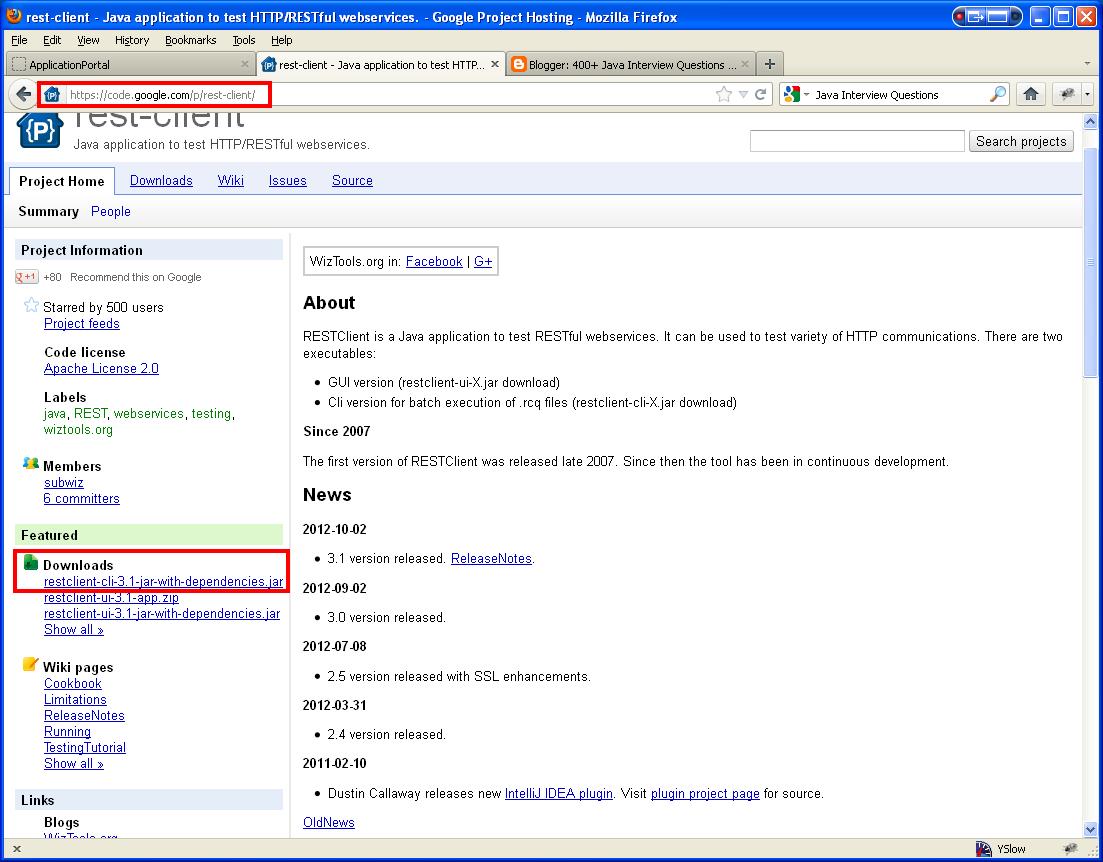
Step 1: From WizTools click on the link to RESTClient.


Step 2: Download the JAR file "restclient-cli-3.1-jar-with-dependencies.jar". Create a short cut to the jar file. Double clicking on the short cut will open the RESTClient GUI as shown below. You can type in the URL and select "POST" as the HTTP method.


Take note of the HTTP headers passed with the request.


Step 3: You need to select the "Content-Type" that you want to post. Select  "application/json" as the content-type.


The GET requests are very straight forward requiring only the URL.


The SoapUI tool requires a WADL file for the RESTFul web services. Here is an example of SOAP Web Service using the SoapUI tool.

SoapUI for Web Service tetsing


Spring Hibernate Restful Web Service Tutorial with Apache CXF


Nowadays, it is more common to work with RESTful Web Service than with SOAP based Web service. This is also a very popular job interview question and I have discussed the reasons at Web Services Interview Questions and Answers. Apache CXF is a popular framework for developing both style Web services. This tutorial extends the "simple Web" Java EE tutorial.

Step 1: You need to bring in the relevant CXF framework JAR files. The transitive dependencies will bring in the other dependent Spring jar files, JAXB jar files, and many other jar files listed in the screenshot below.

Modify the pom.xml file as shown below:

<project xmlns="http://maven.apache.org/POM/4.0.0" xmlns:xsi="http://www.w3.org/2001/XMLSchema-instance"
xsi:schemaLocation="http://maven.apache.org/POM/4.0.0 http://maven.apache.org/maven-v4_0_0.xsd">
<modelVersion>4.0.0</modelVersion>
<groupId>com.mytutorial</groupId>
<artifactId>simpleWeb</artifactId>
<packaging>war</packaging>
<version>1.0-SNAPSHOT</version>
<name>simpleWeb Maven Webapp</name>
<url>http://maven.apache.org</url>


<properties>
<cxf.version>2.2.3</cxf.version>
</properties>

<dependencies>
<dependency>
<groupId>junit</groupId>
<artifactId>junit</artifactId>
<version>3.8.1</version>
<scope>test</scope>
</dependency>


<!-- CXF RESTful Web Service JARS -->
<dependency>
<groupId>org.apache.cxf</groupId>
<artifactId>cxf-rt-frontend-jaxrs</artifactId>
<version>${cxf.version}</version>
</dependency>


</dependencies>
<build>
<finalName>simpleWeb</finalName>
</build>
</project>


Now, if you right-mouse-click on simpleWeb,  and select "Maven --> Update Depencies", you can see all the transitively dependent jar files in the "Java Perspective" as shown below.


As you can see, it transitively brings in Spring and JAXB jars in addition to other relevant jars.

Step 2: Define the RESTful Web Service interface and implementation classes with relevant annotations

Interface HelloUserWebService.java

package com.mytutorial.webservice;

import com.mytutorial.pojo.User;

public interface HelloUserWebService {
//parameter that gets passed via the URL
User greetUser(String userName);
}


Implementation HelloUserWebServiceImpl.java

package com.mytutorial.webservice;

import javax.ws.rs.GET;
import javax.ws.rs.Path;
import javax.ws.rs.PathParam;
import javax.ws.rs.Produces;

import com.mytutorial.pojo.User;

@Path("userservice/1.0")
@Produces("application/xml")
public class HelloUserWebServiceImpl implements HelloUserWebService {

@GET
@Path("/user/{userName}")
public User greetUser(@PathParam("userName") String userName) {
User user = new User();
user.setName(userName);
return user;
}

}


Note: The path "userservice/1.0" and  "/user/{userName}" will be used in the URL when invoking the web service. For example, http://localhost:8080/userservices/userservice/1.0/user/John. The "1.0" is the web service version number.

Step 3: Define the "User" bean (or POJO -- Plain Old Java Object) class with the relevant annotations to marshall (i.e. convert object to XML) User object to relevant XML. Generally, these objects can be generated from a XSD file and running it through "xjc" compiler supplied with JAXB. This is demonstrated at "RESTful Web Service Overview".

package com.mytutorial.pojo;

import javax.xml.bind.annotation.XmlRootElement;

@XmlRootElement(name = "user")
public class User {

private String name;

public String getName() {
return name;
}

public void setName(String name) {
this.name = name;
}
}


This will marshal the user object to XML like

<?xml version="1.0" encoding="UTF-8" standalone="yes"?>
<user>
<name>John</name>
</user>


Step 4: Define the web service endpoint via cxf.xml, which internally uses the Spring framework. Define this under sr/main/resources folder under a package com.mytutorial.webservice.

<beans xmlns="http://www.springframework.org/schema/beans"
xmlns:xsi="http://www.w3.org/2001/XMLSchema-instance" xmlns:jaxrs="http://cxf.apache.org/jaxrs"
xsi:schemaLocation="http://www.springframework.org/schema/beans
http://www.springframework.org/schema/beans/spring-beans.xsd
http://cxf.apache.org/jaxrs
http://cxf.apache.org/schemas/jaxrs.xsd">

<import resource="classpath:META-INF/cxf/cxf.xml" />
<import resource="classpath:META-INF/cxf/cxf-extension-jaxrs-binding.xml" />
<import resource="classpath:META-INF/cxf/cxf-servlet.xml" />


<bean id="helloUserWebService" class="com.mytutorial.webservice.HelloUserWebServiceImpl" />

<jaxrs:server id="userRestfulWebService" address="/userservices/">
<jaxrs:serviceBeans>
<ref bean="helloUserWebService" />
</jaxrs:serviceBeans>
<jaxrs:extensionMappings>
<entry key="xml" value="application/xml" />
</jaxrs:extensionMappings>
</jaxrs:server>

</beans>


Step 5: Define the web.xml with the CXFServlet and tell where to find the cxf.xml file.

<web-app xmlns:xsi="http://www.w3.org/2001/XMLSchema-instance"
xmlns="http://java.sun.com/xml/ns/javaee" xmlns:web="http://java.sun.com/xml/ns/javaee/web-app_2_5.xsd"
xsi:schemaLocation="http://java.sun.com/xml/ns/javaee http://java.sun.com/xml/ns/javaee/web-app_2_5.xsd"
id="WebApp_ID" version="2.5">

<display-name>CXF Web Service Application</display-name>

<context-param>
<param-name>contextConfigLocation</param-name>
<param-value>classpath:com/mytutorial/webservice/cxf.xml</param-value>
</context-param>
<listener>
<listener-class>org.springframework.web.context.ContextLoaderListener</listener-class>
</listener>
<servlet>
<servlet-name>CXFServlet</servlet-name>
<servlet-class>org.apache.cxf.transport.servlet.CXFServlet</servlet-class>
</servlet>
<servlet-mapping>
<servlet-name>CXFServlet</servlet-name>
<url-pattern>/*</url-pattern>
</servlet-mapping>

</web-app>


You should now have the relevant artifacts as shown below.


Step 6: Deploy the simpleWeb.war to the Tomcat server from within eclipse or from outside eclipse as described in the simple web JEE tutorial.


Step 7: Open a wen browser like google chrome, and type the following URL -> http://localhost:8080/simpleWeb/. This will list the RESTful services that are available.

 Click on the wadl (i.e. Web Application Description Language) link to get


Step 8: Finally, invoke the web service via the URL --> http://localhost:8080/simpleWeb/userservices/userservice/1.0/user/John to get an output as shown below. The username supplied is "John". If you are accessing it via a Java application, you can use a framework like Apache HttpClient to make an HTTP call.


Spring Hibernate Web Services Interview Questions and Answers - RESTful Web Service Overview


Q. Why would you use a RESTful Web service?
A. RESTful Web service is easy, straightforward, supports multiple data formats like XML, JSON, etc and easily testable. For example,

It can be tested by

1. Directly invoking the service  from the browser by typing a URL if the RESTFul service supports GET request with query parameters. For example,

http://localhost:8080/executionservices/execution/1.0/order/create?accountId=123&qty=25 

2. You could use a Firefox plugin like "poster" to post an XML request to your service.

3. You could write a Web Service client to consume the Web service from a test class or a separate application client. You could use libraries like HttpClient, CXF Client, URLConnection, etc to connect to the RESTful service.


Q. What are the various implementations of JAX-RS available to choose from in Java?
A. When you're developing with REST in Java, you have a lot of options to choose from in terms of the frameworks. There's Jersey, the reference implementation from Oracle, then you have RestEasy, the JBoss choice, and there is CXF, the Apache choice.


Q. How would you go about implemnting the RESTful Web service using the framework of your choice?
A. Let's look at CXF as it is easy to configure. The steps involved include

  • Bringing in the relevant framework jar files for Spring and CXF. For example, via Maven using a pom.xml file.
  • If the request and responses are XML based POST, then define an XSD file and generate JAXB annotated classes for marshalling and unmarshalling the request and response.
  • Define the WebService interface and implementation classes.
  • Define any interceptor and filter classes if required to intercept the request and responses for implementing the cross-cutting concerns like security validation, logging, auditing, setting up or initializing the locale, etc
  • Wire up the classes via Spring and CXF config files. For example, webservices-config.xml and cxf.xml.
  • Finally define the CXF servlet and bootstrap the relevant config files via the web.xml file.


Firstly, configure the maven pom.xml file to include the relevant jar files.


<dependency>
<groupId>org.springframework</groupId>
<artifactId>spring-context</artifactId>
<version>3.0.5.RELEASE</version>
</dependency>
<dependency>
<groupId>org.springframework</groupId>
<artifactId>spring-web</artifactId>
<version>3.0.5.RELEASE</version>
</dependency>
<dependency>
<groupId>org.apache.cxf</groupId>
<artifactId>cxf-rt-frontend-jaxrs</artifactId>
<version>2.2.3</version>
</dependency>


Define the request and response objects with JAXB annotations as our Web service payload is XML, hence it needs to be marshalled (i.e. convert from object to XML) and unmarshalled (XML to object). OrderRequest & OrderResponse classes can be generated from XSD file OrderRequestResponde.xsd shown below.

<?xml version="1.0" encoding="UTF-8" standalone="yes"?>
<xs:schema version="1.0" xmlns:xs="http://www.w3.org/2001/XMLSchema">

<xs:complexType name="OrderResponse">
<xs:sequence>
<xs:element name="orderId" type="xs:string" minOccurs="0" />
<xs:element name="responseCode" type="responseCode" minOccurs="0" />
<xs:element name="accountId" type="xs:string" minOccurs="0" />
</xs:sequence>
</xs:complexType>

<xs:complexType name="OrderRequest">
<xs:sequence>
<xs:element name="accountId" type="xs:string" minOccurs="0" />
<xs:element name="quantity" type="xs:int" minOccurs="0" />
</xs:sequence>
</xs:complexType>

<xs:simpleType name="responseCode">
<xs:restriction base="xs:string">
<xs:enumeration value="SUCCESS" />
<xs:enumeration value="FAILED" />
<xs:enumeration value="REJECTED" />
<xs:enumeration value="UNKNOWN" />
</xs:restriction>
</xs:simpleType>

</xs:schema>


The .java files can be generated via the xjc command to generate JAXB annotated classes. The OrderRequest.java, OrderResponse.java, ResponseCode.java and ObjectFactory.java files are generated under the package "com.myapp.data.order".

xjc -d "c:\temp" -p "com.myapp.data.order" "C:\temp\xsd\OrderRequestResponde.xsd" -extension

Here are the generated files:

OrderRequest.java

//
// This file was generated by the JavaTM Architecture for XML Binding(JAXB) Reference Implementation, vJAXB 2.1.3 in JDK 1.6
// See http://java.sun.com/xml/jaxb
// Any modifications to this file will be lost upon recompilation of the source schema.
// Generated on: 2012.02.07 at 05:07:31 PM EST
//


package com.myapp.data.order;

import javax.xml.bind.annotation.XmlAccessType;
import javax.xml.bind.annotation.XmlAccessorType;
import javax.xml.bind.annotation.XmlType;


/**
* Java class for OrderRequest complex type.
*
*
The following schema fragment specifies the expected content contained within this class.
*
*
* <complexType name="OrderRequest">
* <complexContent>
* <restriction base="{http://www.w3.org/2001/XMLSchema}anyType">
* <sequence>
* <element name="accountId" type="{http://www.w3.org/2001/XMLSchema}string" minOccurs="0"/>
* <element name="quantity" type="{http://www.w3.org/2001/XMLSchema}int" minOccurs="0"/>
* </sequence>
* </restriction>
* </complexContent>
* </complexType>
*
* * */ @XmlAccessorType(XmlAccessType.FIELD) @XmlType(name = "OrderRequest", propOrder = { "accountId", "quantity" }) public class OrderRequest { protected String accountId; protected Integer quantity; /** * Gets the value of the accountId property. * * @return * possible object is * {@link String } * */ public String getAccountId() { return accountId; } /** * Sets the value of the accountId property. * * @param value * allowed object is * {@link String } * */ public void setAccountId(String value) { this.accountId = value; } /** * Gets the value of the quantity property. * * @return * possible object is * {@link Integer } * */ public Integer getQuantity() { return quantity; } /** * Sets the value of the quantity property. * * @param value * allowed object is * {@link Integer } * */ public void setQuantity(Integer value) { this.quantity = value; } }


OrderResponse.java


//
// This file was generated by the JavaTM Architecture for XML Binding(JAXB) Reference Implementation, vJAXB 2.1.3 in JDK 1.6
// See http://java.sun.com/xml/jaxb
// Any modifications to this file will be lost upon recompilation of the source schema.
// Generated on: 2012.02.07 at 05:07:31 PM EST
//


package com.myapp.data.order;

import javax.xml.bind.annotation.XmlAccessType;
import javax.xml.bind.annotation.XmlAccessorType;
import javax.xml.bind.annotation.XmlType;


/**
* Java class for OrderResponse complex type.
*
*
The following schema fragment specifies the expected content contained within this class.
*
*
* <complexType name="OrderResponse">
* <complexContent>
* <restriction base="{http://www.w3.org/2001/XMLSchema}anyType">
* <sequence>
* <element name="orderId" type="{http://www.w3.org/2001/XMLSchema}string" minOccurs="0"/>
* <element name="responseCode" type="{}responseCode" minOccurs="0"/>
* <element name="accountId" type="{http://www.w3.org/2001/XMLSchema}string" minOccurs="0"/>
* </sequence>
* </restriction>
* </complexContent>
* </complexType>
*
* * */ @XmlAccessorType(XmlAccessType.FIELD) @XmlType(name = "OrderResponse", propOrder = { "orderId", "responseCode", "accountId" }) public class OrderResponse { protected String orderId; protected ResponseCode responseCode; protected String accountId; /** * Gets the value of the orderId property. * * @return * possible object is * {@link String } * */ public String getOrderId() { return orderId; } /** * Sets the value of the orderId property. * * @param value * allowed object is * {@link String } * */ public void setOrderId(String value) { this.orderId = value; } /** * Gets the value of the responseCode property. * * @return * possible object is * {@link ResponseCode } * */ public ResponseCode getResponseCode() { return responseCode; } /** * Sets the value of the responseCode property. * * @param value * allowed object is * {@link ResponseCode } * */ public void setResponseCode(ResponseCode value) { this.responseCode = value; } /** * Gets the value of the accountId property. * * @return * possible object is * {@link String } * */ public String getAccountId() { return accountId; } /** * Sets the value of the accountId property. * * @param value * allowed object is * {@link String } * */ public void setAccountId(String value) { this.accountId = value; } }


ResponseCode.java


//
// This file was generated by the JavaTM Architecture for XML Binding(JAXB) Reference Implementation, vJAXB 2.1.3 in JDK 1.6
// See http://java.sun.com/xml/jaxb
// Any modifications to this file will be lost upon recompilation of the source schema.
// Generated on: 2012.02.07 at 05:07:31 PM EST
//


package com.myapp.data.order;

import javax.xml.bind.annotation.XmlEnum;
import javax.xml.bind.annotation.XmlType;


/**
* Java class for responseCode.
*
*
The following schema fragment specifies the expected content contained within this class.
*
*
* <simpleType name="responseCode">
* <restriction base="{http://www.w3.org/2001/XMLSchema}string">
* <enumeration value="SUCCESS"/>
* <enumeration value="FAILED"/>
* <enumeration value="REJECTED"/>
* <enumeration value="UNKNOWN"/>
* </restriction>
* </simpleType>
*
* */ @XmlType(name = "responseCode") @XmlEnum public enum ResponseCode { SUCCESS, FAILED, REJECTED, UNKNOWN; public String value() { return name(); } public static ResponseCode fromValue(String v) { return valueOf(v); } }


The ObjectFactory.java


//
// This file was generated by the JavaTM Architecture for XML Binding(JAXB) Reference Implementation, vJAXB 2.1.3 in JDK 1.6
// See http://java.sun.com/xml/jaxb
// Any modifications to this file will be lost upon recompilation of the source schema.
// Generated on: 2012.02.07 at 05:07:31 PM EST
//


package com.myapp.data.order;

import javax.xml.bind.annotation.XmlRegistry;


/**
* This object contains factory methods for each
* Java content interface and Java element interface
* generated in the com.myapp.data.order package.
* An ObjectFactory allows you to programatically
* construct new instances of the Java representation
* for XML content. The Java representation of XML
* content can consist of schema derived interfaces
* and classes representing the binding of schema
* type definitions, element declarations and model
* groups. Factory methods for each of these are
* provided in this class.
*
*/
@XmlRegistry
public class ObjectFactory {


/**
* Create a new ObjectFactory that can be used to create new instances of schema derived classes for package: com.myapp.data.order
*
*/
public ObjectFactory() {
}

/**
* Create an instance of {@link OrderResponse }
*
*/
public OrderResponse createOrderResponse() {
return new OrderResponse();
}

/**
* Create an instance of {@link OrderRequest }
*
*/
public OrderRequest createOrderRequest() {
return new OrderRequest();
}

}


Define the Web service interface ExecutionWebService.java.

package com.myapp.webservice.orderexecutionservices;


import javax.ws.rs.Consumes;
import javax.ws.rs.POST;
import javax.ws.rs.Path;
import javax.ws.rs.PathParam;
import javax.ws.rs.Produces;
import javax.ws.rs.QueryParam;

import com.myapp.data.order.*;

@Path("execution/1.0")
public interface ExecutionWebService {


// -------------------------
// Create Order
// -------------------------

@POST
@Path("/order/create")
@Consumes("application/xml")
@Produces("text/xml")
OrderResponse createOrder(OrderRequest orderRequest);

// -------------------------
// Amend Order
// -------------------------

@POST
@Path("/order/amend")
@Consumes("application/xml")
@Produces("text/xml")
OrderResponse amendOrder(OrderRequest orderRequest);

//--------------------------
// Cancel Order
//--------------------------

@POST
@Path("/order/cancel")
@Consumes("application/xml")
@Produces("text/xml")
OrderResponse cancelOrder(OrderRequest orderRequest);

}


Define the Web service implementation class ExecutionWebServiceImpl.java. This class makes use of the back-end service class OrderService.java to talk to to the DAO layer, which is not shown here.

package com.myapp.webservice.orderexecutionservices.impl;

import java.util.ArrayList;
import java.util.Date;
import java.util.List;

import javax.annotation.Resource;
import javax.servlet.http.HttpServletRequest;
import javax.ws.rs.WebApplicationException;
import javax.xml.datatype.DatatypeConfigurationException;
import javax.xml.ws.WebServiceContext;
import javax.xml.ws.handler.MessageContext;


import com.myapp.data.order.OrderRequest;
import com.myapp.data.order.OrderResponse;

public class ExecutionWebServiceImpl implements ExecutionWebService {

private OrderService orderService;

public ExecutionWebServiceImpl() {
}

public ExecutionWebServiceImpl(OrderService orderService) {
this.setOrderService(orderService);
}

public void setOrderService(OrderService orderService) {
this.orderService = orderService;
}

public OrderService getOrderService() {
return orderService;
}

@Override
public OrderResponse createOrder(OrderRequest orderRequest) {
OrderResponse response = null;
try {
//call to back end service
response = getOrderService().createOrder(orderRequest);
} catch (Exceprion e) {
throw new WebApplicationException(e);
}

return response;
}

@Override
public OrderResponse amendOrder(OrderRequest orderRequest) {
OrderResponse response = null;
try {
response = getOrderService().amendOrder(orderRequest);
} catch (Exception e) {
throw new WebApplicationException(e);
}

return response;
}

@Override
public OrderResponse cancelOrder(OrderRequest orderRequest) {

OrderResponse response = null;

try {
response = getOrderService().cancelOrder(orderRequest, null);
} catch (Exception e) {
throw new WebApplicationException(e);
}

return response;
}
}


Now, wire up the above classes using Spring and CXF configuration files.


The webservices-config.xml file.

<?xml version="1.0" encoding="UTF-8"?>
<beans xmlns="http://www.springframework.org/schema/beans"
xmlns:xsi="http://www.w3.org/2001/XMLSchema-instance"
xmlns:cxf="http://cxf.apache.org/core"
xmlns:jaxrs="http://cxf.apache.org/jaxrs"
xmlns:jaxws="http://cxf.apache.org/jaxws"
xsi:schemaLocation="
http://www.springframework.org/schema/beans
http://www.springframework.org/schema/beans/spring-beans.xsd
http://cxf.apache.org/jaxws
http://cxf.apache.org/schemas/jaxws.xsd
http://cxf.apache.org/jaxrs
http://cxf.apache.org/schemas/jaxrs.xsd">

<import resource="classpath:META-INF/cxf/cxf.xml" />
<import resource="classpath:META-INF/cxf/cxf-extension-jaxrs-binding.xml" />
<import resource="classpath:META-INF/cxf/cxf-servlet.xml" />
<import resource="classpath:META-INF/cxf/cxf-extension-soap.xml" />
<import resource="classpath:META-INF/cxf/cxf-extension-http.xml" />


<!-- ~~~~~~~~~~~~~~~~~~~~~~~~~~~~~~~~~~~~~~ -->
<!-- Configure Execution Web Services Beans -->
<!-- ~~~~~~~~~~~~~~~~~~~~~~~~~~~~~~~~~~~~~~ -->
<bean id="executionWebService" class="com.myapp.webservice.orderexecutionservices.impl.ExecutionWebServiceImpl">
<constructor-arg ref="orderService" />
</bean>

<!-- ~~~~~~~~~~~~~~~~~~~~~~~~~~~~~~ -->
<!-- CONFIGURE ENDPOINTS -->
<!-- ~~~~~~~~~~~~~~~~~~~~~~~~~~~~~~ -->
<jaxrs:server id="executionservices" address="/executionservices/">
<jaxrs:inInterceptors>
<ref bean="myAppInInterceptor" />
</jaxrs:inInterceptors>
<jaxrs:outInterceptors>
<ref bean="myAppOutInterceptor" />
</jaxrs:outInterceptors>
<jaxrs:providers>
<ref bean="exceptionMapperInterceptor" />
</jaxrs:providers>
<jaxrs:serviceBeans>
<ref bean="executionWebService" />
</jaxrs:serviceBeans>
</jaxrs:server>


<!-- define orderService, interceptors etc. left out for brevity -->
<!-- This can be defined in other Spring context files as well-->

</beans>


The cxf.xml file.

<?xml version="1.0" encoding="UTF-8"?>
<beans xmlns="http://www.springframework.org/schema/beans"
xmlns:xsi="http://www.w3.org/2001/XMLSchema-instance" xmlns:sec="http://cxf.apache.org/configuration/security"
xmlns:http="http://cxf.apache.org/transports/http/configuration"
xsi:schemaLocation="
http://cxf.apache.org/configuration/security
http://cxf.apache.org/schemas/configuration/security.xsd
http://cxf.apache.org/transports/http/configuration
http://cxf.apache.org/schemas/configuration/http-conf.xsd
http://www.springframework.org/schema/beans
http://www.springframework.org/schema/beans/spring-beans.xsd">

<http:conduit name="*.http-conduit">
<http:tlsClientParameters secureSocketProtocol="SSL" disableCNCheck="true"/>
<http:client AllowChunking="false" ReceiveTimeout="60000"/>
</http:conduit>
</beans>


Finally, register the CXF servlet and bootstrap the above config files via web.xml file. The web.xml file snippet is shown below.

<?xml version="1.0" encoding="UTF-8"?>
<web-app xmlns:xsi="http://www.w3.org/2001/XMLSchema-instance"
xmlns="http://java.sun.com/xml/ns/javaee" xmlns:web="http://java.sun.com/xml/ns/javaee/web-app_2_5.xsd"
xsi:schemaLocation="http://java.sun.com/xml/ns/javaee http://java.sun.com/xml/ns/javaee/web-app_2_5.xsd"
id="services" version="2.5">
<display-name>webservices</display-name>

<!-- ~~~~~~~~~~~~~~~~~~~~~~~~~~ -->
<!-- CONFIGURE SPRING CONTAINER -->
<!-- ~~~~~~~~~~~~~~~~~~~~~~~~~~ -->

<context-param>
<param-name>contextConfigLocation</param-name>
<param-value>
classpath*:transactionContext.xml
classpath*:daoContext.xml

/WEB-INF/webservice-config.xml
classpath*:/cxf.xml

</param-value>
</context-param>
<listener>
<listener-class>org.springframework.web.context.ContextLoaderListener</listener-class>
</listener>

<!-- ~~~~~~~~~~~~~~~~~~~~~~~~~~ -->
<!-- CONFIGURE CXF SERVLET -->
<!-- ~~~~~~~~~~~~~~~~~~~~~~~~~~ -->
<servlet>
<servlet-name>CXFServlet</servlet-name>
<servlet-class>org.apache.cxf.transport.servlet.CXFServlet</servlet-class>
<load-on-startup>1</load-on-startup>
</servlet>
<servlet-mapping>
<servlet-name>CXFServlet</servlet-name>
<url-pattern>/*</url-pattern>
</servlet-mapping>

<!-- ~~~~~~~~~~~~~~~~~~~~~~~~~~ -->
<!-- CONFIGURE JNDI RESOURCES -->
<!-- ~~~~~~~~~~~~~~~~~~~~~~~~~~ -->
<resource-ref>
<description>My App Data Source</description>
<res-ref-name>jdbc/dataSource/MyDB</res-ref-name>
<res-type>javax.sql.DataSource</res-type>
<res-auth>Container</res-auth>
</resource-ref>

</web-app>


Now, the sample client that consumes the Web service.


Note that the interface classes like ExecutionWebService, OrederRequest, OrderResponse, etc will be required by both the client (i.e. the Web service consumer) and the service implementation classes like ExecutionWebServiceImpl (i.e. service provider). Hence, the interface classes need to be packaged as separate jar file to be used by both the client and the service implementation.

package com.myapp.webservice.client;

import org.apache.cxf.jaxrs.client.Client;
import org.apache.cxf.jaxrs.client.JAXRSClientFactory;

//...other imports

public class ExecutionWebServiceClient {

private static final String EXECUTION_SERVICES_CONTEXT_ROOT = "executionservices";


public void consumeRestWebService( ) Throws Exception {
ExecutionWebService serviceClient = JAXRSClientFactory.create("http://localhost:8080" + EXECUTION_SERVICES_CONTEXT_ROOT, ExecutionWebService.class);
OrderRequest request = constructOrderReqObj(); // not shown
OrderResponse response = serviceClient.createOrder(request);
//... do something with the response.
}
}


The URLs that we be used will be like

http://localhost:8080/executionservices/execution/1.0/order/create
http://localhost:8080/executionservices/execution/1.0/order/amend
http://localhost:8080/executionservices/execution/1.0/order/cancel


That's all to it. You can also test your Web service using the "poster" plugin for Firefox.


The request payload will be something like:

<?xml version="1.0" encoding="UTF-8"?>
<OrderRequest>
<orderId>orderId</orderId>
<responseCode>responseCode</responseCode>
<accountId>accountId</accountId>
</OrderRequest>


The response payload will be something like

<?xml version="1.0" encoding="UTF-8"?>
<OrderResponse>
<orderId>orderId</orderId>
<responseCode>responseCode</responseCode>
<accountId>accountId</accountId>
</OrderResponse>

Note: You could generate the payload from the XSD file within eclipse IDE by selecting the schema file and then right clicking to click on Generate --> XML. Make sure you check optional elements to be included. It will also require a root element, henc you need to wrap you r schema with something like


<xs:element name="OrderRequest" >

.......

</xs:element>


to generate the request payload and

<xs:element name="OrderResponse" >

.......

</xs:element>


to generate the response payload within eclipse IDE.


Other relevant links on Web Services

Web Services Interview Questions and Answers - Overview

Labels

.equals = operator abstract class abstract method abstract window toolkit Access Modifiers accessing java beans accessing javabeans action events actionperformed active addition Advanced Advanced Overloading AdvJavaBooks Agile development ajax alive AMQP and Android anonymous class anonymous inner class Ant ant tutorials anti patterns antipatterns Apache Camel api for jsp api for servlet api for servlets api jsp application context application scope application session Apps Architecture are you eligible for the ocmjd certificaiton are you eligible for the scjd certification arithmetic operator arpanet array construction array declaration array initialization array list array to list conversion arraylist arraylist of strings arraylist of types arraylist questions arraylists Arrays arrays in java ask for help assert assert in java assertions assertions in java assignment assignment operator Atlassian attribute visibility authentication authorization autoboxing autounboxing awt AWT Event Handling awt interview questions AWT Layouts awt questions awt questions and answers backed collection backed collections Basic Basics of event handling bean attributes bean properties bean scope Beginner best practices BigData blocked books boxing buffer size bufferedreader bufferedwriter business delegate business delegate pattern calendar case statement casting in java casting interview questions chapter review choosing a java locking mechanism choosing a locking mechanism choosing a thread locking mechanism class inside a method class questions class with no name class without a name classes interview questions Clipboard closing jsp tags code snap coding cohesion collection generics collection interview questions collection methods collection of types collection questions collection searching collection types Collections Collections Framework collections interview questions collections sorting colors in java swings colors in swing command line arguments communication between threads comparable comparator comparison operators compiling java classes computers concurrency example and tutorial config Configuration ConnectionPooling constructor creation constructor interview questions constructor overloading constructors in java containers contents of deployment descriptor contents of web.xml context context scope converting array to list converting list to array core java core java interview core java interview question core java interview questions core java questions core java; core java; object oriented programming CoreJava CoreJavaBooks CORS coupling create threads creating 2 dimensional shapes creating 2D shapes creating a frame creating a jframe creating a thread creating an arraylist creating an inner class creating an interface creating java beans creating java threads creating javabeans creating threads creating threads in java CSS cURL currency current thread determination custom tag library custom taglib custom taglibs custom tags CVS dao dao design pattern dao factory pattern dao pattern data access object data access object pattern data structure and algorithm database date and time tutorial date format dateformat dates deadlock deadlocks debugging Declarations decorator pattern decrement default deleting sessions deploy web app deployment deployment descriptor deployment descriptor contents deployment of web application deserialization deserialize design pattern design pattern interview questions design patterns Designpatterns destory method destroy destroying sessions determining current thread determining the current thread Developer Differences different types of collections display stuff in a frame displaying images displaying images in java swings displaying images in swings displaying text in a component division do while loop doget dohead dopost doput DOS Downloads drawing a line drawing an ellipse drawing circles drawing ellipses drawing lines Drools tutorial eBooks Eclipse Eclipse Tutorial Encapsulation encapsulation in java enhanced for loop entity facade pattern enumerations enumerations in java enums equal to equals equals comparison error and exception error codes error handling in servlets error page event handling in swings event listeners exam prep tips example servlet Examples exception exception handling exception handling in servlets exception handling interview questions exception handling questions Exceptions exceptions in java exceptions in web applications explicit locking explicit locking of objects file file navigation filereader filewriter final class final method FireBug first servlet FIX protocol FIX Protocol interview questions FIX protocol tutorial font fonts for each loop for loop form parameters form values formatting forwarding requests frame frame creation frame positioning frame swings front controller front controller design pattern front controller pattern fundamental.Java FXML Games garbage collection garbage collection interview questions garbage collection questions garbage collector gc gc questions general generic Generics generics collections Geo get get set methods getattribute getting bean property getting form values getting form values in servlet getting scwcd certified getting servlet initialization parameters getting sun certified Google Graphics2D gregorian calendar handling strings in java hash hash map hash table hashcode hashmap hashset hashtable head head request HeadFirst heap heaps hibernate hibernate interview questions hibernate interview questions and answers hibernate questions hibernate questions and answers Hibernate Tutorial HibernateBooks homework How To HTML HTML and JavaScript html form http request http request handling http request header http request methods http request servlet http request type http session httprequest httprequest methods httpservlet httpservlet interview questions httpservlet interview questions with answers httpsession httpsession interview questions httpsession questions HttpSessionActivationListener HttpSessionAttributeListener HttpSessionBindingListener if if else if else block if else statement Image IO implementing an interface Implicit objects increment info inheritance inheritance in java init init method Initialization Blocks inner class inner class inside a method inner classes innerclass installation instanceof instanceof operator IntelliJ interaction between threads interface interface interview interface questions interfaces interfaces in java interfaces interview questions internet history interrupting a thread interrupting threads Interview interview questions interview questions on design patterns interview questions on exception handling interview questions on java collections interview questions on serialization introduction to java threads introduction to jsps introduction to threading introduction to threads invalidating session Investment Banking IO Package iscurrentthread iterator J2EE j2ee api j2ee design pattern j2ee design pattern interview questions j2ee design patterns j2ee hibernate interview questions j2ee history j2ee interview j2ee interview questions j2ee mvc j2ee mvc pattern j2ee programmer j2ee questions j2ee servlet api j2ee session j2ee struts interview questions java java 5 tutorial Java 8 java arrays java assertions java assignments java awt questions java bean java bean scope java beans java beginners tutorial Java career java certification Java Class java collection interview questions and answers java collection tutorial java collections java collections interview questions java constructors java currency Java CV java data base connectivity java database connectivity java database connectivity interview questions and answers java dates java design pattern java design patterns java developer certification Java EE java encapsulation java enums java event listeners java exceptions java formatting java garbage collection java garbage collector java gc java heap Java I/O java inheritance java input output Java Interface Java Interview Java Interview Answers Java Interview Questions Java Introduction java io java IO tutorial java iterator java jdbc Java JSON tutorial Java Key Areas java lists java literals java locks nested Java Media Framework java methods java multithreading Java multithreading Tutorials java nested locks java networking tutorial java numbers Java Objects java operators java overloading java parsing Java Programming Tutorials java race conditions java regex java regular expressions Java resume java scjp java searching java serialization java server pages java server pages api java server pages questions java spring interview questions. j2ee spring interview questions java stack java strings java swing java swing event listeners java swing frame java swing images java swings java swings images java thread explicit locking java thread lock scope java thread locking java thread locking mechanism java thread locking objects java threads java threads race condition java tips java tokenizing Java Tools Java Tutorial java ui questions Java Utilities java variables java wrappers Java xml tutorial java.lang java8 javabean javabean accessing javabean scope JavaBeans javac JavaEE JavaFX JavaFX 3D JavaFX 8 JavaOne JavaScript JavaTips JDBC jdbc driver jdbc example jdbc interview questions jdbc interview questions and answers jdbc interview questions with answers jdbc sample code JDBC Tutorial jdbc type 1 driver jdbc type 2 driver jdbc type 3 driver jdbc type 4 driver Jdeveloper JDK JDK8 JEE Tutorial jframe jframe creation jframe position jframe positioning JIRA JMeter JMS JMX join() joining threads JPA JQuery JS JSF JSF Tutorial JSONP JSP jsp and java beans jsp and servlets jsp and xml jsp api jsp code jsp compilation jsp conversion jsp directives jsp error page jsp error page directive jsp implicit objects jsp interview jsp interview questions jsp introduction jsp intvw questions jsp life jsp life cycle jsp life-cycle jsp lifecycle jsp page directive jsp questions jsp sample jsp scripting jsp scriptlets jsp servlets jsp summary jsp synopsis jsp tag libraries jsp tag library jsp taglib jsp tags jsp technology jsp to servlet jsp to servlet conversion jsp translation jsp usage jsp usebean jsp xml tags jsp xml tags usage jsp-servlet jsp:getProperty jsp:setProperty jsp:usebean jsps JSTL JUnit testing keyword synchronized keyword volatile Keywords Lambda Expressions Learning libraries life cycle life cycle of a jsp life cycle of a servlet life cycle of a thread life cycle of jsp life cycle of threads lifecycle of a thread linked list linkedhashmap linkedhashset linkedlist linux List listeners lists Literals locale lock manager pattern lock scope locking objects using threads log Logging logging errors logical and logical operators logical or loops loosely coupled making an arraylist making threads sleep making threads sleep for time MapReduce maps maps usage Maven Maven Tutorial max priority member access method arguments method local inner class method overloading method overriding method return types methods creating classes min priority Miscellaneous mobile mock exam model view controller model view controller design pattern model view controller pattern Multi Threading Multi-threading multiple threads multiplication multithreading multithreading in java multithreading interview questions multithreading questions mvc mvc design pattern mvc pattern MyEclipse mysql nested java lock nested java locks nested java thread locks nested locks nested thread locks NetBeans Networking new news nio NonAccess Modifiers norm priority normal inner class Normalization not equal to Notepad notify notifyall number format numberformat numbers object comparison object notify object orientation object oriented object oriented programming Object Oriented Programming in java objects interview questions ocmjd certification ocmjd certification eligibility OO OO Java oops OpenCSV OpenCV opening jsp tags OpenJDK OpenJFX Operators or Oracle Oracle ADF Mobile Oracle Certified Exams oracle certified master java developer oracle database ORM other topics out overloading overloading constructors overloading in java overriding page page directive page scope parsing passing variables passing variables to methods performance Platform Playing with Numbers points to remember polymorphism positioning a frame post practice exam Primitive Casting primitive variables printwriter priority queue priority queues priorityqueue priorityqueues private processing form values Products programming Projects protected public put questions questions on garbage collection questions on java strings queue quick recap quick review race conditions read objects from stream reading http request header RealTime_Tips redirecting to another servlet redirection reference reference variable casting reference variables Refreshing Java regex Regular Expressions regular inner class relational operators reminder request request dispatcher request forwarding request header request object. httpservletrequest request scope requestdispatcher response RESTClient RESTful retrieving values from session return error codes return types returning values runnable runnable interface running running java programs RUP sample jsp sample questions sample questions scwcd sample servlet scanner Scene Builder scjd certification scjd certification eligibility requirements scjp SCJP Certification scjp exam scjp exam questions scjp exam sample questions scjp questions scjp test scjp test questions scope scope of java locks scope of java thread locks scope of locks scripting in jsp scriptlet tags scriptlets scriptlets in jsp pages scwcd scwcd certification scwcd certification practice exam scwcd exam scwcd exam questions scwcd jsp summary scwcd mock exam scwcd mock exam answers scwcd practice exam scwcd practice test scwcd questions scwcd test SDLC searching searching arrays searching collections searching in java searching treemap searching treesets security self assement self assement scwcd self assessment scjp self test self test scjp self test scwcd send error method senderror method sending error code to browser serialization serialization in java serialization interview questions Serialization on Swing serialization questions service service method servlet servlet and forms servlet and jsp servlet api servlet attributes servlet code servlet container servlet context servlet error handling servlet exception handling servlet handling http request servlet initialization servlet initialization parameters servlet interview servlet interview questions servlet interview questions with answers servlet intvw questions servlet life cycle servlet lifecycle servlet questions servlet questions with answers servlet request servlet request dispatcher servlet request type servlet skeleton servletcontext servletcontextevent servletrequest Servlets servlets and jsps servlets api servlets details servlets request handling session session clean up session event listeners session facade pattern session interview questions session invalidation session listeners session management session questions session scope session timeout session tracking through url rewriting set collections set status method setattribute sets setstatus method setting bean property setting request type short circuit operators Singleton sleep sleeping threads soapUI Software Installation sorting sorting arraylist sorting arrays sorting collections special collections special inner classes split spring spring and hibernate interview questions spring batch Spring Core Spring Framework Spring Integration spring interview questions Spring JDBC Spring MVC Spring security Spring tutorial SQL SQL and database tutorial examples SQL Tutorial SSL stack stacks stacks and heaps static static class static declaration static imports static inner static inner class static method Static variable stopped stopping a thread stopping thread stopping threads Stored Procedure storing values in session Streams strictfp StrictMath string string buffer string builder string class string formatting String Handling string interview questions string manupulation string questions string tokenizer stringbuffer stringbuffer questions stringbuilder Strings strings in java struts Struts 1 Struts 1.2 Struts 2 struts framework interview questions struts interview questions struts interview questions with answers struts mvc interview questions struts questions Struts2 StrutsBooks submitting request subtraction Sun Certification sun certified java developer Sun Certified Java Programmer swing swing action performed swing and colors Swing Components swing event handling swing event listeners swing events Swing Hacks swing images Swing Look And Feels swings swings frame switch block switch case block switch case statement Sybase Sybase and SQL Server synchronization synchronized code synchronized keyword synchronized method System Properties tag lib tag library tag-lib taglibs tags TDD Technical Blogging ternary operator Test Driven Development test scjp Testing the context the session the volatile keyword thread thread class thread deadlocks thread interaction thread interruption thread life cycle thread lifecycle thread lock scope thread locks thread notify thread priorities thread race conditions race conditions in threads thread sleep thread states thread stoppage thread stopping thread synchronization thread syncing thread yield Threads threads in java threads interview questions threads life cycle threads questions tibco tightly coupled tips tips and tricks tips.FXML tokenizing Tomcat Tools toString transitions treemap treeset tricks Tricks Bag try catch try catch finally. finally block Tutorial type casting in java ui programming with java swings UML unboxing unit testing unix url rewriting use bean usebean using a arraylist using collections using colors using colours using command line arguments using different fonts using expressions using font using fonts using fonts in swings using hashmap using http session using httpsession using iterator using java beans in jsp using javabean in jsp using javabeans in jsp using javac using lists using maps using request dispatcher using scriptlets using session persistense using sets using special fonts using system properties using the jsp use bean using treeset using use bean Using Variables using volatile Using Wrappers using xml in jsp Util pack value object value object design pattern value object pattern var-args varargs Variable Arguments Variables vector vector questions vectors visibility vo pattern volatile volatile keyword volatile variables wait method waiting web app exception handling web app interview web application deployment web application exceptions web application scope web application security web component developer web component developer certification web context web context interfaces web context listeners web interview questions web security web server web servers Web services web.xml web.xml deployment webapp log weblogic website hacking website security what are threads what is a java thread what is a thread what is thread while loop windows windows 8 wrapper classes wrappers write objects to stream WSAD xml xml and jsp xml tags xslt yield()